
Soft
Temporary delivery error — mailbox full, message too large, server-busy. Mumara retries on the next send; only after persistent soft bounces does the contact reach the suppression threshold. Default for RFC 4.x codes.
Deliverability · reputation
Multiple systems working together — Bounce Addresses for POP/IMAP fetch, Bounce Rules for SMTP-code classification, Feedback Loops for ISP complaint ingestion. Soft and Hard classification on every bounce. Per-campaign visibility. Auto-suppression downstream. Reputation on autopilot.
The bounce-processing pipeline
Every bounce and every complaint flows through the same pipeline. Receive, fetch, classify, suppress + report. Once you've configured the inputs (mailboxes and rules), Mumara runs the whole loop on its own.
Recipient's MTA returns a bounce, or a mailbox provider forwards a complaint to your Feedback Loop mailbox.
Mumara polls your configured Bounce Addresses and Feedback Loops via POP or IMAP on a cron, pulling new messages in for processing.
Bounce Rules match the SMTP code + reason text and classify the bounce as Soft (temporary) or Hard (permanent). First matching rule wins.
Hard bounces and confirmed complaints flow into suppression. Soft bounces accumulate per your thresholds. Every event lands in the campaign's BOUNCED or COMPLAINTS tab.
Bounce Addresses · the ingestion layer
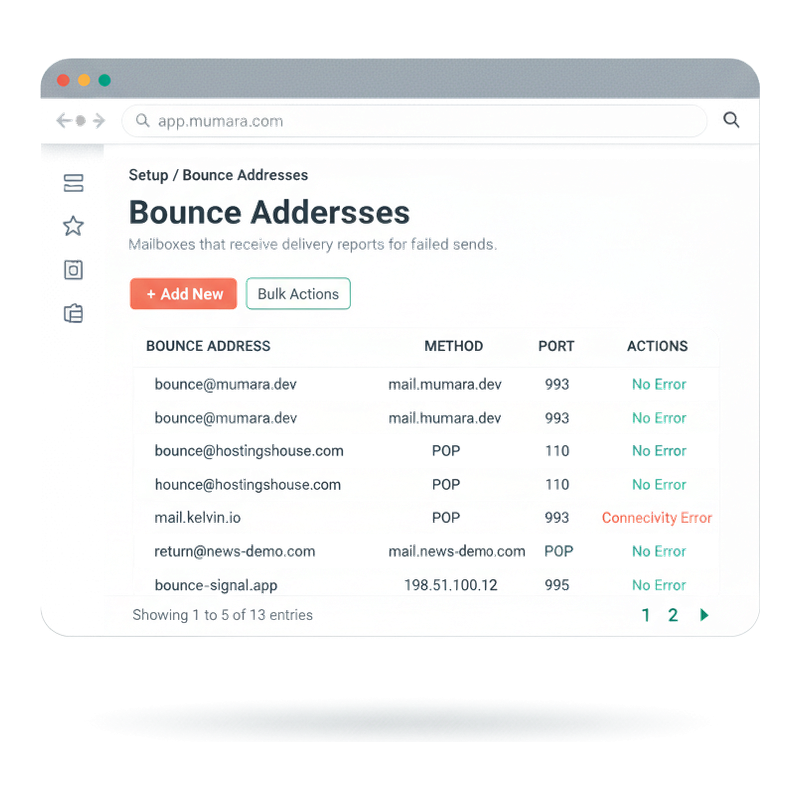
Configure as many bounce-return mailboxes as you operate — one per sender brand, one per sending domain, however your setup is shaped. Each address has its own POP/IMAP connection, credentials, and Verify Connection check so you confirm credentials BEFORE Mumara starts fetching. Connectivity errors surface in the Error column so a broken mailbox doesn't fail silently.
POP for one-way fetch (common default, port 110); IMAP for two-way sync (common port 993 with SSL). Pick whichever your bounce-return host supports.
One-click button in the form. Mumara tests the credentials and connection settings synchronously and reports back. No saving and hoping; you know it works before you commit.
Toggle to delete bounce emails from the mailbox after processing. Useful for keeping bounce inboxes lean; leave it off if you want to retain bounces for audit.
Run separate bounce mailboxes per brand, per program, per sending domain. Each address gets its own status, error reporting, and processing toggle.
Bounce Rules · the classification engine
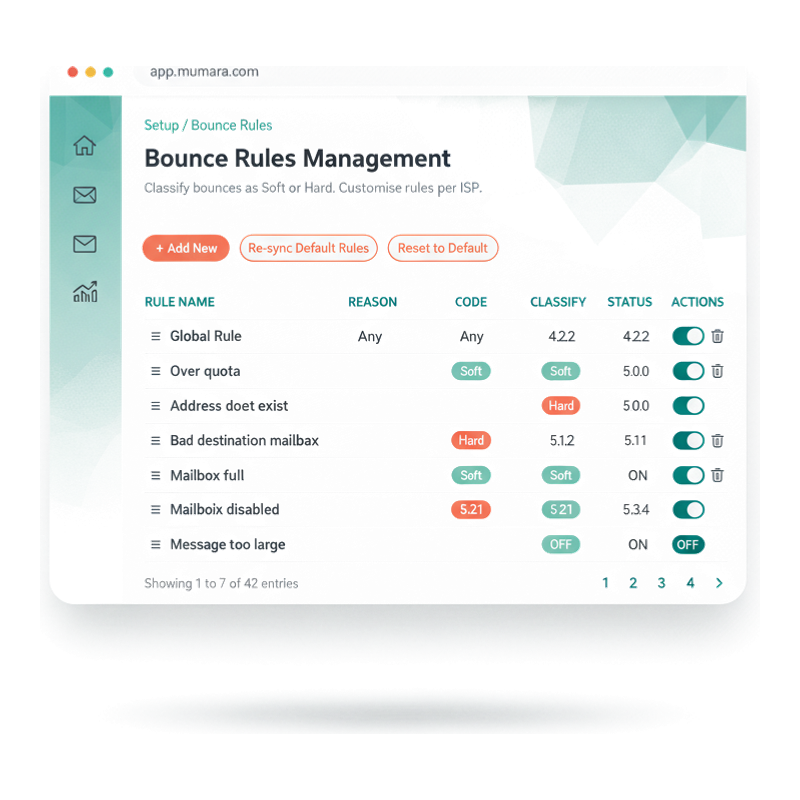
Mumara ships a curated default library covering RFC 3463 enhanced SMTP status codes — 4.x codes default to Soft, 5.x to Hard, with specific exceptions for common edge cases (mailbox full, quota exceeded, address invalid). You can re-sync the defaults at any time, reset entirely, or add your own custom rules for ISP-specific bounce text that the defaults miss.
Default rules cover the SMTP enhanced status codes you actually see in production. Re-sync to pull the latest curated set when Mumara updates its defaults.
When Yahoo or Gmail return a custom error string the defaults don't cover, add a custom rule that matches the text and classifies appropriately. Conditions stack with the field selector + operator + value pattern.
Rule order matters. Drag handles let you reprioritise: put your most-specific custom rules above the defaults, the Global Rule catch-all sits at the bottom.
Status toggle per rule lets you turn classifications off without losing the rule definition. Useful for debugging deliverability anomalies — disable a rule, watch the next batch reclassify.

Feedback Loops · the spam-complaint layer
Mailbox providers (Gmail, Yahoo, Microsoft, AOL, and others) operate Feedback Loops — when a recipient marks your email as spam, the provider forwards the complaint to a designated FBL inbox. Mumara connects to that inbox the same way it connects to bounce mailboxes (POP/IMAP), reads complaints automatically, and writes the complaining contacts into suppression on receipt.
FBL Email, hostname, port, credentials, encryption (SSL / TLS / None), and Email Protocol (POP / IMAP). Same form pattern as Bounce Addresses, separate connection.
Just like the bounce addresses, a one-click Validate Connection button tests the credentials and lets you fix issues before saving.
Confirmed complaints flow into Suppression (Global scope, source 'FBL complaint'). The complainant never gets another email from your account — exactly what compliance demands.
In every broadcast's Campaign Statistics, the COMPLAINTS tab lists every complainant for that send — email, FBL source, timestamp. Spot which content triggered complaints and avoid the pattern.

Different flavours of bounce
The Bounce Rules engine doesn't just label bounces — it shapes what happens downstream. Soft, Hard, and your custom classifications each trigger different behaviour.
Temporary delivery error — mailbox full, message too large, server-busy. Mumara retries on the next send; only after persistent soft bounces does the contact reach the suppression threshold. Default for RFC 4.x codes.
Permanent delivery failure — address does not exist, domain invalid, mailbox disabled. The contact is suppressed on the spot. Default for RFC 5.x codes that indicate permanent failure.
Your own classification rules for ISP-specific bounce strings the defaults miss. Match by code, reason, or description — classify how you want. Useful for the long tail of vendor-specific bounce dialects.
What unprocessed bounces cost
Email reputation is built in years and lost in weeks. Unprocessed bounces and unhonored complaints are the quietest, fastest way to lose it.
Every time you re-send to an address that already hard-bounced, mailbox providers note that you didn't process the signal. Senders who keep retrying known-dead addresses get progressively deprioritised in inbox placement — the damage compounds with each campaign.
A soft bounce isn't 'try again next week.' It's 'this might be permanent.' Without classification rules and accumulation thresholds, soft bounces drift indefinitely — and the next mailbox-provider audit treats them as failed deliveries.
FBL complaints are the strongest negative signal you can receive. One complaint per thousand is normal; ten per thousand triggers reputation alarms; a hundred per thousand starts inbox-placement collapse. Without Feedback Loop ingestion, you don't even know the complaints are happening until your delivery rate drops.
When deliverability slumps, you need to know WHICH campaign triggered it. Mumara's per-campaign BOUNCED + COMPLAINTS tabs surface the patterns; without them, you're guessing.
“The bounce-rule system is genuinely engineered. We migrated from a platform that black-boxed bounce handling, and being able to reorder rules and add custom classifications for our regional ISPs cut our soft-bounce-to-suppression conversion time in half.”
Verified review
Mumara customer
Common questions
Soft bounces are temporary delivery errors — mailbox full, message too large, server overloaded. Mumara retries on later sends; the contact stays active. Hard bounces are permanent — address does not exist, domain invalid, mailbox disabled — and the contact lands in suppression immediately. The Bounce Rules engine maps SMTP enhanced status codes (RFC 3463) to Soft or Hard based on the curated default library, plus any custom rules you add.
Soft bounces accumulate per contact. When the count crosses your configured threshold (e.g., five soft bounces in seven days), the contact graduates to suppression as if it were a Hard bounce. This protects you from senders who genuinely have transient issues while still suppressing addresses that consistently fail. The exact threshold is configurable via Bounce Rules.
No. Mumara ships a curated default library covering RFC 3463 enhanced SMTP status codes (the 4.x and 5.x bounce code families). Most senders use the defaults as-is — they handle 95%+ of real-world bounces. Custom rules become useful when you see ISP-specific bounce text the defaults don't classify correctly. The 'Re-sync Default Rules' button refreshes the curated set when Mumara updates it; 'Reset to Default' wipes custom rules entirely.
When a recipient clicks 'Mark as Spam' in Gmail, Yahoo, Microsoft, AOL, or similar, the mailbox provider forwards the complaint to a designated FBL inbox. Mumara connects to that inbox (POP/IMAP), reads complaints automatically, and writes the complainants into suppression. Without FBL ingestion, complaints are invisible to you — you only notice when your inbox-placement rate drops. With it, complaints fix themselves.
Yes. Each Bounce Address is a separate mailbox configuration — useful when you have multiple sender brands, sending domains, or programs that should bounce to different inboxes. Each address has its own credentials, connection method (POP/IMAP), port, encryption settings, and status indicator. The Bulk Actions menu handles batch operations across addresses.
Two pipeline stages, both with their own cadence. (1) Mumara polls your bounce mailbox periodically (cron-based) to fetch new messages. (2) Each parsed bounce is classified by Bounce Rules immediately. (3) Hard classifications write to the suppression list right then. (4) The suppression-list-to-sending-node sync runs every 15 minutes — see /campaigns/features/suppression-management/. End-to-end, most bounces reach effective suppression within 15-30 minutes of arriving in the bounce mailbox.
Yes. Every broadcast's Campaign Statistics view has dedicated BOUNCED and COMPLAINTS tabs alongside SUMMARY / OPENED / CLICKED / UNSUBSCRIBED / LOGS / A/B. The BOUNCED tab lists every bounce by email, type (Soft/Hard), the rule that classified it, reason, and date. The COMPLAINTS tab lists FBL complaints for that send. Useful for diagnosing which content triggered deliverability issues.
Yes — the PowerMTA Integration addon connects Mumara directly to PMTA logs for bounce processing, bypassing the POP/IMAP mailbox pattern. Useful for high-volume senders running PMTA where log-based ingestion is faster and richer than mailbox parsing. See the PowerMTA addon page for details.
Related
Bounces and complaints flow into suppression automatically — see the downstream behaviour that protects every campaign.
Read moreBounces affect contacts. The Contact record's Bounced flag updates on every event so segments and triggers see the latest state.
Read morePer-broadcast BOUNCED and COMPLAINTS tabs in Campaign Statistics let you spot which content triggered deliverability issues.
Read moreAuthentication (SPF/DKIM/DMARC) sits upstream of bounces. Properly authenticated domains receive better classifications from receiving MTAs.
Read moreAuthenticated domains classify cleaner — Auto DNS publishes SPF / DKIM / DMARC for you across the major DNS providers. Addon.
Read moreVariant content avoids the ISP fingerprinting that flags identical bulk emails. Addon.
Read moreMumara Campaigns · Bounces & Spam
Bounce processing and Feedback Loop ingestion ship with every Mumara Campaigns plan — Self-Hosted and Mumara Machine. The default rule library handles most senders out of the box; custom rules let you tune for your specific ISPs and use cases. Free trial includes the full deliverability toolkit.