Skip to content
Mumara

Email craft

Build the email once. Reuse it through every send.

A broadcast in Mumara is the email content itself — subject, body, personalization, attachments. You write it one time, save it, and send it through scheduled campaigns, triggers, drips, or one-off blasts. Same email, every path.

  • Three editors, your choice
  • Three personalization syntaxes
  • Responsive in one toggle
  • Spam-score analyzer built in
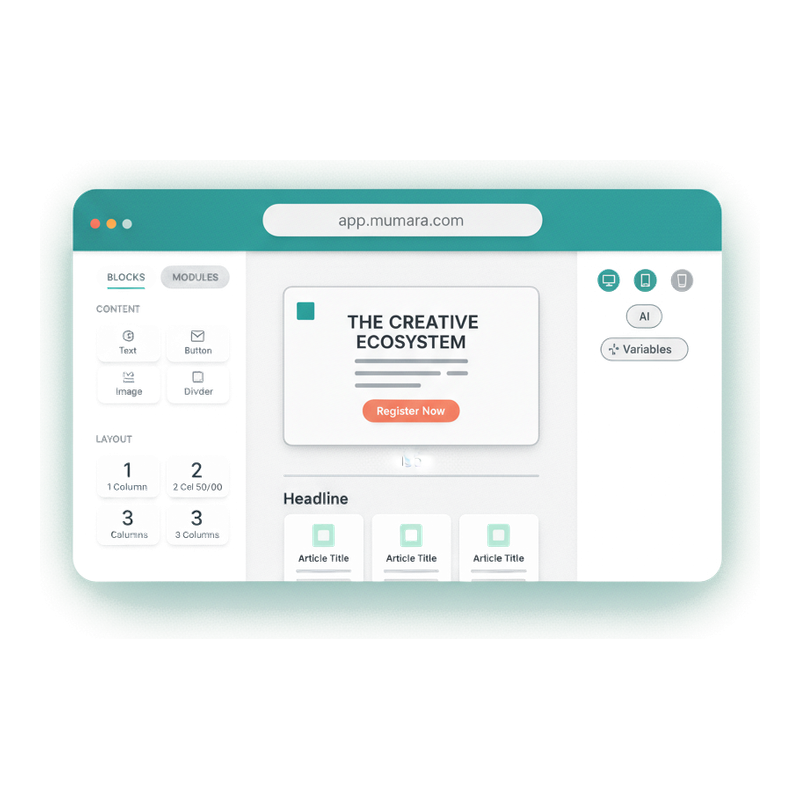
Mumara Campaigns Drag & Drop email builder with blocks panel, canvas with email preview, and device toggles

Editor of your choice

HTML for the developers. Drag & Drop for everyone else.

Both ship first-class. Both render the same email at send. Pick by how you want to compose — not by what you can get away with.

Ships with core

HTML Editor

Classic WYSIWYG with toolbar, image upload, URL import for existing HTML, custom-header injection. The composer developers reach for when they want full control of the markup.

  • Live preview as you type
  • Paste-from-URL HTML import
  • Custom headers + responsive auto-injection
  • Available on every Mumara Campaigns tier

Advanced Broadcast Builder addon

Drag & Drop Builder

A full visual composer. Drag blocks for text, buttons, images, dividers, social links, hero, header bar, quote, raw HTML, footer. Layouts in 1-, 2-, 3-column variants. Pre-built modules. Device-perfect preview. Designed for marketers who think in components instead of code.

  • Block library + pre-built modules
  • Layouts: 1 / 2 / 3 columns with 50-50, 25-75, 33-67 variants
  • Device-toggle preview (desktop / tablet / mobile)
  • Available as the Advanced Broadcast Builder addon

Mumara AI Assistant

The agent that designs the email for you.

Mumara AI lives inside both editors as a chat sidebar. Tell it 'design a newsletter for my coffee subscription company offering 20% off in October' — it drafts the subject, preheader, body, hero, and CTA, end to end. Ask it to add a paragraph, change a tone, insert a coupon code, swap the hero — it edits in place. Same agent in HTML editor and Drag & Drop Builder. Three quality tiers: Mumara AI Fast, Mumara AI, Mumara AI Advanced. Credit-based, with quick actions for subject lines, preheaders, and plain-text versions at the click of a button.

  • 0-to-100% from a prompt

    Generate a complete email from a single brief. No template-picking, no block-dragging — describe the campaign and ship the draft.

  • Edit by conversation

    "Add a paragraph about the September sale." "Make this paragraph more energetic." "Swap the CTA color to coral." The agent edits in place; you accept or iterate.

  • Personalization-aware

    The AI knows Mumara's tags (%%first_name%%, %%unsubscribelink%%, etc.) and inserts them correctly. It proactively suggests merge tags when relevant.

  • Quick actions

    Generate Subject. Generate Preheader. Plain Text version. Inspect Email. Single-click helpers for the small chores that add up.

Mumara AI Assistant chat sidebar with model selector, quick actions, and a conversation about designing a newsletter

Personalization

Layered syntaxes. Every level of customization.

The same email can render differently for every recipient. Mumara stacks personalization syntaxes in the same body — they combine.

  • %%merge_tag%%

    Merge tags

    Subscriber data substituted at send time. First name, plan tier, signup date, any custom field. The classic personalization layer.

  • {{spintax}}

    Spintax

    Rotate between text variants on each send. Different greeting for different recipients of the same broadcast. Helps deliverability — defeats spam-filter content fingerprinting.

  • [[dynamic_block]]

    Dynamic content tags

    Reusable placeholders that render conditional blocks per subscriber, OR live RSS/JSON feed content (with the RSS Feed addon). One tag, many uses. Deep-dive in the section below.

Dynamic Content Tags

Drop a tag. Render anything dynamic.

The [[tag-name]] syntax in the personalization grid above is a doorway to the broader Dynamic Content Tags system. A DCT is a reusable placeholder — drop it inline in any broadcast and Mumara renders different content depending on what the tag is configured for. Conditional blocks per subscriber (core). Live RSS / JSON / Atom feed data (requires the RSS Feed addon). Reusable content units shared across many broadcasts.

  • Conditional content per subscriber (core)

    Show one block for free-tier contacts, a different block for Pro-tier, a third for Business. Driven by any field on the contact record. No segment-juggling required — the same broadcast renders differently for different audiences.

  • Embed RSS feeds inline (RSS Feed addon)

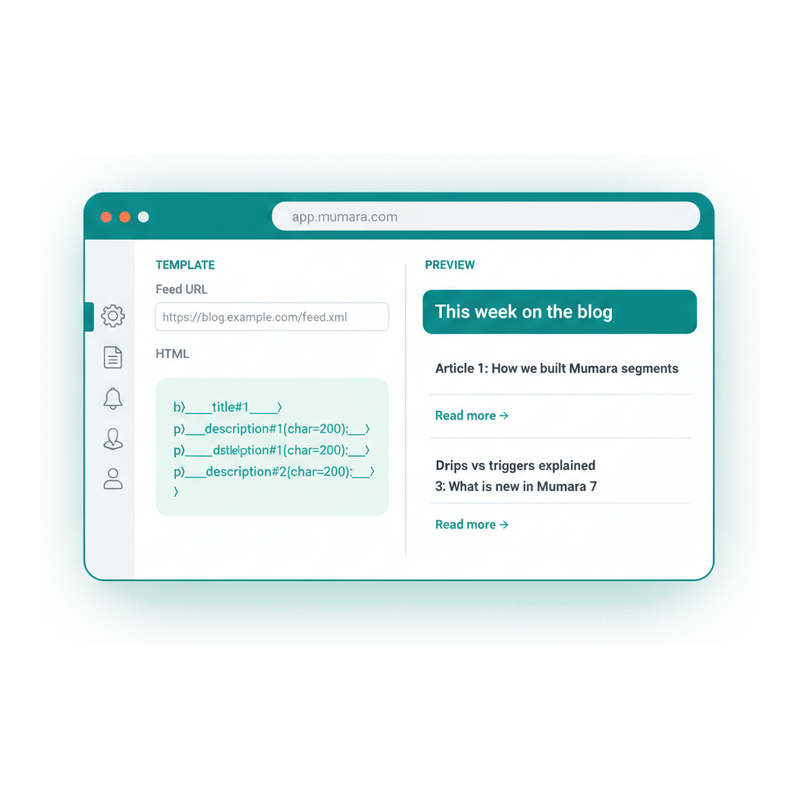
    Connect a feed URL inside a DCT, write the template with ___title#1___, ___title#2___ iteration syntax, and the latest feed items render straight into your broadcast. RSS 2.0, Atom, JSON Feed, Media RSS — all supported. Requires the RSS Feed addon.

  • Sanitize feed content on the way in

    Per-variable parameters: {char=200;images=none;style=none;}. Truncate to N characters, strip images, strip HTML. Cleanup happens in the template, not in the feed source.

  • Build once, reuse everywhere

    A DCT lives at the account level. Drop the same [[my-blog-feed]] tag into a broadcast, a drip step, or an evergreen campaign — all of them render the same content from the same source.

Mumara Dynamic Content Tag editor on the left showing the triple-underscore RSS iteration syntax, with the rendered email digest on the right showing three blog article items

Spam Score Analyzer

Score it before you send it.

Every broadcast runs through Mumara's built-in spam score analyzer. Subject line, content structure, compliance elements, trigger words — all scored, with specific suggestions for what to fix. The deliverability check that most ESPs charge extra for, included on every tier.

  • Pre-send analysis

    Subject line, body, links, headers, compliance fields — all scanned client-side. No surprises at send time.

  • Compliance check

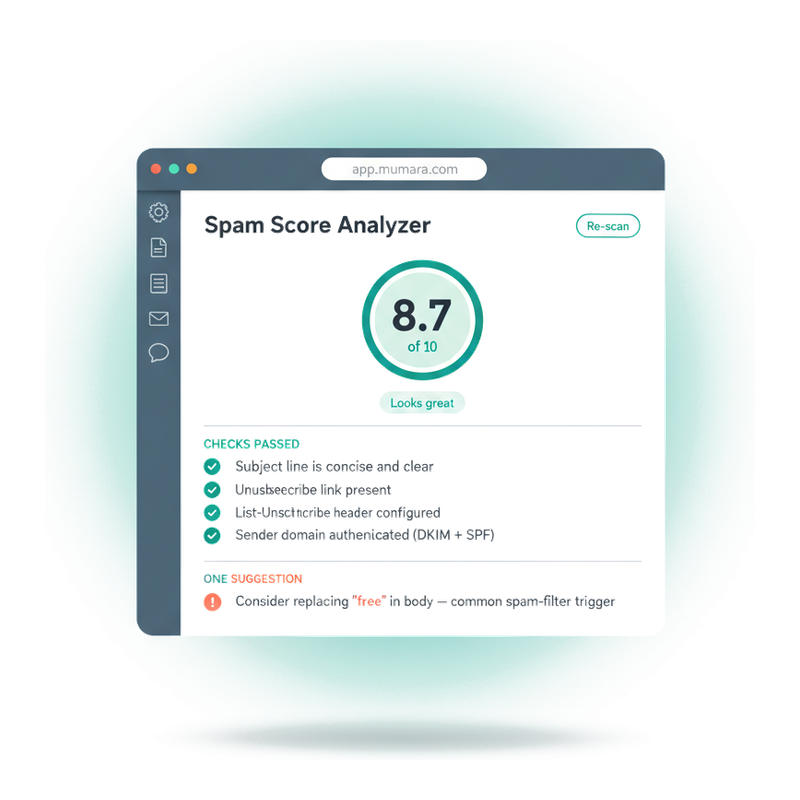
    Unsubscribe link present, List-Unsubscribe header configured, sender domain authenticated with DKIM and SPF. All the boxes regulators check, surfaced before send.

  • Specific suggestions

    Not vague warnings. "Consider replacing 'free' in body — common spam-filter trigger." Edit, re-scan, ship.

Mumara Campaigns spam score analyzer showing 8.7 out of 10, five passing checks, and one suggestion about trigger words

Why this matters

What badly-crafted email costs you.

The send-button is the easy part. Everything that happens before it is where most teams leak ROI.

  • Hand-coding responsive email is a project

    Supporting Outlook, Gmail, Yahoo, dark mode — all from scratch — takes a developer a week per template. Then a maintenance burden after every Outlook update.

  • Personalization breaks when fields change

    Rename a custom field and 50 emails silently send the wrong placeholder. Without a searchable variable picker, you don't catch it until subscribers do.

  • You don't know it's spammy until it's spam

    No pre-send analysis means you find out about trigger words and missing unsubscribe headers when your reputation drops. By then the damage is in the logs.

  • Building the same email twice is sloppy

    Without reusable broadcast templates, every send is a fresh setup. Subject lines drift, brand voice drifts, design drifts. The marketing audit a year later finds twelve versions of the same welcome.

“What started as a solid email marketing tool has grown into a genuinely modern platform with AI, a beautiful new email builder, powerful APIs, and thoughtful design touches everywhere. It's rare to find a self-hosted solution that feels this polished and backed by people who care.”

Anass Hadi

Verified Trustpilot reviewer

Common questions

What buyers usually ask.

What's a broadcast in Mumara — is it the email or the send?

It's the email itself — the reusable template that holds subject, body, personalization, attachments, and settings. The send is configured separately. A Scheduled Campaign picks a broadcast and chooses the audience + send time. A Trigger picks a broadcast as its action. A Drip step references a broadcast as its content. One email, many delivery paths.

Which editor should I use?

Whichever fits how you compose. The HTML editor (ships with core) is for developers and marketers comfortable with markup. The Drag & Drop Builder (addon) is for visual designers who'd rather drag blocks than write code. Both render the same email at send time — the editor is a workflow preference, not a capability gate.

How does the Mumara AI Assistant work?

It's a chat agent inside both editors. Open the AI sidebar, tell it what you want — 'design a newsletter for my coffee subscription company offering 20% off in October' — and it drafts the email end to end. Ask it to refine: 'add a paragraph about free shipping', 'change the CTA to red', 'make this more urgent'. It edits in place. Three quality tiers (Mumara AI Fast / Mumara AI / Mumara AI Advanced) trade speed for output quality. Credit-based — each chat consumes credits from your account balance.

Can the AI generate emails 100% from scratch?

Yes — that's the headline use case. Give it a prompt, get a complete email back: subject, preheader, body, hero image search tag, CTA, footer. It uses Mumara's personalization tags correctly (%%first_name%%, %%unsubscribelink%%) and won't invent things it can't verify — no fake logos, no made-up prices, no fictional coupon codes. You provide the facts; the AI provides the writing.

Can I personalize content per subscriber?

Yes, three ways. Merge tags (%%first_name%%) substitute subscriber data. Spintax ({{tag}}) rotates between variants you write for the same broadcast. Dynamic content tags ([[block]]) show or hide entire blocks based on subscriber data — and can also fetch live content from RSS feeds with the RSS Feed addon. Combine them in the same email — the editor has a searchable Variable Picker organized by category.

Can a broadcast render live content from an RSS feed?

Yes — via Dynamic Content Tags configured with a feed URL. RSS 2.0, Atom, JSON Feed, and Media RSS are all supported. The tag's HTML template uses ___title#1___, ___link#2___ iteration syntax to render multiple items in one email, with per-variable parameters (char=200, images=none, style=none) for cleanup. RSS-fetching specifically requires the RSS Feed addon; the base DCT mechanism for conditional content is core. See the pricing page for current addon pricing.

Does the email render correctly in Outlook and dark mode?

Yes — toggle Responsive Email on and Mumara injects viewport tags, CSS resets, dark-mode support, and client-specific fixes for Outlook, Gmail, Yahoo, Apple Mail, and Samsung Mail automatically. No hand-coding per client.

What does the spam score analyzer check?

Subject line for spam triggers, content structure, image-to-text balance, compliance elements (unsubscribe link, List-Unsubscribe header, sender authentication), and known trigger words in the body. It runs client-side before send and gives you specific suggestions — not generic warnings — for what to fix. Re-scan after edits to confirm.

Can I attach files to a broadcast?

Yes. Drag-and-drop attachments into the editor. Mumara warns about size and spam-filter risk — large attachments slow sends and can trigger filters, so linking to hosted files is often the better move. But the option's there for invoices, receipts, calendar invites.

What happens if I edit a broadcast that's already scheduled?

Edits affect future sends only. If the broadcast is used in a scheduled campaign that hasn't run yet, your changes apply when it sends. Past sends are unaffected — what landed in inboxes stays as it was.

Can the same broadcast be used in multiple campaigns?

Yes — that's the whole point of treating broadcasts as reusable content. The same broadcast can be sent by a scheduled campaign on Monday, a trigger on Tuesday, and a drip step on Wednesday. Update the broadcast once and every future send picks up the change.

Mumara Campaigns

Build your first broadcast in two minutes.

Broadcasts ship on every Mumara Campaigns tier — both Self-Hosted and Mumara Machine. Drag & Drop Builder and AI Email Builder available as addons. No credit card to try.