Skip to content
Mumara

Audience · preference centre · partial unsubscribe

Turn 'unsubscribe' into 'send me less'.

A hosted preference centre on your brand where subscribers update their own profile fields, choose the frequency they want, and opt out of one program without losing the rest. Every change flows into the contact record instantly. The retention play that turns full unsubscribes into partial ones, and the compliance play that gives subscribers control without burdening your support team.

Acme · Email Preferences

Hi Aisha — keep getting the right emails. Update your preferences below and we'll save the change immediately.

Programs

  • Weekly Newsletter
  • Product Updates
  • Promotions & Offers
  • Event Invites

Frequency

  • Weekly
  • Monthly
  • Major events only
Unsubscribe from all

The retention angle

A preference centre saves the subscriber you'd otherwise lose.

Most marketing platforms treat the unsubscribe link as a one-way door. Mumara's preference centre offers three other doors — reduce frequency, narrow topics, edit profile — before the total opt-out is the only option left.

no-login experience
Branded
no-login experience
Pre-identified link in the email footer. Subscriber lands on a page that looks like your site, never logs in, makes changes, leaves.
opt-out
Per-program
opt-out
Subscribed to four lists? Drop one, keep three. Partial unsubscribe instead of all-or-nothing.
control
Frequency
control
Subscriber picks weekly / monthly / major-events. Mumara honours the choice automatically in send eligibility.
profile edit
Self-service
profile edit
Subscriber updates their own name, role, interests, custom fields. Changes flow into the contact record instantly.

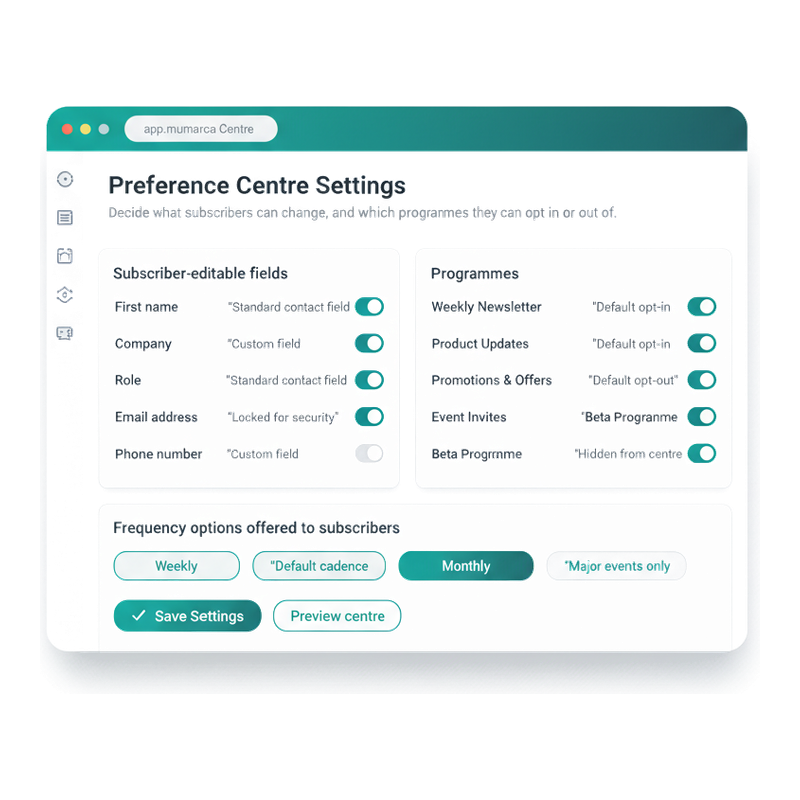
The admin side of the centre

Decide which fields they can edit. Which programmes they can pick.

Preference Centre Settings is where you decide what subscribers control. Toggle fields ON to make them editable in the centre — name, company, role, country, custom fields. Toggle OFF for fields you don't want subscribers changing themselves (email address is locked by default for security; you can lock others too). Then list the programmes subscribers can opt in or out of, and the frequency options they can pick from. Save once; every subscriber gets the centre you configured.

  • Field-level editability per setting

    Each contact field has its own toggle. Standard fields and custom fields handled the same way. Some defaults are locked (email address, status) for security and audit-trail reasons.

  • Programmes with default opt-in / opt-out

    Each programme appears in the centre with its default state. 'Default opt-in' means subscribers are subscribed unless they untick; 'Default opt-out' means they're not, unless they tick. Set per programme based on consent posture.

  • Frequency options offered

    Pick which cadence chips the subscriber sees. Weekly / Monthly / Major-events-only is the typical menu; you can offer all of them or just a subset based on what your sending programme supports.

  • Preview before publish

    The Preview centre button shows you exactly what subscribers will see when they land on the page. No deploying-then-checking — preview first.

Mumara Preference Centre Settings admin page — two side-by-side cards (Subscriber-editable fields with toggle rows for name/company/role/country/email/phone, and Programmes with toggle rows for Weekly Newsletter / Product Updates / Promotions / Event Invites / Beta Programme), plus a full-width Frequency options card with three selected chips

Three alternatives to 'unsubscribe from everything'

The preference centre's three escape valves.

Total unsubscribe is the worst outcome — you lose the subscriber forever. The preference centre offers softer alternatives short of that, each of which keeps the relationship alive.

Less, not none

Frequency reduction

Subscriber feels overwhelmed by weekly emails. Without a preference centre, they hit unsubscribe. With one, they pick Monthly or Major-events-only — and you keep them in the audience, just at a lower cadence. Mumara honours the frequency choice automatically; campaigns include only the segment matching the chosen cadence.

  • 3 frequency tiers
  • Honored automatically in send eligibility
  • Per-subscriber, not per-list
  • Retains subscriber long-term

Narrow, not nothing

Per-program partial unsubscribe

Subscriber loves your weekly newsletter but doesn't care about promotional offers. Without a preference centre, they unsubscribe from all of it. With one, they uncheck Promotions and keep the Newsletter. The contact stays active on the lists they actually want — the platform-level unsubscribe per list scope makes this work.

  • Per-program checkboxes
  • Per-list suppression scope
  • Keeps the lists they love
  • Loses only the ones they don't

Fix, not flee

Profile edit

Subscriber's role has changed (junior dev → engineering manager) and they're getting content meant for ICs. Without a preference centre, they unsubscribe. With one, they update the role field — and the platform's segmentation automatically routes them to the manager-tier content. Profile self-service prevents irrelevant-content unsubscribes.

  • Custom field self-edit
  • Drives segmentation downstream
  • Catches life-changes
  • Saves content-mismatch unsubscribes

Through the centre

From email footer click to saved preferences.

What happens between a subscriber clicking the preferences link in your footer and the platform reflecting their new choices.

  1. Step 1

    Click the footer link

    Every email footer carries the preference-centre link tag (alongside the unsubscribe link). The link is pre-identified — clicking it opens the centre with the subscriber already authenticated; no login form.

  2. Step 2

    Arrive on the branded page

    The centre loads with your brand chrome — logo, fonts, colours. Subscriber sees a page that feels like your site, not Mumara's. White-label-ready out of the box; deeper branding via the [White Labeling addon](/campaigns/addons/white-labeling/).

  3. Step 3

    Make changes

    Toggle program checkboxes. Pick a frequency. Update custom fields you marked editable. Maybe tick the "Unsubscribe from all" link at the bottom — but only if the centre didn't catch them earlier with a less-drastic option.

  4. Step 4

    Hit Save

    One click. The platform records the change with a timestamp + IP, just like the original subscribe event. The audit trail covers every preference edit, not just the initial signup.

  5. Step 5

    Take effect immediately

    Mumara reflects the changes instantly — segmentation queries reflect the new fields, the next scheduled send checks the new frequency and program subscriptions before adding the contact to its recipient list. No batch-update delay, no "wait 24 hours for sync".

Four ways the preference centre earns its keep

One preference centre. Four customer wins.

  • Frequency complaint

    Subscriber action
    "I love your newsletter but you're emailing me too often." Without the centre, they unsubscribe. With it, they pick Monthly.
    What it saves you
    A subscriber retained at lower cadence is worth significantly more lifetime engagement than a subscriber lost entirely. The centre converts the would-be unsubscribe into a frequency setting.
  • Topic narrowing

    Subscriber action
    "I only care about your product updates, not the promo emails." Without the centre, they unsubscribe from everything to escape the promos.
    What it saves you
    They uncheck Promotions and keep Product Updates. The platform-level per-list scope means future campaigns to Promotions skip them; future campaigns to Product Updates still include them.
  • Profile staleness

    Subscriber action
    "You're sending me content that doesn't fit my role anymore." Without the centre, they unsubscribe because the content feels wrong.
    What it saves you
    They update the role field. The platform's segmentation queries reflect the new role on the next send, and content matches their current life situation. Stale profiles caught before they cost subscriptions.
  • Compliance / GDPR right-to-rectify

    Subscriber action
    GDPR Article 16 grants subscribers the right to correct inaccurate personal data. Without a self-service centre, this is a support ticket.
    What it saves you
    The preference centre is the self-service path for right-to-rectify. Subscribers edit their own fields; no support overhead, no manual data correction process, full audit trail recorded.

Common questions

What buyers usually ask.

Does the subscriber need to log in to the preference centre?

No — the link in every email footer is pre-identified with a token that auth's the subscriber to their own profile only. They click, they land on the page already authenticated, they make changes, they leave. No password, no signup, no friction. The token is single-purpose (preference centre access only, not full account access) so the security model is appropriately scoped.

How does this differ from the unsubscribe link?

Every Mumara-sent email carries both. The unsubscribe link is the one-click full opt-out for compliance (RFC 8058 + RFC 2369) — required by Gmail and Yahoo bulk-sender rules. The preference-centre link is the softer alternative — it opens the centre page where the subscriber can choose less drastic options before getting to a total unsubscribe. Many sender accounts include both links in the footer so the subscriber picks the path that matches their actual intent.

Can I customise which fields the subscriber can edit?

Yes — configure per field. Email and identity fields are typically read-only (you don't want subscribers changing their own email address through the centre; that creates account-takeover risk). Profile fields (name, role, interests, segmentation-relevant custom fields) are editable. The platform's [Contact Management](/campaigns/features/contact-management/) controls which fields are editable per field type.

Can the preference centre handle multiple programs / lists?

Yes — and this is its main value. Subscribers see their current per-list subscription status as checkboxes. They tick to subscribe, untick to opt-out. Per-list suppression scope (see [Suppression Management](/campaigns/features/suppression-management/)) means opting out of one list doesn't affect the others. The list-of-programs in the centre is configurable per installation; show only the lists the subscriber is actually on, or show all available programs so they can opt in to new ones.

How does the frequency control actually work?

Each subscriber has a frequency field on the contact record (Weekly / Monthly / Major-events-only). Campaigns and drips include a segment query that filters by frequency before sending. A weekly newsletter campaign includes only subscribers with frequency = Weekly. A monthly digest campaign includes Weekly + Monthly. A major announcement includes all three. The campaign-side logic is yours to design; the platform stores and exposes the field.

Is the centre brandable?

Yes — out of the box, the centre matches the basic branding you configure on the platform (your logo, your colour scheme). For deeper branding (custom HTML / CSS, fully replaced templates), the [White Labeling addon](/campaigns/addons/white-labeling/) extends control to the preference-centre HTML. Resellers / agencies typically use this for per-client branded centres.

Does the centre work for resellers / user setups?

Yes — each user has their own preference centre URL with their own branding (when using the White Labeling addon for the user). Subscribers of user A see user A's branded centre; subscribers of user B see user B's. Mumara routes the centre to the right tenant based on the identifying token in the link.

Are changes from the centre reflected in segmentation immediately?

Yes — segments are dynamic queries against the contact data, evaluated at send time. A subscriber who unticks 'Promotions' is excluded from the next send to Promotions because the segment query at send time reflects the new state. No batch-update delay, no nightly sync — the platform's segmentation is real-time against the underlying contact record.

Is there an audit trail of preference changes?

Yes — every preference edit is logged with the subscriber, the change, the timestamp, and the IP. The audit trail is the same compliance evidence the platform records for the original consent (see [Compliance](/campaigns/features/compliance/)). For right-to-rectify (GDPR) and right-to-modify (CASL) audits, the trail is queryable per subscriber.

Mumara Campaigns · Profile Management

A preference centre that saves the subscriber from themselves.

Profile Management ships with every Mumara Campaigns plan. Hosted preference centre on your brand, per-program subscriptions, frequency control, self-service profile edits, full audit trail. The retention surface that turns the unsubscribe link into the option of last resort.