Skip to content
Mumara

Dynamic audiences

One audience. Infinite ways to split it.

A segment is a saved query, not a copied list. Contacts join it automatically when they match your filters and fall out when they don't. Set the criteria once. Mumara keeps the audience accurate for you, forever.

  • Dynamic — updates live
  • Multiple flavours: data or behaviour
  • Stack unlimited conditions
  • Powers every other feature
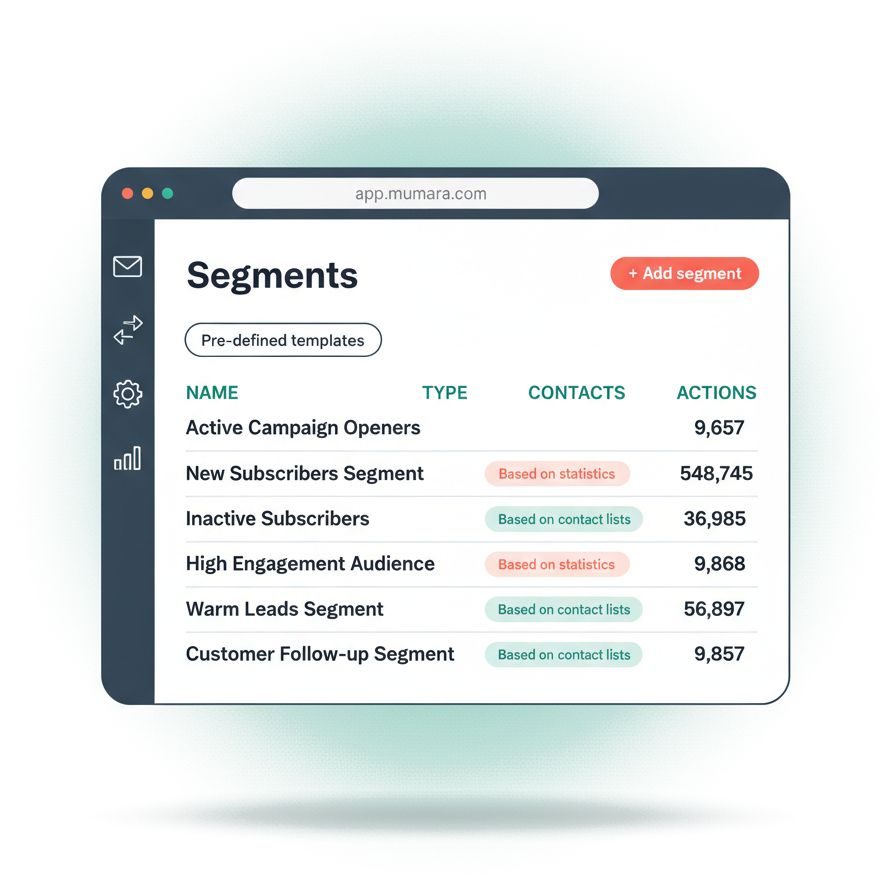
Mumara Campaigns segments dashboard listing audience segments with contact counts and type labels

Multiple flavours

Filter on who they are. Filter on what they did.

Mumara has two distinct segment types — each tuned for a different kind of question. You can run as many of each as you want, side by side.

Static contact data

Based on contact lists

Pull contacts from one or many lists. Filter on profile fields, subscription status, geography, and any custom field you've defined. The classic 'who are they' segment.

  • Scope to specific lists, or all of them
  • Status, geography, custom-field filters
  • Stack as many filter rows as you want
  • Updates live as contact data changes

Engagement behaviour

Based on statistics

Filter on what they did with past sends. Opened a specific broadcast, clicked a specific link, engaged from a specific country, on a specific device, in a specific time window. The 'what did they do' segment.

  • Any broadcast, or specific ones
  • Geo + device + browser of the engagement event
  • Time-window conditions on the engagement
  • Looks back as far as your log retention runs

Contacts-based builder

Stack filter rows. Build the audience you actually want.

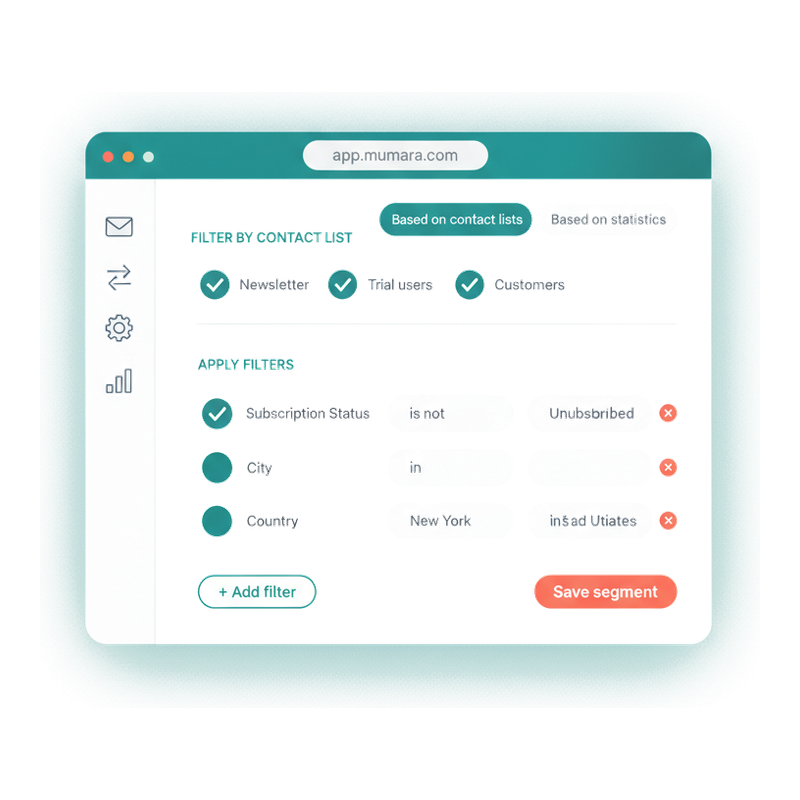
Pick the lists in scope. Stack as many filter rows as you need — field, operator, value. The segment recomputes the moment you save it. Add a contact who matches, they appear. Change someone's data so they no longer fit, they fall out.

  • Combine fields freely

    Subscription status, geography, custom fields you defined — any property on the contact record can be a filter row. Stack rows for AND-style intersection.

  • Rich operator catalogue

    "Is" / "isn't", "contains", "starts with", "ends with", "domain is" for email-domain matches, and date operators including "day of month" and "month of year" — birthday and anniversary segments come for free.

  • Templates ship with the product

    Don't start from scratch. Clone a template like 'Active subscribers in EMEA' and tweak it. Administrators can create custom templates and enable them across the team.

Mumara Campaigns contacts-based segment builder with filter rows for subscription status, city, and country

Stats-based builder

Slice your audience by what they did.

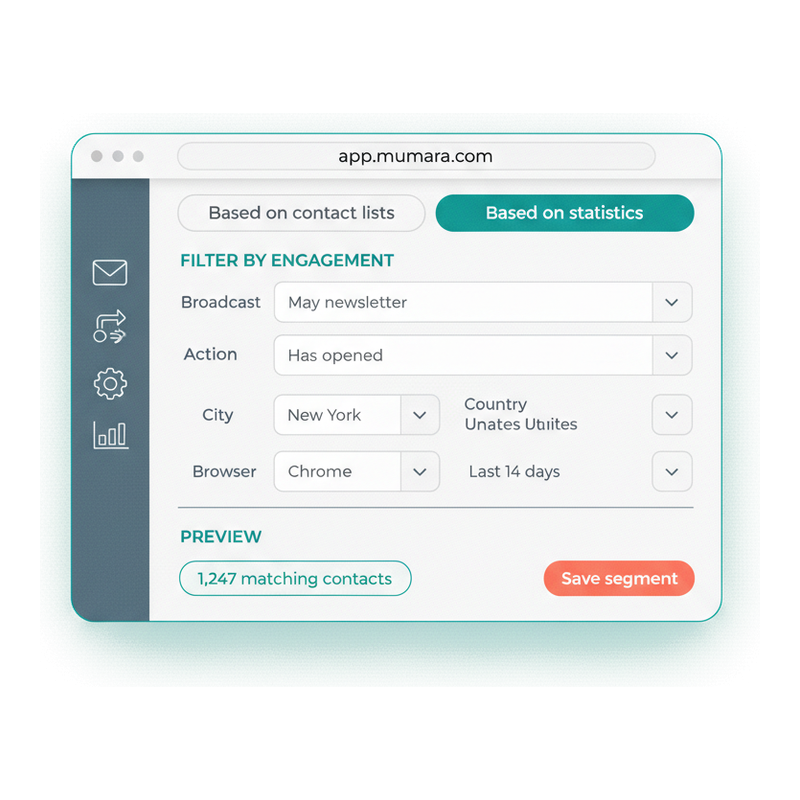
Pick a broadcast (or any broadcast). Pick the engagement action — opened, clicked, ignored. Then narrow further by where they engaged from, what device they used, what time they did it. This is where 'opened my Tuesday newsletter from New York on Chrome in the morning' becomes a real audience you can act on.

  • Behaviour and pipeline visibility

    Opens, clicks, link selection, geography, browser, OS — plus pipeline states most platforms hide: Injected, Delayed, Delivered, Bounced. Segment on where your sends are getting stuck, not just whether they landed.

  • Compliance-grade filters

    "Has unsubscribed" and "Has complained" as direct segment criteria — clean cohorts for compliance review or win-back without a manual query.

  • Log-retention aware

    Stats-based filters look back as far as your log retention allows — three days on Essential, seven on Pro, thirty on Business. Plan your segment time-ranges accordingly.

Mumara Campaigns engagement-based segment builder filtering opens by city, country, browser and time range

The cost of skipping it

What unsegmented sending costs you.

Sending the same email to everyone is the marketing equivalent of shouting into a crowded room.

  • Everyone gets the wrong message

    The customer who bought yesterday gets the same email as the prospect who joined last week. Both notice. One unsubscribes; the other gets the wrong impression of your brand.

  • Engagement drops, deliverability follows

    Mailbox providers reward relevance. Send everyone everything and your open rates fall — and your spam complaints rise. Reputation erodes quietly, on every send.

  • Win-back never happens

    The 'people who haven't opened in 60 days' segment is the highest-ROI list you'll never build by hand. Without segmentation, those contacts sit dormant until they unsubscribe.

  • You can't measure what you can't slice

    Was the campaign great for new subscribers and bad for existing? Was it great in EMEA and flat in APAC? Without segments, the report is one number. With them, it's the answer.

“The segmentation capabilities are incredibly detailed, and the automation workflows are robust and easy to map out. A professional-grade tool for serious marketers.”

James

Verified Trustpilot reviewer

Common questions

What buyers usually ask.

What's the difference between a list and a segment?

A list is a static container — contacts go in and out manually (or by import / API / web-form signup). A segment is a saved query — contacts qualify or disqualify automatically based on filters you defined. Most senders use lists as the broad audience containers and segments as the precise audiences they actually send to.

How are contacts-based and stats-based segments different?

Contacts-based segments filter on the contact record — fields, status, geography, list membership. Stats-based segments filter on behaviour — opens, clicks, engagement events, device, time-of-event. Use contacts-based to answer 'who are they' and stats-based to answer 'what did they do'. You can run as many of each as you want.

Do segments update automatically?

Yes. Segments are queries, not snapshots. A contact who newly matches your filters appears in the segment automatically; one whose data changes so they no longer fit falls out. Downstream features (triggers, drips, broadcasts) see the current membership at the moment of use.

How far back can a stats-based segment look?

As far as your log retention allows. Essential keeps 3 days of engagement logs. Pro keeps 7 days. Business keeps 30 days. A stats-based filter referencing events older than that can't retrieve them. Plan your time-window conditions around your tier's retention.

Can I stack multiple conditions?

Yes. The Apply Filters block lets you add as many filter rows as you need. Each row is a field, an operator, and a value — and rows stack with AND-style intersection. The "Advanced criteria" mode adds "is member of" / "isn't member of" semantics for list-membership conditions.

Can I send a broadcast to multiple segments at once?

Yes. When you schedule a broadcast you can select multiple segments — the recipient list is the union of all of them. And because segments are dynamic, contacts who newly match between scheduling and sending will be included automatically when the send goes out.

Are there ready-made segment templates?

Yes. The Segments list has a Pre-defined Templates button. Mumara ships a library of common segments — Active Subscribers, Hard Bounces, Inactive 30 Days, High Engagement Audience — that you can clone and tweak instead of building from scratch.

Where else can I use a segment once I build it?

Everywhere. Triggers fire when a contact joins a segment. Drip groups can target a segment as their audience. Broadcasts send to a segment as their recipient list. Workflows branch on segment membership. Build the segment once; the rest of the platform consumes it automatically.

Mumara Campaigns

Build your first segment in under a minute.

Segments ship on every Mumara Campaigns tier — both Self-Hosted and Mumara Machine. No credit card to try. Start with a template and tweak it, or build from scratch.