Skip to content
Mumara

Throughput · sending infrastructure

Many gateways. Many servers. One queue, ruthlessly parallel.

Mumara Campaigns connects to every major SMTP gateway and API service, distributes load across as many servers as you operate, runs concurrent worker threads tuned to each mailbox provider, and ships with PowerMTA as a first-class addon. Built for senders who count in millions.

  • SMTP, API, PowerMTA gateways — your choice
  • Multi-server, multi-threaded queue
  • SPF / DKIM / DMARC verification
  • Pause, resume, retry without loss
throughput · live

12,840

in flight

48

workers

5.2K/m

delivered

Gateways · rate · status

API Mumara ONE 4,000 / h
API SES (us-east-1) 2,500 / h
PMTA PowerMTA 6,000 / h
SMTP smtp.acme.io 350 / h
SPF / DKIM / DMARC verified queue · OK

Four pillars of high-throughput sending

The infrastructure under every campaign you'll ever send.

Email at scale isn't about one fast button. It's about the configuration surface beneath it — gateways, throughput, authentication, and the PowerMTA path for the high-volume tier.

  • Every gateway you need

    SMTP servers, API services, and PowerMTA — all configurable as Sending Nodes. Add as many as your sending stack requires. Group them. Route per-broadcast.

  • Parallel by design

    Each node runs concurrent worker threads. Multiple servers run in parallel. The queue drains at the rate your sending IPs and provider tolerances allow — not bottlenecked by a single thread.

  • Authentication, baked in

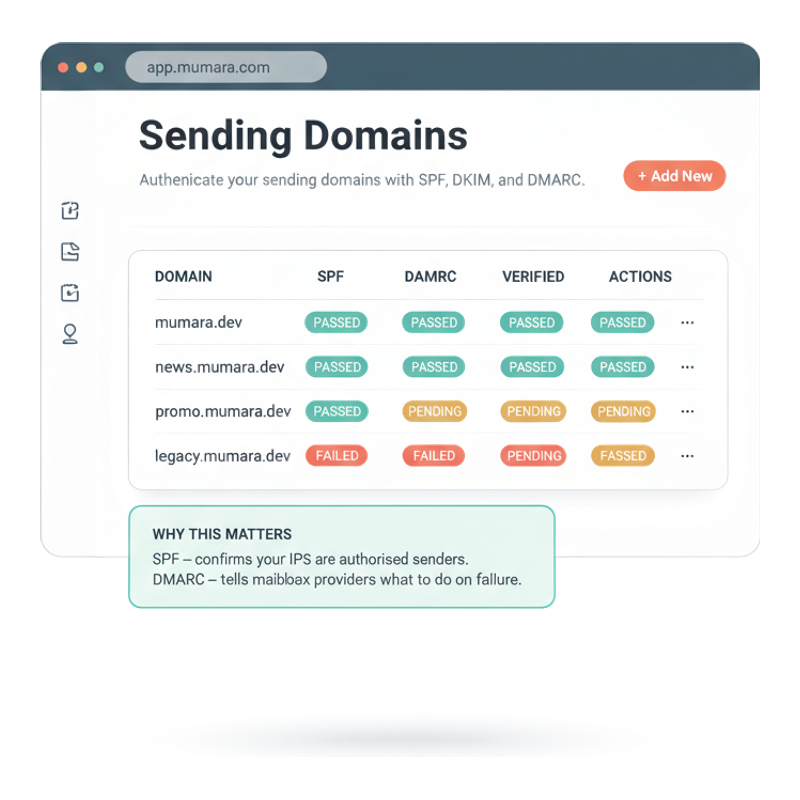
    SPF, DKIM, DMARC verification for every sending domain — with real DNS checks, not a "trust us" toggle. Domain status is visible in the dashboard with PASSED / PENDING / FAILED.

  • PowerMTA, native

    For high-volume senders running PowerMTA, the addon adds first-class integration — auto-generated nodes, DNS keys, bounce handlers, SSH-pushed config. No glue scripts required.

Sending Node configuration

Configure once, send forever. With every detail exposed.

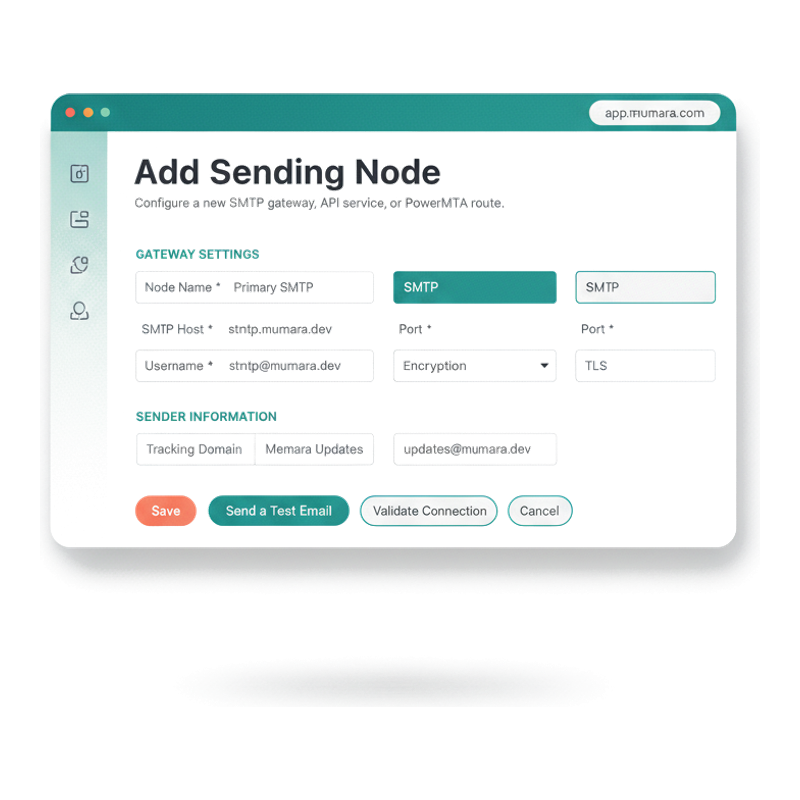
Each Sending Node is a complete delivery configuration — gateway type (SMTP / API / PowerMTA), authentication, encryption, sender identity, tracking domain, custom headers. Mumara's Validate Connection button tests credentials before save; Send a Test Email confirms end-to-end delivery before you ever commit a real broadcast. Mistakes caught at setup, not at scale.

  • SMTP, API, or PowerMTA

    Pick the gateway type. SMTP for self-hosted relays and most managed services; API for partners that expose a HTTP send endpoint; PowerMTA for the high-volume tier via the addon.

  • Group nodes for routing

    Nodes group together (e.g., "smtp group", "pmta group") so Mumara can route specific broadcasts to specific gateway pools. Useful for separating transactional and marketing traffic.

  • Tracking Domain per node

    Attach a tracking domain to each node for click-redirect and open-tracking links. Means your tracking URLs share the same brand as your sender domain — better deliverability, better trust.

  • Test before send

    Validate Connection and Send a Test Email buttons live on the node config screen. You verify credentials and end-to-end delivery before pointing a real broadcast at it.

Mumara Add Sending Node form — Gateway Settings section with SMTP Host / Port / Username / Encryption, Sender Information section, Tracking Domain picker, Validate + Test buttons

Sending Domains · SPF / DKIM / DMARC

Authentication that actually checks DNS. Not a 'trust us' toggle.

Every Sending Domain you add to Mumara gets verified against real DNS records — SPF, DKIM, and DMARC — with explicit status pills (PASSED, PENDING, FAILED). When a domain fails, Mumara tells you why; when it passes, mailbox providers reward you with better inbox placement. The Auto DNS addon takes this one step further: configure once, Mumara pushes the right records to your DNS provider automatically (CloudFlare, Route53, Hetzner, and more).

  • Real DNS verification

    PASSED / PENDING / FAILED based on actual DNS lookups. When DKIM fails, you see the specific selector and key that didn't match.

  • Per-domain tracking prefix

    Each sending domain has its own tracking prefix and redirection type (cname / 302) so click and open URLs match the brand of the email — not a generic tracker.com domain.

  • Multi-domain support

    Configure as many sending domains as you operate — different brands, regions, programs. Each authenticates independently; Mumara honours per-domain reputation.

  • Auto DNS addon, optional

    Don't want to manage SPF/DKIM/DMARC records by hand? The Auto DNS addon pushes them to your DNS provider directly. Supports the major registrars; one-click installation per provider.

Mumara Sending Domains dashboard — table with SPF, DKIM, DMARC columns, status pills (PASSED / PENDING / FAILED), and a why-this-matters callout card

Two paths to high-throughput

SMTP partners or PowerMTA. Both first-class.

Most senders start with SMTP/API gateways — the partners are everywhere, the config is straightforward, and Mumara connects to all of them. When volume justifies it, PowerMTA via the addon adds another tier.

Start here

SMTP & API gateways

Connect to every major SMTP gateway and API-based sending service. Configure as many nodes as you need; group them by purpose; route campaigns by group. The path most senders use — and the only path needed for most volumes.

  • A growing roster of supported gateways
  • SMTP, API, and credentials-based config
  • Per-node tracking domains
  • Validate Connection + Send Test Email before save

High-volume tier

PowerMTA — addon

When SMTP partners can't keep up with your volume, PowerMTA is the answer. Mumara's PowerMTA addon adds first-class integration: auto-generated sending nodes, DNS keys, bounce handlers, and PMTA config pushed via SSH. No glue scripts.

  • Auto-generates PMTA config from the app
  • SSH-managed deployment
  • Native bounce-handler integration
  • Paid addon

Why Mumara senders scale

The architecture that compounds — every send, every day.

Gateway types supported
Many
Gateway types supported
SMTP, API, PowerMTA
Concurrent threads per node
N
Concurrent threads per node
Tuned per receiving MTA
Servers running in parallel
Many
Servers running in parallel
Balanced automatically
Messages lost on restart
Zero
Messages lost on restart
Queue is durable

What undersized sending infrastructure costs

Why scale lives in the queue, not the send button.

Sending a million emails isn't a single command — it's a thousand thousand-email operations, each in parallel, each respecting different rate limits, each with its own authentication and tracking. Mumara is built for the architecture; most ESPs hide it from you and hope you don't notice.

  • Single-gateway lock-in is a single point of failure

    If your ESP routes everything through one SMTP partner, the day that partner has an outage or a deliverability drop is the day your campaigns stop. Mumara's multi-gateway architecture means a routing failure on one path doesn't take everything down.

  • Single-threaded send queues throttle the whole campaign

    A serial queue can only go as fast as one connection. Mumara's per-node thread pool fans out parallel deliveries to the receiving MTA's tolerance — not a single thread's pace.

  • Unauthenticated domains land in spam folders

    Mailbox providers in 2026 require SPF + DKIM + DMARC for any volume sender. Without verified records, your inbox placement collapses regardless of content quality. Mumara's domain-verification flow makes this configurable, not opaque.

  • Black-box bounce handling delays reputation recovery

    When a node has connectivity issues or a domain's auth fails, you need to see it immediately — not in a support ticket three days later. Mumara surfaces node Error states and domain verification failures directly in the dashboard.

“We migrated from a black-box ESP that hid every sending decision. Mumara is the opposite — we see every node, every domain's auth, every server's queue. Our deliverability climbed within a month of switching.”

Verified review

Mumara customer

Trustpilot

Common questions

What buyers usually ask.

Which SMTP and API gateways does Mumara support?

A growing roster of major SMTP gateways and API-based sending services. The Sending Node Gateway dropdown lists every supported type at configuration time — connect with credentials, validate the connection, send a test, you're live. Mumara's integration list expands as the ecosystem changes.

What is PowerMTA integration?

PowerMTA is a high-volume MTA used by senders who push past what SMTP partners comfortably handle. Mumara's PowerMTA Integration addon adds first-class support — the dedicated '+ Add PowerMTA' button in the Sending Nodes view, auto-generated PMTA config including DNS keys and bounce handlers, and SSH-managed deployment. Paid addon, see the pricing page for current pricing.

How does multi-threading work?

Each sending node runs a configurable pool of concurrent worker threads. When a broadcast queues, Mumara's worker pool fans out parallel deliveries to the receiving MTA. The per-node thread count, throttle rules, and per-mailbox-provider rate limits combine to push at the rate the receiving side accepts — never faster (which would trip deliverability thresholds).

Can I run multiple sending servers?

Yes — multi-server distribution is core to Swift Sending. The Sending Nodes page has both a Nodes tab and a Servers tab; sending servers group physical or virtual machines that handle delivery, and Mumara balances the queue across all configured servers automatically. Pause, resume, restart any individual server without losing messages from the queue.

How are SPF, DKIM, and DMARC handled?

Per Sending Domain. Add a domain in the Sending Domains view; Mumara performs real DNS lookups and reports verification status (PASSED / PENDING / FAILED) with explicit reasons for failures. The Auto DNS addon takes this further — for supported providers (CloudFlare, ClouDNS, Hetzner, Google Cloud DNS, Route53, Dynu, GoDaddy, DNS Made Easy) it pushes the required records automatically. See the pricing page for Auto DNS addon pricing.

Can I route different campaigns through different gateways?

Yes. Sending Nodes group together (e.g., 'transactional group', 'marketing group', 'pmta group'), and broadcasts can be routed to specific groups. Use this to keep transactional separate from bulk marketing, or to route region-specific traffic to region-specific infrastructure.

What happens if a node fails mid-campaign?

Queue durability is built in. If a node drops connectivity, its in-flight messages return to the queue and Mumara redistributes them to other available nodes in the same group. The campaign continues without messages being orphaned or duplicated. Restart the failed node and it rejoins the pool on the next poll.

How is bounce processing connected to sending?

Each Sending Node specifies its bounce-return path (the bounce address that receives MTA failure reports). The Bounce Addresses configuration is separate — see /campaigns/features/bounces-and-spam/ — and connects via POP/IMAP. Confirmed bounces flow back into Mumara's bounce processor for classification, and Hard bounces lead to suppression.

Mumara Campaigns · Swift Sending

Build the infrastructure once. Run millions of campaigns on it.

Sending Nodes, Sending Domains, and Swift Sending throughput ship with every Mumara Campaigns plan. The PowerMTA Integration and Auto DNS addons are separate purchases for high-volume and multi-domain setups. Free trial includes all addons — try the full infrastructure surface.