Skip to content
Mumara

Event-driven automation

Mumara watches. The right thing happens — every time.

Your contacts are doing things all day. Joining lists. Hitting segments. Updating fields. Each is a moment that deserves a response. Set the trigger once and Mumara reacts for you — as events happen, on every match, forever.

  • Event-driven, not calendar-driven
  • Reacts as events happen
  • Delays from minutes to years
  • Pre-built templates ship with it
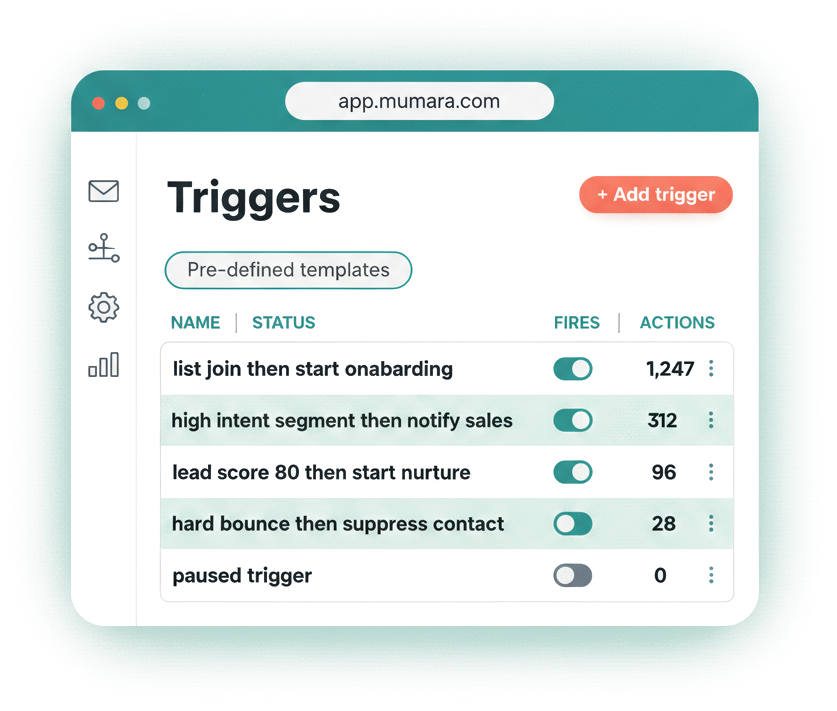
Mumara Campaigns triggers dashboard listing event-driven automations and their running fire counts

How they fire

A signal. A response. Every time.

A list join. A segment match. A profile change. A custom event from your app. Mumara catches each one and runs the action you chose.

One trigger can start a drip, send a broadcast, move a contact between lists, alert an admin, suppress a problem address, or update a field. Whatever the right reaction is, you decide it once. Mumara fires it forever, every time the signal hits — without you opening the dashboard.

Why it matters

What manual reactions cost you.

Most marketing teams spend half their time reacting to things that should react themselves.

  • Lists go dirty while you're not looking

    A contact hard-bounces twice. You don't catch it for a week. By then they've complained — and your reputation is taking the hit.

  • Hot leads cool off in the gap

    A prospect lands in your high-intent segment at 11pm. You catch it at 10am. The window to engage closed eleven hours ago.

  • Internal alerts never get sent

    A trial upgrades to the Pro plan. Sales should hear about it in minutes. Without a trigger, they hear about it from the billing report a week later.

  • Cross-list moves get forgotten

    A contact updates their preferences. The right thing is to move them to the matching list, send the right welcome, and clean them off the old one. Doing that by hand for 500 contacts is a job. For 5,000 it's impossible.

Recipes

Triggers people actually build.

Every team's stack is different, but these show up most often. Each is a single trigger doing the work of an entire workflow.

  • Welcome a new subscriber

    When
    A contact joins your main list.
    Then
    Start a multi-email onboarding drip group automatically.
  • Re-engage on segment match

    When
    A contact lands in your 'inactive 30 days' segment.
    Then
    Fire a personalized win-back broadcast through your warm-up pool.
  • Alert sales on high intent

    When
    A contact's lead-score field crosses your threshold.
    Then
    Send a rich notification email to the sales lead — with the contact's details merged in.
  • Move on preference change

    When
    A contact updates their audience-type field.
    Then
    Copy them onto the matching list, remove them from the old one.
  • Suppress problem bouncers

    When
    A contact is added to your hard-bounce list.
    Then
    Suppress the address and alert the admin with the bounce reason.
  • Onboard a paying customer

    When
    A contact joins your 'paid plan' segment after upgrading.
    Then
    Start the customer-onboarding drip and tag them in your CRM.

Pick the signal

Every thing your contacts do, in one screen.

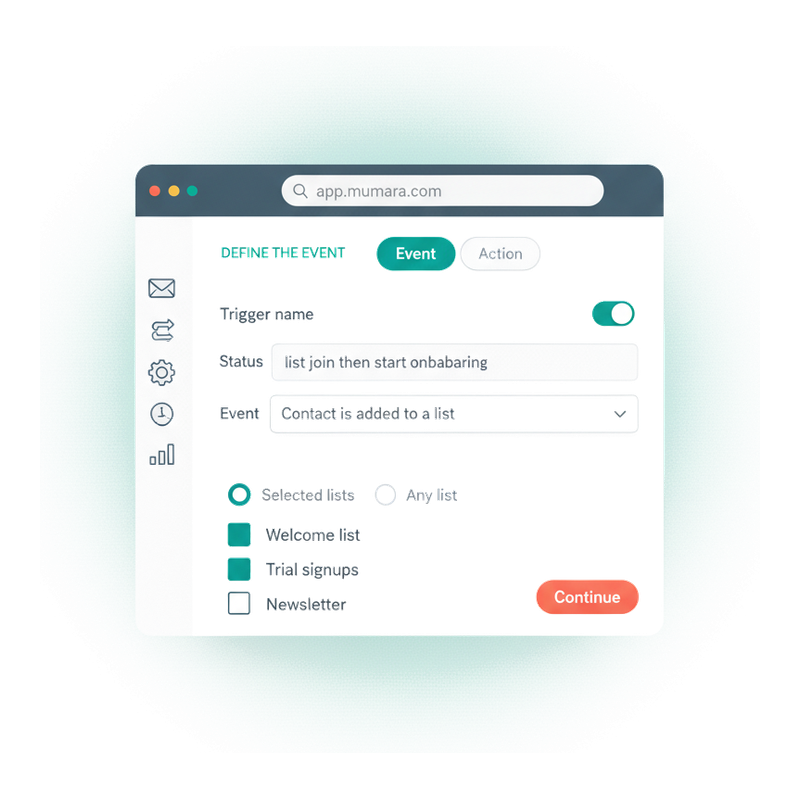
Step one of the trigger wizard. Pick the event, scope it down to the contacts you care about, name it, save it. Mumara starts watching the moment you flip it on.

  • Three event shapes, fine-grained scoping

    Contact added to a list. Contact added to a segment. Profile field changed. Each one has its own sub-form — pick selected lists or any list, a specific segment, a single field changing to a specific value.

  • Filter by how the contact arrived

    List-add triggers can fire only when the contact came from a chosen source — manual entry, API call, CSV import, or web-form signup. Run a trigger ONLY for API-sourced contacts, for example, and skip everyone else.

  • Pre-defined templates

    Don't start from scratch. Mumara ships a library of cloneable templates — welcome on join, win-back on inactivity, suppress on bounce. Clone one, tweak it, save it.

Mumara Campaigns trigger wizard — step one, define the event with list scope and conditions

Decide the response

Once the signal lands, do anything.

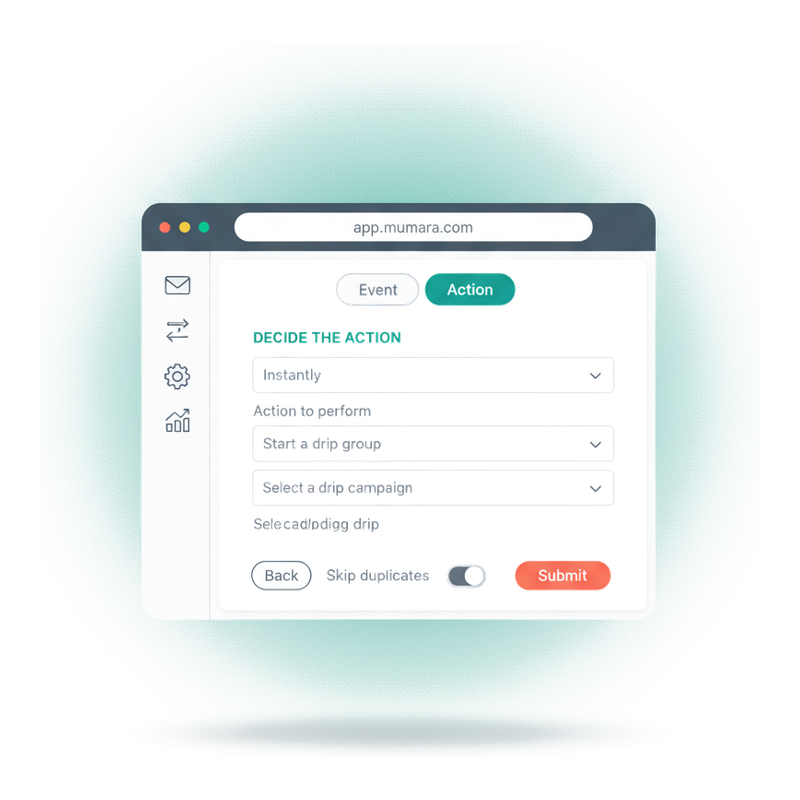
Step two. Pick the action. Choose when it runs — with no delay, or after minutes, hours, days, weeks, months, even years. Hit submit and the trigger is live. Reorder triggers by dragging them; they execute in list order.

  • Start a drip group

    The most common use. The trigger becomes the entry point for a full lifecycle sequence — welcome, nurture, win-back, whatever the journey is. See the drip campaigns page for what runs inside.

  • Send a one-shot broadcast

    Pick the broadcast, pick the sending node, dial in tracking and sender info. The trigger sends the campaign to every contact that matches the event — through the infrastructure you chose.

  • Modify the contact in-place

    Move them to another list. Copy them onto a second one. Update a custom field. Change their status. Suppress them. Whatever needs to happen to the contact record — handled in the trigger, no second tool.

  • Notify your team

    Send a rich notification email to an admin — subject, body, merge tags for subscriber data, sending node, attachments. Sales, ops, support: they hear about the events that matter, as they happen.

Mumara Campaigns trigger wizard — step two, decide the action with delay, action type, and configuration

The automation stack

Triggers, drips, workflows — how they fit.

They're not alternatives. Triggers are the upstream piece. Drips and workflows are two shapes the response can take.

You are here

You are here

Triggers

Detect the event, run a single action. The action might be a drip start, a broadcast, an admin email, a contact move. Triggers are what kick everything else off.

  • Event-driven
  • Many event types
  • Near-real-time
  • Pro + tier
Reading now

Linear journeys

Drip Campaigns

A sequence of emails sent in order with delays between them. The trigger fires; the drip group plays out. Best for welcome series, lead nurture, win-back — anywhere the path is a straight line.

  • Sequential
  • Time-delayed
  • Linear flow
  • All tiers

Branching journeys

Workflows

A visual canvas with branches. IF/ELSE on opens, clicks, segment changes, contact state. Reach for workflows when a drip's straight line isn't enough — when the next email depends on what the last one did.

  • Multi-path
  • Branching
  • Conditions
  • Automations addon
“Greatest mailing app you'll ever need. Drip and trigger functions are amazing. Superb support. Hands down the best mailing app I've ever used.”

Zito Calderon

Verified Trustpilot reviewer

Common questions

What buyers usually ask.

How quickly does a trigger fire after the event?

It depends on the event. A contact-based event — a list join or a field change — set to 'Instantly' is acted on as it happens, so the welcome goes out while the signup is fresh. Segment matches and any trigger with a delay run on a trigger cycle you control in Cron Settings — tighten it to every minute for time-critical work like abandoned-cart recovery, or relax it for routine automations. Either way it's your schedule, not an overnight batch. For sub-second event delivery to external systems, reach for Webhooks.

What's the difference between a trigger and a drip campaign?

A trigger detects a single event and runs a single action — list join, segment match, field change → start a drip, send a broadcast, alert an admin. A drip campaign is one of the actions a trigger can run: a sequence of emails sent over time. You almost always use both. Triggers are the upstream piece; drips are the response sequence.

Can I delay the action after the event fires?

Yes. Each trigger has a 'When to execute' setting — Instantly, or after a delay in minutes, hours, days, weeks, months, or years. That long-tail range is what makes anniversary triggers (renewal reminders, birthday flows) possible from a single event. The delay is calculated as event-time-plus-delay, then runs at the next cron cycle.

Can a single event run multiple actions?

Each trigger has one event and one action. To run several actions on the same event, create several triggers with the same criteria — each runs independently, and you can drag them into the order you want them to execute. For richer branching (different actions based on what the contact did next), workflows are the better tool.

What about trigger loops — can a trigger fire another trigger?

Yes, indirectly. If Trigger A updates a field that Trigger B watches, A's action will satisfy B's event. That can create a loop. To prevent it: use 'Changed to this value' (not 'any value') on field-change triggers so you narrow the match window, and add timing delays so the loop has circuit-breaks. Test with a sample contact before turning a trigger on.

Are there pre-built triggers I can start from?

Yes. The Triggers page has a 'Pre-defined templates' button. Mumara ships a library of common triggers — welcome on join, win-back on inactivity, suppress on hard bounce, alert on high intent — that you can clone and tweak instead of building from scratch.

Can I scope a trigger to specific lists or segments?

Yes. The event step lets you pick 'Selected lists' (multi-select) or 'Any list'. For segment events, you pick a specific segment. For field-change events, you choose any field or a specific one, and either 'changed to any value' or 'changed to this specific value'. The dial goes as fine as you need.

What kinds of actions can a trigger run?

Start a drip group. Send a broadcast through a chosen sending node. Send a rich notification email to an admin (full WYSIWYG with subscriber merge tags). Move or copy a contact to another list (with skip-and-keep, skip-and-remove, or overwrite handling for duplicates). Add a contact to the suppression list (global or list-specific). Delete a contact. Change status to active or inactive. Change email-format preference. Update a custom field. Each action has its own configuration sub-form.

Mumara Campaigns

Set up your first trigger in two screens.

Triggers ship on Professional and Commercial tiers of Mumara Campaigns Self-Hosted, and on every Mumara Machine plan. No credit card to try. Wire one up today and watch it run.