Skip to content
Mumara

Acquisition · capture → confirm → nurture

Capture the lead. Route them into the right journey on day one.

Lead generation isn't the form — it's the full path from a stranger's first click to a confirmed subscriber who's already inside their welcome sequence. Mumara Campaigns owns the lifecycle: Web Forms capture, double opt-in confirms, Triggers respond as they land, Drip Campaigns carry the cadence, Segmentation shapes the audience. One platform, one data model, no glue.

  • Capture — Web Forms, single or double opt-in
  • Confirm — auto-tag with form source on every signup
  • Trigger — start the welcome journey as soon as they confirm
  • Nurture — drips run, segments evolve, broadcasts target
contact · [email protected]

Alex Foster

via footer-signup form

Day 3 · welcome
  1. 14:32

    Form submitted

    footer-signup · source tag: footer

  2. 14:32

    Confirmation email sent

    double opt-in · awaiting click

  3. 14:34

    Confirmed

    status flipped to active

  4. 14:34

    Trigger fired

    "Footer signup confirmed" → start drip

  5. 14:35

    Welcome drip · email 1

    "Welcome to Acme" delivered

One contact. Five events. All inside Mumara — no webhooks to Zapier to spreadsheet.

Built for the full pipeline

Capture mechanic, journey start, nurture cadence — same data model.

The platform's compound advantage is that it owns every step. The form knows about the trigger; the trigger knows about the drip; the drip knows about segmentation. The contact moves through without leaving.

lifecycle from click to engaged
5-step
lifecycle from click to engaged
Visitor → form submit → confirm → trigger fires → drip starts. End-to-end in one platform.
opt-in optional per form
Double
opt-in optional per form
Each form has its own toggle. Newsletter signups single-opt, gated content double-opt — your choice per use case.
auto-tagging
Per-source
auto-tagging
Tag every signup with the form they used. Source attribution baked into the contact record for downstream segmentation.
data — no integration
Same-record
data — no integration
Web Forms, Triggers, Drips, Segments, Broadcasts — all operate on the same contact record. The lead capture isn't a separate system.

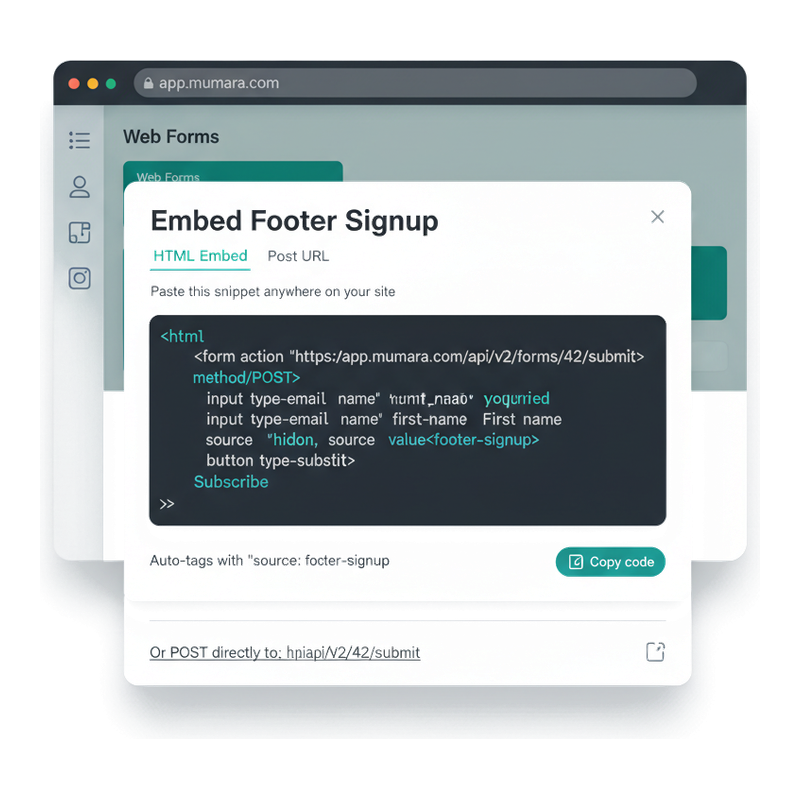
Embed anywhere

Copy the snippet. Paste on your site. Done.

When you've built a Web Form in Mumara, the Embed dialog gives you two paths to put it on your site. The HTML Embed tab hands you a ready-to-paste snippet you drop into your footer / sidebar / landing page. The Post URL tab gives you a direct endpoint — useful when you've built your own form HTML and just need somewhere to POST it. Hidden fields like UTM tags auto-flow into source attribution on the contact record.

  • HTML Embed for the common case

    A ready-to-paste <form> snippet with the right action URL, the right field names, and the right hidden values. Style it however you like — Mumara never imposes presentation.

  • Post URL for custom forms

    Bring your own form HTML and POST submissions to the Mumara endpoint. Useful when your designer has already built the form and you don't want to re-build it in Mumara's builder.

  • Source attribution auto-tagged

    Hidden field `source: footer-signup` (or whatever you set) lands on every submitted contact. Downstream segmentation can filter 'everyone who came in via the footer signup' — without you wiring anything extra.

  • One click to copy

    The Copy code button puts the snippet on your clipboard. The Or POST directly to row beneath gives you the raw endpoint when you want it without the wrapper.

Mumara Web Forms embed-code modal — HTML Embed tab active, dark-themed code snippet with form action POST URL and hidden source field, Copy code button, plus the direct POST URL row beneath

Three lead-capture patterns

One form-builder. Three common shapes of capture.

Most lead-gen pages on most sites are one of three patterns. Mumara's Web Forms + Triggers + Drips combination handles each, with the same building blocks composed differently.

Low-friction

Newsletter signup

Single email field, single opt-in (or double for compliance), thank-you redirect, immediate drop into a recurring newsletter cadence. The "footer signup" pattern every content site runs. Auto-tag with the form ID for source attribution; let segmentation pull the right audience as engagement data accumulates.

  • One field (email)
  • Single or double opt-in
  • Auto-tag for attribution
  • Drop into recurring newsletter

Higher intent

Gated content / lead magnet

Form with 3-5 fields (email + first name + company + role). Double opt-in mandatory for compliance and lead quality. Confirmation email delivers the asset (PDF, video, template). Trigger fires once confirmed; drip starts a 5-7 step nurture sequence ending in a sales-ready outreach. Auto-tag with the asset name for cross-asset performance comparison.

  • 3-5 fields
  • Double opt-in mandatory
  • Confirmation email delivers asset
  • 5-7 step nurture drip

List-builder

Event / waitlist signup

Form with a date or interest field. Confirms inclusion. Trigger fires at a specific later date (event start, product launch, waitlist opening). Useful for product launches, webinar registrations, beta sign-ups — anywhere the value of the signup is "I want to know when X happens" and the platform has to wait until X to act.

  • Date / interest field
  • Confirmation acknowledges signup
  • Date-triggered action later
  • Useful for launches + events

Web Forms vs Lead Generation

The form is the mechanic. Lead generation is the strategy.

Both terms are used in marketing, and they're not interchangeable. Knowing the distinction makes the platform pages easier to navigate.

[Web Forms](/campaigns/features/web-forms/) is the form-builder UI — the mechanic for capturing a contact. It covers field types (email, text, date, dropdown, hidden), the wizard for building forms (4 steps — Details / Confirmation / Welcome / Error), embed options (HTML or POST URL), and the form-level settings (double opt-in toggle, reCAPTCHA, multi-list submit). If you want to know how a form actually works on Mumara, that's the page.

Lead Generation is the broader story — the funnel that uses Web Forms as one of its components. The page you're reading covers the full lifecycle: capture (Web Forms), confirmation (the Double Opt-in flow), journey start (Triggers), nurture (Drip Campaigns), long-term audience shape (Segmentation). It's the strategic view; Web Forms is the tactical mechanic underneath.

Most pages in marketing platforms blur the two. Mumara separates them on purpose — when a customer asks "how do I capture leads from my site?" the right answer depends on whether they mean the form-builder details (Web Forms) or the post-capture journey (Lead Generation + Triggers + Drips). Reading both pages gives the complete picture.

One platform, end-to-end

From the first click to a contact already inside the welcome drip.

What actually happens between a visitor seeing the form and them being two emails into the onboarding sequence. The whole flow runs inside Mumara — no Zapier, no glue, no sync lag.

  1. Step 1

    Visitor sees the form

    Embedded on your site or landing page. Mumara renders the form, or you provide the markup and POST to Mumara. Either way, no JavaScript dependency on a third-party widget.

  2. Step 2

    Submit lands

    The form data hits Mumara. reCAPTCHA validates if enabled. Field validation runs. On pass, a new contact record is created with the form's tags, the source attribution, the consent timestamp + IP.

  3. Step 3

    Confirmation (if double opt-in)

    When double opt-in is ON, contact gets a confirmation email immediately and is held in pending status. When they click confirm, status flips to active. When OFF, contact goes straight to active. Either way, the audit trail is preserved.

  4. Step 4

    Trigger fires

    A Trigger watching "contact added to list X" acts as soon as the contact lands; one watching "contact reaches segment Y" runs on the trigger cycle you set in Cron Settings (as fast as a minute). Trigger actions can copy/move to another list, send a broadcast, start a drip group, notify an admin, update a custom field.

  5. Step 5

    Drip starts

    The Drip Campaign begins. First email goes out per the drip's schedule (immediate, day 1, day 3, etc.). Each subsequent step waits the configured delay. Engagement feeds segmentation as it accumulates, refining downstream targeting.

Four common funnels

One acquisition surface. Different buyer patterns.

  • Content-site newsletter

    Pattern
    Blog or content site. Footer signup form. Want subscribers to land directly in the recurring newsletter list with a friendly welcome sequence.
    What runs on Mumara
    Single-field web form embedded site-wide. Double opt-in for compliance. Trigger on confirm → 3-step welcome drip → newsletter list. Source-tag with the page slug for content-attribution segmentation later.
  • B2B lead magnet

    Pattern
    Whitepaper / template / video gated behind a 5-field form. Want to deliver the asset, qualify the lead, and start nurturing toward a sales-ready conversation.
    What runs on Mumara
    5-field web form on the landing page. Double opt-in delivers the asset via the confirmation email. Trigger on confirm → 7-step nurture drip with behavioural branching → segmentation for sales-handoff at lead-score threshold.
  • Product / event waitlist

    Pattern
    Launching a product or running an event. Want to capture interested signups, confirm them, and send a campaign when the launch date arrives.
    What runs on Mumara
    Web form with optional date / interest fields. Confirmation acknowledges signup. Date-triggered broadcast fires on launch day to all confirmed waitlisters. No manual scheduling, no one-off campaign drafting.
  • Referral / member-get-member

    Pattern
    Existing subscribers share a referral link. New signups via the link should be tagged with the referrer for attribution and reward.
    What runs on Mumara
    Web form with a hidden field for the referrer ID (pre-populated by URL parameter). Double opt-in confirms. Trigger captures the referrer in a custom field. Periodic broadcast aggregates referrals and rewards top referrers.

Common questions

What buyers usually ask.

Is 'Lead Generation' a separate product from Web Forms?

No — it's the strategic view on top of Web Forms + Triggers + Drips + Segmentation. Web Forms is the mechanic (the form builder). Lead Generation is the pipeline (form → confirm → trigger → drip → segment). Both pages exist to give buyers two angles into the same surface: tactical ("how does a form work?") and strategic ("how do I run lead generation?"). The platform is one thing; the pages document different lenses.

Do I need any third-party tools to run lead generation on Mumara?

No. The capture (Web Forms), the confirmation flow, the post-signup automation (Triggers + Drips), the audience shaping (Segmentation), and the long-term communication (Broadcasts) all run on the same platform with the same contact record. No Zapier, no Make.com, no glue scripts. The exception is if you're capturing leads in a SaaS tool Mumara doesn't directly integrate with (e.g. a typeform-style builder) — then the [REST API](/campaigns/features/rest-api/) and [Webhooks addon](/campaigns/addons/webhooks/) are the connection layer.

How does double opt-in work for lead generation?

Each Web Form has a Double Opt-in toggle. When ON, a contact who submits the form lands in the list with pending status, gets a confirmation email, and only becomes active when they click confirm. The confirmation timestamp + IP are recorded permanently on the contact record for compliance evidence. Triggers fire on the active state — so a 'contact added to list X' trigger doesn't fire until the contact actually confirms. Useful for compliance (CASL, GDPR) and lead quality (filters bot signups and accidental submissions).

Can I auto-tag signups by source?

Yes — every Web Form can be configured with custom tags applied to every contact submitted through it. Combined with hidden form fields populated by URL parameters (utm_source, utm_campaign, referrer), you get full source attribution baked into the contact record. Downstream segmentation can then filter by source — 'show me everyone who came from the May newsletter referral campaign' is a saved segment query.

What happens after confirmation?

A Trigger fires. The trigger is configured to watch for 'contact added to list X' or 'contact reaches segment Y' or 'contact custom-field equals Z'. When that condition matches a newly-confirmed contact, the trigger's action runs — copy to another list, send a broadcast, start a drip group, notify an admin, update a field. A confirmation is a contact-based event, so a trigger set to Instantly acts without waiting for a batch; segment-based matches run on the trigger cycle you set in Cron Settings (as fast as a minute).

Can I run different welcome drips based on the form they used?

Yes — and this is the typical pattern. Auto-tag each form with a unique tag. Build a Trigger per tag that starts a specific Drip Campaign. A user who signed up via the 'whitepaper-2026' form gets the whitepaper-2026 nurture; a user who signed up via 'webinar-may' gets the webinar-follow-up sequence. The contact record carries the tag forever, so segmentation can recombine them later.

Can the form fields populate custom fields on the contact?

Yes — Web Form fields can map to any contact field, including custom fields. A B2B lead form with role and company-size fields maps those values directly into custom fields on the contact record. Drip Campaigns and Broadcasts can then personalise based on those fields ([Personalization Options](/campaigns/features/personalization-options/)), and Segmentation can filter by them.

How do I A/B test lead-gen forms?

Mumara's [A/B Testing](/campaigns/features/ab-testing/) is for broadcast variants today, not form variants. To A/B test forms, the typical pattern is to run two separate Web Forms with different fields or layouts on different landing pages, then compare conversion rates in the per-form statistics. The platform tracks form-level submissions, so the comparison is in the reporting surface.

What about reCAPTCHA / bot protection on forms?

Web Forms support reCAPTCHA V2 and V3 — toggle per form. V3 is invisible (score-based), V2 shows the checkbox challenge. Combined with double opt-in (which filters bot signups that don't click the confirmation link), bot signups become statistically negligible for most installations. See [Web Forms](/campaigns/features/web-forms/) for the full anti-abuse surface.

Mumara Campaigns · Lead Generation

Capture the lead. Onboard them. Keep them. One platform.

Web Forms, Double Opt-in, Triggers, Drips, Segmentation — every piece ships with Mumara Campaigns. Self-Hosted and Mumara Machine both. No Zapier, no glue, no integration sync lag. The complete lifecycle from first click to engaged subscriber lives in one contact record.