
Authentication Logs
Sign-ins, sign-outs, password changes, 2FA enrolments. Who is on the platform, from where, how. The answer to 'did someone access the system?' Lives under Tools → Authentication Logs and is referenced on the Administrators page.
Account control · audit trail
When a campaign goes out wrong, when a contact disappears, when a sending limit gets bumped — the question is always the same: who, what, when. Activity Logs is the answer. Every admin and user action across the platform, recorded with the actor, the target, the IP, the timestamp. Searchable. Exportable. Retention-configurable.
Activity Logs
Today · 7 entries · all actors
Broadcast: May Newsletter #38
Aisha Karim
Segment: Highly Engaged
Marcus Wei
Drip: Welcome series → Newsletter list
Aisha Karim
Contact: 19 imported rows (bulk)
Devi Patel
Domain: yahoo.com (CIDR import)
Jonas Riedel
Sending node: Amazon SES — hourly limit 30k → 50k
Marcus Wei
API role: Read-only auditor
Aisha Karim
Captured by default
Activity Logs runs by default on every Mumara Campaigns installation. You don't configure what's tracked — the platform records every action that mutates state, automatically.
Filter, find, export
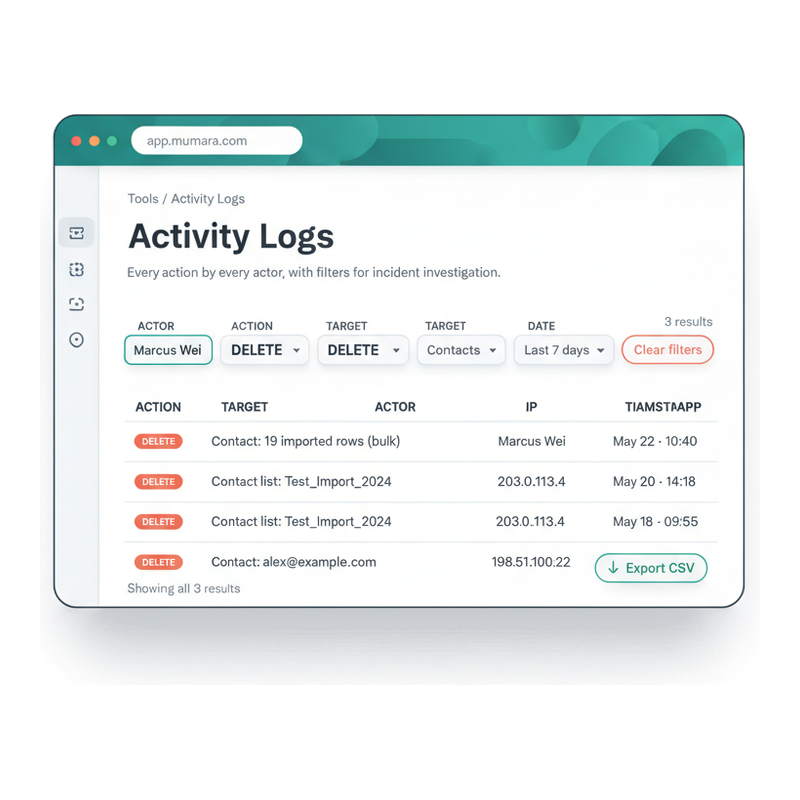
The Activity Logs UI is built around the question 'who did this'. Filter by actor, action type, target type, and date range — combine the axes freely until the result set is small enough to read. Click any entry for the full per-event detail (payload diff included where relevant). Export the filtered set as CSV to attach to a ticket, feed your SIEM, or archive separately.
Pick an actor (specific admin, user, or API token), an action verb (delete, edit, schedule), a target type (Broadcasts, Contacts, Sending Nodes), a date window. The result set narrows live; the count updates per filter.
Hit Clear filters to wipe every axis at once. Useful when bouncing between investigations on the same page.
Click any log row to see the full event — actor, IP, target identifier, timestamp, and (where applicable) a field-level diff of what changed. The depth most audit surfaces hide.
The Export CSV button respects the active filter. Attach to compliance tickets, pipe into your SIEM, or archive for long-term retention.
Three log surfaces
Mumara records three distinct kinds of platform activity, each surfaced separately because the questions they answer are different. Knowing which log to open is half the investigation.
Sign-ins, sign-outs, password changes, 2FA enrolments. Who is on the platform, from where, how. The answer to 'did someone access the system?' Lives under Tools → Authentication Logs and is referenced on the Administrators page.
Every mutation across the platform — create, edit, delete, schedule, configure. The answer to 'who changed this?' Tools → Activity Logs. The broadest of the three and the one most often consulted during incident investigation.
Per-campaign send events — sent, delivered, bounced, opened, clicked, complained, unsubscribed — at the recipient level. The answer to 'what happened to this specific send?' Lives under the campaign reports, with the per-recipient drill-down.
Through an incident
The flow every operator follows when they have a question about platform state. Each stop assumes only the previous step's output — no engineering, no SQL, no log-server access.
Step 1
A subscriber complains. A campaign sent twice. A sending node was deactivated. The first signal usually arrives from elsewhere — support ticket, dashboard graph, customer email. You start with a vague question.
Step 2
Tools → Activity Logs. Filter by target type (Broadcasts, Contacts, Sending Nodes), by date window (last 24h, last 7d), by actor (which admin or user). Within seconds the result set is small enough to read.
Step 3
The entry shows the action verb, the target (which broadcast, which contact, which node), the actor (which admin or token), the IP, the timestamp. You now know the what, the who, the when, and the from-where — every axis of the incident, at one glance.
Step 4
For compliance review, security incident, or post-mortem documentation — export the filtered set as CSV. Attach to the ticket, pipe to your SIEM, or archive separately. The platform never deletes data you have already exported.
Step 5
Knowing the action lets you fix the immediate problem (undo the delete, restore the segment, reactivate the node) and the structural one — adjust a role's permissions, enforce 2FA on the actor's role, tighten an API token's IP allowlist. The log becomes the source for the prevention plan.
Four ways Activity Logs earn their keep
Common questions
Authentication Logs record sign-ins and sign-outs — when an admin or user got onto the platform and from where. Activity Logs record what they did once they were in. The two together give you the full story: Authentication Logs prove someone was signed in at 11:00 from IP 203.0.113.4; Activity Logs prove that at 11:08 the same person deleted a contact list. For most incident investigations you'll cross-reference both. Authentication Logs live on the [Administrators page](/campaigns/features/administrators/); Activity Logs are the broader audit surface this page is about.
Every mutation across the platform — Create, Update / Edit, Delete, Schedule, Send, Pause, Resume, Suppress, Unsuppress, Activate, Deactivate. Across every resource — Contacts, Lists, Custom Fields, Segments, Broadcasts, Drips, Triggers, Sending Nodes, Sending Domains, Bounce Addresses, Bounce Rules, Web Forms, Suppression entries, API Tokens, API Roles, Admin Roles, Administrators, Users. If it changes state on the platform, it lands in the log.
A consistent set of fields, plus a sometimes-attached payload. The core fields: action verb (CREATE / EDIT / DELETE etc.), target type + identifier (Broadcast: May Newsletter #38), actor (admin or user name + ID, or API token name + ID), IP address, timestamp. The payload (when relevant) is a JSON snapshot of what changed — useful for edits where you want to see the field-level diff. Read-only operations (just viewing a contact list) aren't logged because the volume would drown the audit trail.
Every API call that mutates state is logged with the API token's identity as the actor — token name, token ID, and the role the token was acting under. If the same logical user has both an admin login and an API token, the two surfaces show as distinct actors in the log. This is the right behaviour for audit purposes — you want to see whether a contact was deleted by a person clicking in the UI or by a script using a token.
Configurable per installation. Tools → Settings → Cron / Data Retention exposes the auto-deletion window. Common choices are 90 days, 180 days, 1 year, or longer per your data-retention policy and storage budget. For longer retention than the default, the simplest path is regular CSV export to your archive — the platform never deletes data you've already exported.
Yes — multi-axis filtering. By actor (a specific admin, user, or API token). By action type (just deletes, just edits, etc.). By target type (just Broadcasts, just Contacts). By time window (today, last 24h, last 7d, custom range). The filters combine freely — "show me every DELETE that admin Marcus did against Contacts in the last week" is one click per axis. The result is paginated and exportable.
Activity Logs focus on successful mutations — what actually changed on the platform. For failed authentication attempts (login failures, 2FA mismatches), the Authentication Logs are the surface. For failed API requests (token revoked, rate-limited, permission denied) the API request logs are the surface. The boundary keeps each log searchable for its purpose — but in an incident investigation you'll often cross-reference them.
CSV export is the lowest-friction path — schedule a daily filter + export job and pipe the file into your SIEM's ingestion pipeline (Splunk, Datadog, Elastic, Sumo Logic, all support CSV ingestion). For real-time integration, the [Webhooks addon](/campaigns/addons/webhooks/) can fire on certain admin-action events, giving you an event stream your SIEM can consume directly. The platform doesn't ship a native syslog forwarder today — CSV + webhook is the supported pattern.
Logs are write-only from the application layer — no UI mechanism to edit or delete individual entries. Auto-retention deletes the oldest entries based on the configured window, but you can't selectively delete an embarrassing entry. For installations under strict compliance (SOC-2 Type-2, financial services, healthcare), the recommended pattern is to export to your SIEM regularly so the SIEM becomes the immutable record of truth — the platform-side copy is then the working dataset.
Related
Authentication Logs (sign-ins) live here. Pair with Activity Logs for full incident-investigation surface.
Read moreActivity Logs are the audit-trail surface auditors examine for CAN-Spam / CASL / GDPR evidence.
Read moreCampaign / Send logs (per-recipient) live in the reporting surface — distinct from Activity Logs.
Read moreAPI token actions surface in Activity Logs with the token's identity as actor — distinct from admin-UI actions.
Read morePer-contact activity timeline — the contact-centric view of platform actions, complementary to Activity Logs. Addon.
Read morePer-user accountability — Activity Logs filter by user identity, useful for reseller / agency tenant isolation.
Read moreMumara Campaigns · Activity Logs
Activity Logs ship with every Mumara Campaigns plan — Self-Hosted and Mumara Machine. Recorded by default, filterable by actor / action / target / time window, exportable as CSV, retained per your policy. The platform-side of the 'who did this' question, every time.