
Triggers
What kicks the sequence off. A list join, a segment match, a custom event from your app. Segments can layer thousands of conditions — 'opened the welcome on a Monday, age 18-35, in New York' is a real trigger you could set.
Lifecycle automation
A new subscriber joins. A welcome lands two minutes later. A product tour three days in. You wrote those emails once — Mumara sends them on cue, to every new contact, forever.
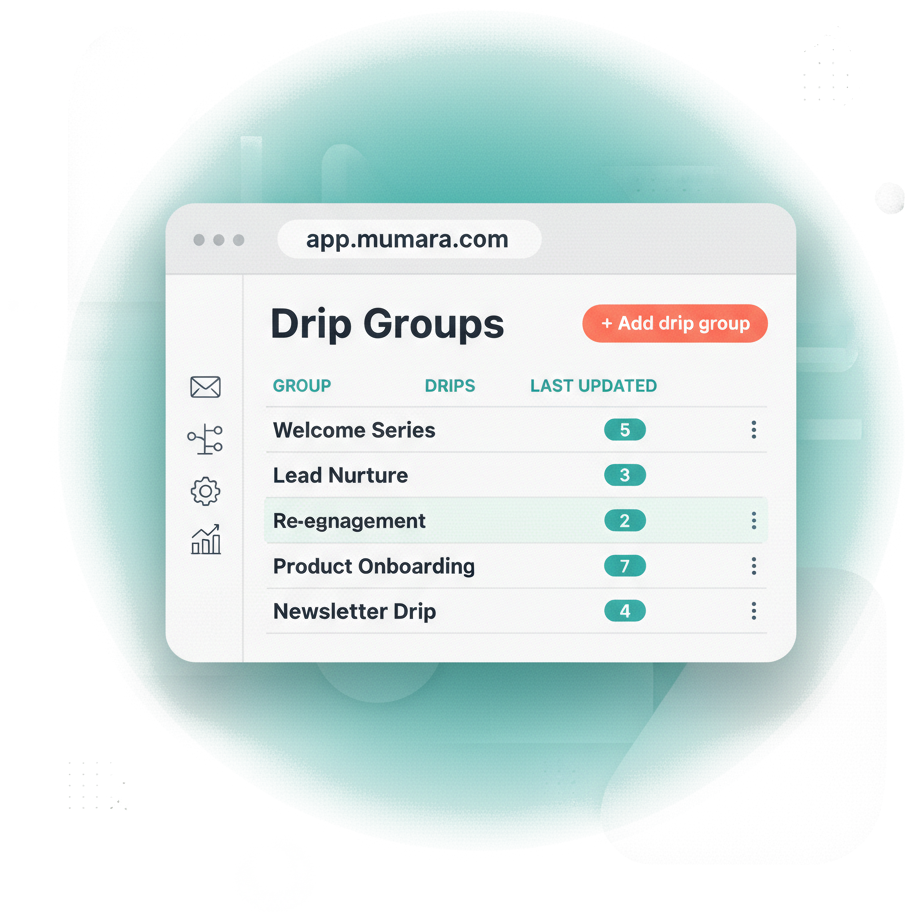
How it runs
A subscriber joins. A purchase clears. A segment matches the rules you set. Each one starts the drip you wrote for it.
Build the sequence once. Mumara keeps running it on the days you set, for every contact, forever. Most senders end up with several in parallel — welcome for new signups, nurture for leads, win-back for the ones drifting away. Each fires on its own signal. None of them need you.
Why this matters
Email is the cheapest channel in marketing — but only when it scales. Doing it by hand erases the ROI.
Every new signup deserves a welcome. Doing it by hand doesn't scale past 50 contacts a week. By 500 a week, it's a part-time job. By 5,000, you've stopped trying.
A prospect signs up at 10pm and doesn't hear from you until you check email at 9am. By then they've forgotten you. Follow-ups have to land when interest is hot, not in office hours.
You're sharp the first week, sloppy by the fifth. Half your prospects get the full nurture. Half get one email and ghost. The funnel leaks at exactly the people you'd most want to keep.
The customer who hasn't opened in 60 days gets ignored, because pulling that list manually is a project. So they sit on your list cold, then unsubscribe. Both bad.
What you'd actually run
These are the sequences most senders set up first. Each fires on its own trigger, runs its own pace, and keeps producing while you focus on the rest of the business.
Anatomy
Three levers. Move any of them and the sequence shifts to fit the journey you want.
What kicks the sequence off. A list join, a segment match, a custom event from your app. Segments can layer thousands of conditions — 'opened the welcome on a Monday, age 18-35, in New York' is a real trigger you could set.
The emails. Each drip lives in a group that holds shared sending nodes, tracking, and sender identity. Configure the group once. Every drip inside it inherits the policy.
How long after the trigger each drip lands. Instant. Five minutes. Two days. A week. Stack them and the cadence builds itself.
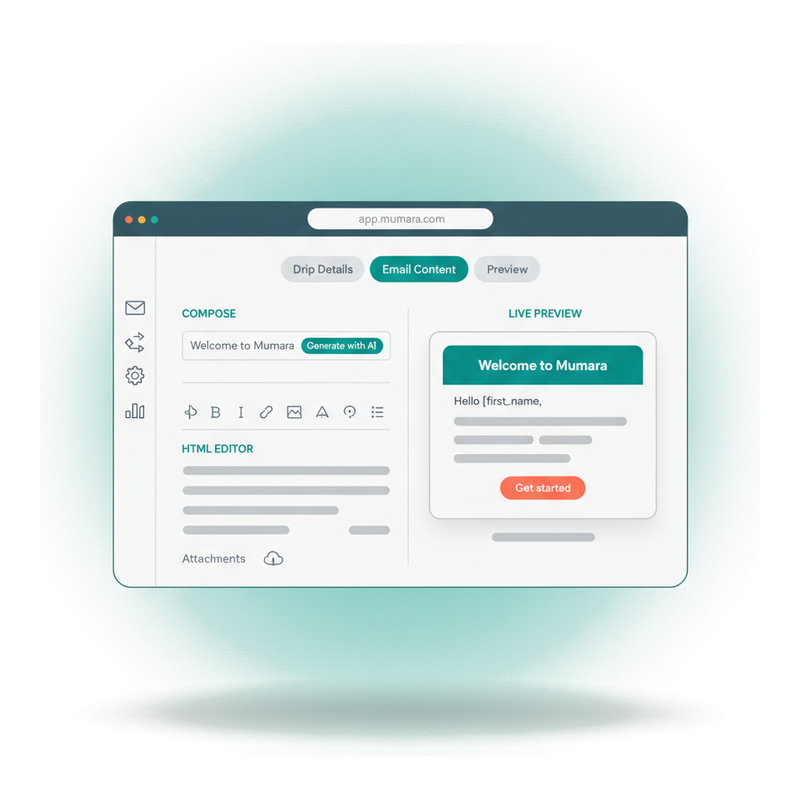
Compose
The same composer you'd use for any campaign — HTML editor, AI assist, subject and preheader, plain-text variant, attachments. Save the drip and Mumara sends that exact email to every contact whose trigger fires, on the delay you set, forever.
Generate-with-AI buttons on the subject, preheader, and body. Mumara AI Fast for quick drafts, Mumara AI Advanced for brand-critical copy.
No second screen, no duplicated work. The plain-text version updates as you edit the HTML.
{first_name}, custom fields, contact attributes — insert any subscriber data into the drip the same way you would in a broadcast.
Set sending policy once
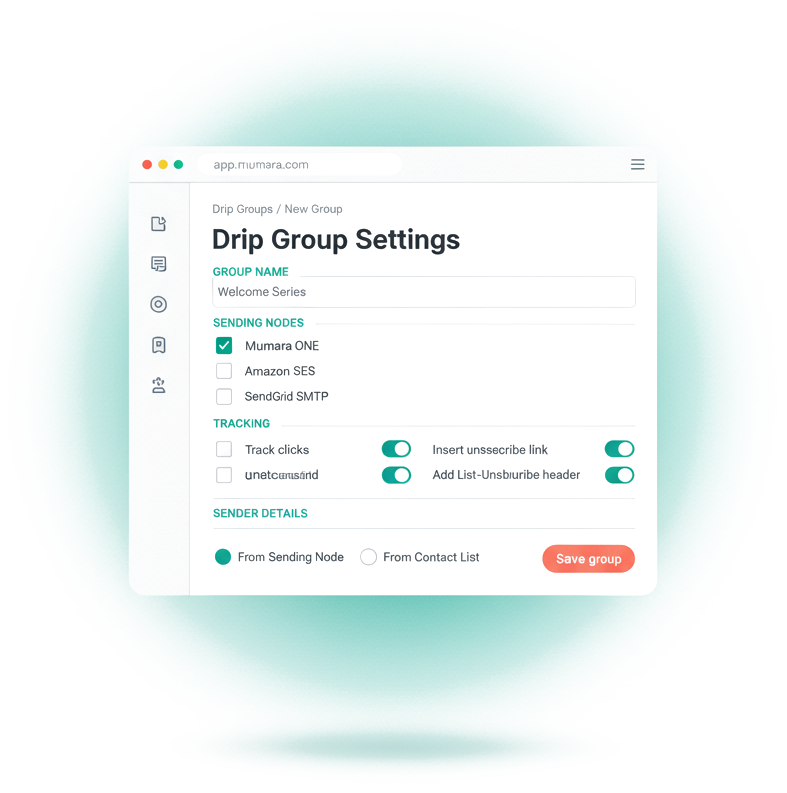
A drip group carries the operational config — sending nodes, tracking toggles, sender identity, unsubscribe handling. Every drip inside inherits it. So you decide the rules at the start, and the campaign keeps running on them for as long as you let it.
Route the drip group through specific SMTP, API, or PowerMTA nodes. Different traffic patterns get different reputation pools — separate transactional from promotional, separate lead-nurture from welcome.
Per-group toggles for open tracking, click tracking, unsubscribe insertion, and the List-Unsubscribe header for one-click opt-outs. Compliance handled.
Double opt-in respected. Drips skip contacts who haven't confirmed — no permission grey area, no spam-complaint risk.
Before it ships
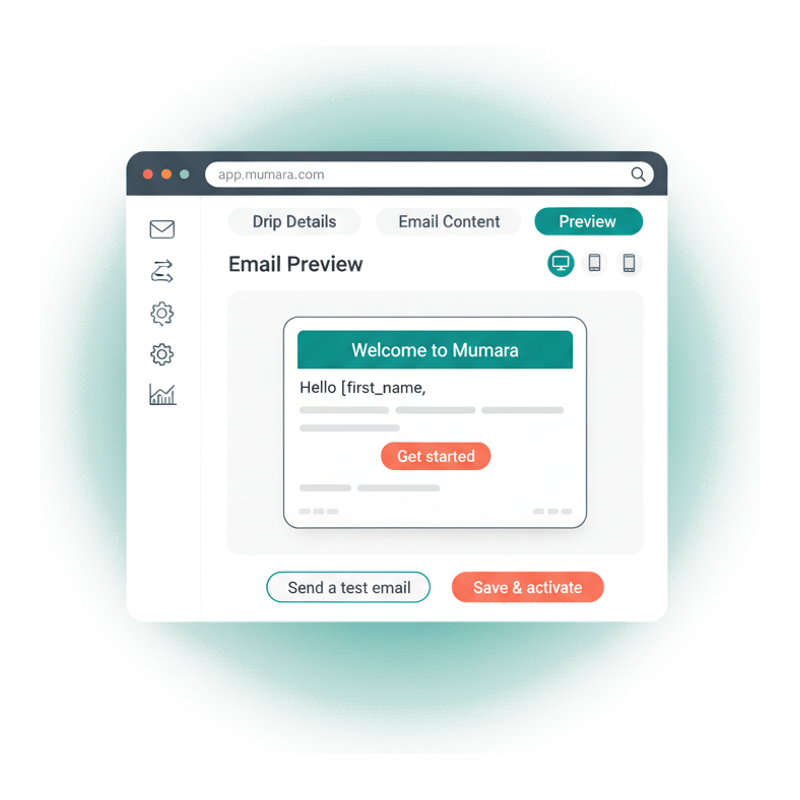
Every drip you write ends up in someone's inbox. The preview shows you exactly what — across desktop, tablet, and mobile — before you commit. Catch the broken hero image, the truncated subject, the merge tag that didn't render. Then send a test to yourself to be sure.
Desktop, tablet, and mobile renderings on the same screen. Most opens are on mobile. Now your QA is too.
Fire a test send to yourself or your team. Real email, real client, real verdict — before any subscriber sees it.
Every change in the editor refreshes the preview instantly. No save-then-check loop, no surprises at send time.
The automation stack
They're not alternatives. Triggers detect events. Drips and workflows are two different shapes a triggered sequence can take. Pick the shape that matches the journey.
Upstream
Detect the event. List join, contact edit, segment match — anywhere from a simple list-add to a richly conditional segment match. Triggers are what start your drip groups and workflows.
You are here
You are hereA linear sequence. The trigger fires, the drip group starts, each drip lands in order on the delay you set. Best for welcome series, lead nurture, win-back — anywhere the path is a straight line.
When journeys branch
A visual canvas with branches. IF/ELSE on opens, clicks, segment changes, contact state. Reach for workflows when a drip's straight line isn't enough — when the next email depends on what the last one did.
“Greatest mailing app you'll ever need. Drip and trigger functions are amazing. Superb support. Hands down the best mailing app I've ever used.”
Zito Calderon
Verified Trustpilot reviewer
Common questions
Triggers detect the event. Drips are the sequence that gets sent because of it. When a trigger fires for a contact — they joined a list, matched a segment, fired a custom event — it starts the drip group for that contact. The drips then land in order with the delays you set. Triggers are upstream of drips, and you almost always use both.
Anywhere from simple to richly conditional. Contact added to a list, contact edited, contact joining a segment, custom events you push from your own app, contact-level date fields hitting a target. Segments themselves can layer thousands of criteria — open behaviour, click history, geography, age, time-of-day patterns, custom fields you defined — and a contact matching that segment is enough to fire the drip.
Minutes, hours, or days. Each drip in a group has its own delay. A welcome at zero. A product tour two days later. A final check-in seven days after that. Build the rhythm that matches the journey.
By default a drip only sends to NEW matches — contacts who match the trigger criteria going forward. Turn 'Send to Existing Contacts' on and the drip also sends to contacts who already matched in the past. Useful when you build a welcome series after you already have subscribers and you want them to get the same experience.
Yes, and you should. Most lifecycle programs run four to six drip groups at once — welcome series, lead nurture, re-engagement, post-purchase, course drip — each on its own trigger, each firing for the right contacts at the right time. Mumara Campaigns runs them in parallel without you doing any orchestration work.
Yes. Drip groups can route through any sending node Mumara Campaigns supports — generic SMTP, PowerMTA, and a wide range of API-based providers including SendGrid, Mailgun, Amazon SES, Postmark, Mailjet, SparkPost, Gmail OAuth, and many more. Pick one or several per group.
Drips fire once per contact, in a defined sequence after a trigger. Evergreen Campaigns fire repeatedly on a schedule — useful for recurring newsletters or weekly digests. If you need 'send this every Monday forever,' use Evergreen. If you need 'send these five emails over fourteen days when someone joins,' use Drips.
Related
The event detectors that start every drip — list joins, segment matches, field changes, custom events.
Read moreDynamic audiences. Filter contacts or engagement behaviour, then feed them into a drip.
Read moreThe email content itself. Build the email once, send it through every drip step.
Read moreRecurring scheduled sends on a cadence you set — weekly, daily, RSS-driven. Addon.
Read moreRewrite drip-step content per send so re-entering subscribers see fresh copy. Addon.
Read moreMumara Campaigns
Drip Campaigns are included on every Mumara Campaigns tier — both Self-Hosted and Mumara Machine. No credit card to try. Set up one welcome series and feel the difference by the end of the week.