
Compose
'Build a Black Friday email with a hero, three feature highlights, a testimonial, and a CTA.' Mumara AI picks modules, writes copy, sets layouts — the full email appears on canvas. From prompt to draft in one round.
AI · built-in · chat-based composer
Mumara AI is a chat-based agent built into every Mumara Campaigns plan — no addon to install, no separate vendor to authorise. It composes whole emails, iterates by conversation, and personalises with knowledge of your contacts, fields, segments, and triggers. Tiered — Fast, Standard, Advanced — credit-based, with bundled credits on day one and top-ups whenever you need them.

The tiers
A tiered range covering the spectrum of AI capability. Pick per task — a subject line doesn't need Advanced; a multi-section brand-voice newsletter does. The admin enables which tiers your users can pick from.
Quick drafts and short copy
Fastest tier — best for subject lines, preheaders, short marketing snippets, and quick rewrites. Costs the least credits per task. Available on every plan as a default tier.
Credit usage
Low credit cost · ~1–2 per subject line
Everyday work and full emails
The default tier. Composes full broadcasts, handles personalization, manages multi-section emails. The right balance for most marketing teams' day-to-day work.
Credit usage
Medium credit cost · ~25–30 per plain-text email
Complex compositions and personalization
Highest-capability tier — best for complex multi-section emails, deep personalization with many contact fields, and brand-voice-sensitive copy. Costs more credits per task but produces the most polished output.
Credit usage
Higher credit cost · ~150–200 per multi-section email
Pricing: 1,000 Mumara AI credits = $1 USD. Credits never expire while your account is active. Bundled credits ship with every Mumara Campaigns plan; top up via the billing panel at any time.
AI Settings · admin control
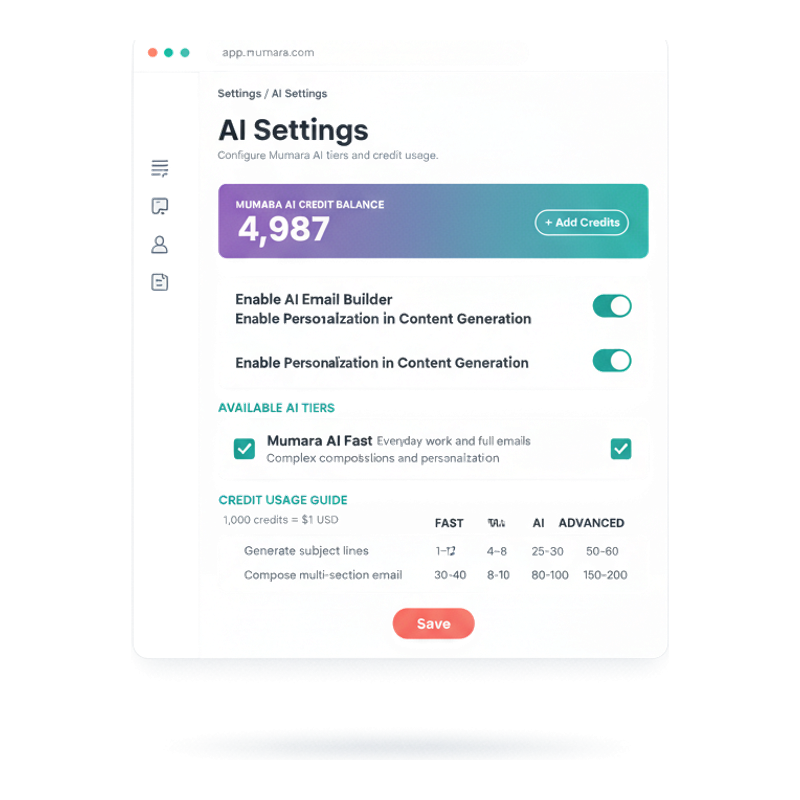
The AI Settings admin panel is where you configure the AI surface. See your current credit balance, enable individual tiers (Fast, Standard, Advanced), toggle Enable Personalization in Content Generation (so the AI knows your contact fields, custom fields, segments, triggers, and drips), and write Custom Instructions that Mumara AI applies on every task — brand voice, do-not-mention list, target audience, whatever your team needs the AI to remember.
Toggle which tiers your users can pick from. Useful if you want to lock the org to Standard only, or open Advanced to specific teams.
Turn this on and Mumara AI gains knowledge of every contact field, custom field, profile field, sender tag, dynamic content tag, and the conditions on your triggers, drips, and segments. The AI writes copy that already knows the audience.
Free-text guidance the AI applies on every task. 'Our brand voice is warm and direct, never corporate.' 'Always include the legal disclaimer at the bottom.' Mumara AI follows the instructions across every conversation.
See exactly how many credits each task costs across tiers (subject lines ~1–2 with Fast, multi-section emails ~150–200 with Advanced). Set a User Credit Markup % to bill consumption to end-users in reseller / agency setups.
For agencies and resellers
Mumara AI is built-in for you — but you control how it shows up to your users. Set a markup percentage in AI Settings and Mumara charges your end-users at that rate while you keep paying us the flat $1 / 1,000 credits. The margin is yours to set.
Pair with the White Labeling addon and your users see your brand, your price, your AI — never the underlying platform.
Worked example · 100% markup
You pay Mumara
$1
per 1,000 credits
Your user pays you
$2
per 1,000 credits
Your margin: $1 / 1,000 credits. Mumara invoices you at $1/1k flat. You bill your end-user at any rate you choose — 50%, 100%, 300%. The margin compounds across every email your customers generate with AI.
Configure the User Credit Markup % in AI Settings. Different markups per role or sub-customer tier are supported.
Where Mumara AI lives
Mumara AI isn't a separate tab you switch to. It's a chat panel inside the same canvas you're already in — top toolbar, one click, conversation opens.
AI button sits in the top toolbar. Compose whole emails on canvas with a single prompt. Iterate by chat — every edit lands live.
Same AI agent, same capabilities — inside the base HTML editor. Generate or rewrite content, paste in your own HTML for AI to refine.
One-click 'Generate with AI' on subject and preheader fields. Fast tier is plenty for short copy. Multiple alternatives per click.
Configure which tiers users can access, set credit markup, write custom brand instructions Mumara AI follows on every task.
How the agent works
Mumara AI doesn't just generate text — it acts on the canvas. Tell it what you want; it builds; you redirect by chat. Three patterns capture how marketers actually use it.
'Build a Black Friday email with a hero, three feature highlights, a testimonial, and a CTA.' Mumara AI picks modules, writes copy, sets layouts — the full email appears on canvas. From prompt to draft in one round.
'Make the hero darker.' 'Replace feature two with a Quote block.' 'Tighten the copy.' Each chat message edits the email live. No copy-paste, no leaving the builder, no losing context.
When Enable Personalization is on, Mumara AI uses your contact fields, segments, and dynamic content tags in the generated copy automatically. 'A welcome email for new Pro subscribers' produces a welcome email that already references the Pro tier's specific fields.
What manual content creation costs
Most email work is repetitive — same hero structure, same CTA copy patterns, same subject-line formulas. Mumara AI exists because it's faster to ask than to retype.
Marketers spend disproportionate time on subject lines because they matter — but generating five candidates by hand takes 10 minutes. Mumara AI Fast generates them in seconds. The time saved compounds across every campaign.
When five different team members write copy, you get five voices in your campaigns. Mumara AI's Custom Instructions let you encode brand voice once at the admin level — every AI-generated piece follows it.
Knowing which contact fields exist and which segments are defined is half the personalization battle. Mumara AI with personalization knowledge already knows — it writes copy that references the right fields without you having to remember them.
When tweaking an email means rewriting whole sections by hand, you ship the first draft. With chat-based iteration, polishing is a 30-second cycle instead of a 5-minute one — and the final email reflects it.
“Mumara AI cut our weekly newsletter prep from four hours to forty minutes. The Custom Instructions field is the killer feature — we encoded our voice guidelines once and every generated piece sounds like us.”
Verified review
Mumara customer
Common questions
Credit-based. 1,000 Mumara AI credits = $1 USD. Every Mumara Campaigns plan ships with a bundled credit allowance; top up via the billing panel when you need more. Credits never expire while your account is active. The AI Settings page in your account shows exactly how many credits each task costs across tiers — typically 1–2 per subject line, 25–30 per plain-text email, 150–200 per multi-section composition.
Speed-quality-cost trade-off. Mumara AI Fast is the cheapest and quickest tier — best for subject lines, preheaders, short copy. Mumara AI (Standard) handles everyday work — full broadcasts, personalization, multi-section emails — at a balanced credit cost. Mumara AI Advanced is the most capable and costs the most credits per task — best for complex compositions, deep personalization, and brand-voice-sensitive output. Most teams use Standard for daily work and reach for Advanced only when polish matters.
Mumara AI is Mumara's branded AI service. The customer-facing tiers are Mumara AI Fast / Mumara AI / Mumara AI Advanced — that's the surface you work with and the surface we support. The underlying infrastructure can change as the AI landscape evolves; Mumara abstracts that complexity so you get consistent capability without the vendor-lock concerns.
On Mumara ONE and Mumara Machine (cloud), every tier is available on every plan with no gating. On Self-Hosted Campaigns, tier availability depends on your plan: Personal includes Fast; Professional adds Standard; Commercial unlocks the full range. The admin can additionally restrict tiers for the team via the AI Settings page.
Yes — same agent, same capabilities, both editors. In the Drag & Drop Builder it sits in the top toolbar (one click to open). In the HTML editor it's a panel inside the broadcast composer. Quick subject-line generation works in both via 'Generate with AI' links beside the subject and preheader fields.
Free-text guidance the AI applies on every task in your account. Set brand-voice rules ('warm and direct, never corporate'), required elements ('always include the unsubscribe link copy from our footer'), audience context ('our audience is technical founders'), do-not-mention lists, and anything else. The AI follows the instructions across every conversation — you don't have to repeat them per prompt.
Yes, when Enable Personalization in Content Generation is on in AI Settings. With that toggle on, Mumara AI gains knowledge of your contact fields, custom fields, profile fields, sender tags, dynamic content tags, and the conditions on your triggers, drips, and segments. It can write copy that already references the right fields — e.g., 'A re-engagement email for subscribers who haven't opened in 60 days' will produce an email that references the right fields and segments specifically.
Yes. AI Settings has tier-enable toggles (lock Advanced off for the team if you want), credit-balance monitoring, and Custom Instructions all users inherit. For reseller / agency setups, the User Credit Markup % field bills end-users at a marked-up rate — see below.
Yes. Set the User Credit Markup % in AI Settings. You pay Mumara the flat $1 / 1,000 credits and bill your users at whatever rate you choose. Worked example: at 100% markup, you pay us $1 and charge your user $2 per 1,000 credits — $1 margin per 1,000 credits, scaling with their consumption. The markup applies to top-up purchases your users initiate from inside their own Mumara session.
No. Mumara AI is built into every Mumara Campaigns plan — you don't install or purchase a separate addon. Plans ship with a bundled credit allowance to get you started; you only pay for top-ups once those bundled credits are exhausted (flat $1 / 1,000 credits). Distinct from paid addons like Drag & Drop Builder or RSS Feed, which are separately purchased extensions to the platform.
Related
The visual editor where Mumara AI sits in the top toolbar. Compose whole emails on canvas with a single prompt. Addon.
Read moreVariables, Spintax, Dynamic Content Tags — the syntax stack the AI uses when Personalization is on.
Read moreEvery AI composition saves to Broadcasts as a normal email. Same pipeline, same analytics, same A/B testing.
Read moreWhen Personalization is on, the AI knows your segments — useful for prompts like "an email for the EMEA-VIP segment".
Read moreMumara Campaigns · Mumara AI
Mumara AI ships with every Mumara Campaigns plan — bundled credits included, top up via the billing panel when you need more. Tiered (Fast, Standard, Advanced), credit-based pricing at $1 per 1,000 credits. Free trial includes the full AI surface — try Compose / Iterate / Personalize on a real campaign.