
DKIM Verified
key._domainkey.acme.com  TXT
v=DKIM1; k=rsa; p=MIIBIjANBg...
Deliverability · DKIM · CNAME · MX
Mumara generates the DKIM keys (your choice of 512, 1024, 2048, or 4096 bits), tells you exactly which SPF and MX records to publish, and verifies every record on demand — and again every 24 hours. List-Unsubscribe ships automatically on every send, with RFC 8058 one-click support so Gmail and Yahoo's bulk-sender rules stop being a problem.
key._domainkey.acme.com TXT v=DKIM1; k=rsa; p=MIIBIjANBg...
click.acme.com  CNAME
track.mumara.com
bounce.acme.com  SPF + MX
v=spf1 include:bounces.mumara.com -all
MX → bounces.mumara.com
Owned, not borrowed
Authentication is where most senders get stuck. Mumara generates what it can, surfaces what you have to publish, and verifies it on a cadence so configuration drift never becomes a deliverability incident.
Add a sending domain
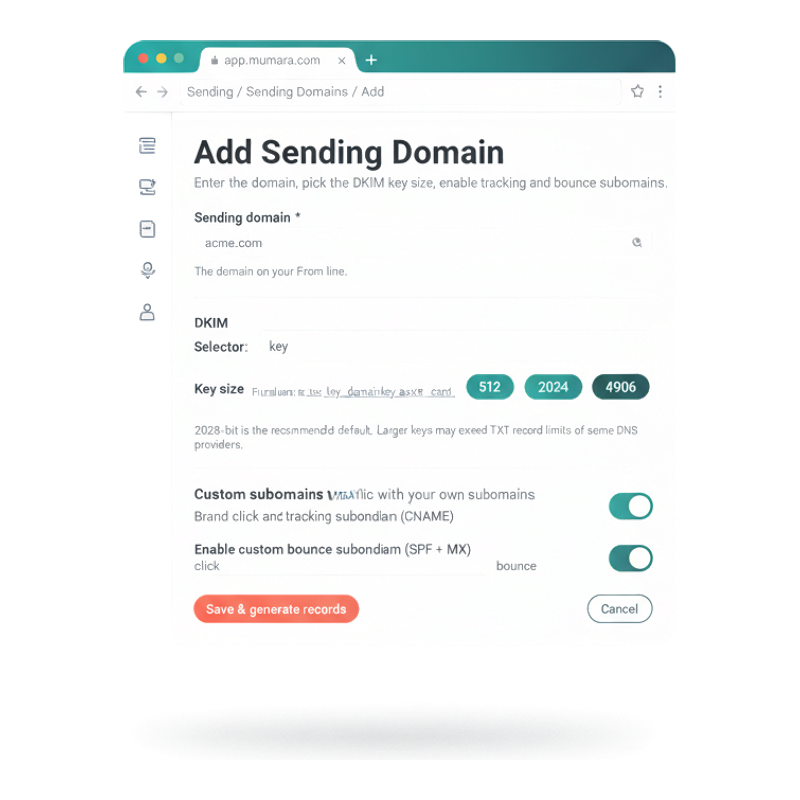
Adding a sending domain is a single form. Type the domain. Pick the DKIM key size (2048-bit is the recommended default). Choose the selector. Toggle on the tracking subdomain (CNAME) and the bounce subdomain (SPF + MX) if you want branded click and return-path traffic. Hit Save — Mumara generates the key pair, surfaces the records you publish, and waits for you to verify.
Pick from 512, 1024, 2048, or 4096-bit RSA keys. 2048-bit is recommended; larger keys may exceed some DNS providers' TXT record length limits — the picker warns you when relevant.
Default `key` works for most setups. Change the selector when you're rotating keys or running multiple selectors in parallel (typical during a key-rotation window).
Toggle each ON to brand click-tracking and bounce return-path traffic with your own subdomain. Leave OFF and Mumara's defaults handle it (still works, less branded).
Save triggers DKIM key generation and surfaces the exact DNS records you need to publish at your DNS provider. Auto DNS addon does the publishing for you across CloudFlare, Route 53, GoDaddy, and others.
Three subdomains, three roles
A complete sending identity needs each of them. Each maps to different DNS records, fixes a different problem, and stays separately verifiable.
The send identity
The domain on the From line. DKIM signs each message with a private key Mumara generates and stores; you publish the public key as a TXT record at key._domainkey.yourbrand.com. SPF tells receivers which servers can send from your domain — Mumara surfaces the include directive to paste into your existing SPF record. DMARC alignment depends on both being verified.
Branded click and open links
By default, click and open tracking flows through Mumara's tracker domain. With a custom tracking subdomain (click.yourbrand.com → CNAME → Mumara) every link in every email shows your brand instead. Configure multiple tracking subdomains and Mumara picks one at random per domain creation, which protects reputation across separate sending streams.
Return-path identity
Bounces and complaints need a return-path that aligns with your sending domain to keep DMARC happy. A bounce subdomain (bounce.yourbrand.com) with its own SPF include and an MX record pointing at Mumara's bounce handler keeps the return-path in your namespace — and lets Mumara classify and process every bounce per the rules you configure.
From added to sending
The default flow when you skip the Auto DNS addon. Most domains complete in under an hour — the wait is your DNS provider's propagation, not Mumara's processing.
Step 1
Sending Domains → + Add Domain. Type the domain. Pick which features to enable — DKIM, custom tracking subdomain, custom bounce subdomain — and the DKIM key size.
Step 2
The DKIM key pair (your chosen bit size, RSA), the tracking CNAME target, the bounce SPF + MX values. The private key stays in Mumara; the public values surface in the records view.
Step 3
Copy each record into your DNS provider — Cloudflare, Route 53, GoDaddy, Hetzner, whatever you use. Or skip this step entirely with the Auto DNS addon, which pushes records to your DNS provider directly.
Step 4
Click Verify in the UI — Mumara runs the DNS lookup live. Verified records turn green. A scheduled 24-hour re-verification catches record drift between manual checks.
Step 5
Once the relevant records are verified, the domain is eligible for use on broadcasts, drips, triggers, and the API. Force-DKIM-aware users have their sends gated until their domains pass verification.
What an unauthenticated domain costs
Most senders only think about DKIM, SPF, and DMARC once a deliverability incident has already happened. By then the damage is in the spam-folder rate, the complaint rate, and the bounce-back ratio.
Major mailbox providers (Google, Microsoft, Apple) increasingly require both DKIM and SPF alignment for inbox placement on bulk mail. An unsigned message, or one signed by a different domain than the From line, lands in spam — often without bouncing — so you don't even see the problem until engagement craters.
Without a custom bounce subdomain, the platform's default return-path handles your bounces. That return-path may not align with your DMARC policy, causing bounces to be rejected as misaligned — which means you don't process them, which means your hard-bouncing addresses keep getting tried, which means your bounce-back ratio climbs.
Gmail and Yahoo now require RFC 8058 one-click List-Unsubscribe on bulk mail. Without it, your unsubscribe rate gets quietly downgraded to spam complaints — because users hit "Report Spam" when they can't find the unsub link fast enough. Mumara ships the header automatically; senders without it are paying for the wrong metric.
Clicking a link in an unconfigured Mumara email reveals the Mumara tracker domain. For agencies and resellers, that's the brand leak that ends client confidence. Custom tracking subdomains (click.yourbrand.com) hide the implementation from recipients while keeping the data flowing.
Different shapes of sender
Common questions
Yes — when you enable DKIM on a sending domain, Mumara generates an RSA key pair at the bit size you choose (512, 1024, 2048, or 4096 bits). The private key stays in Mumara and signs every outgoing message; the public key surfaces in the DNS-records view as a TXT record value, ready to paste at key._domainkey.yourdomain.com. You also choose the selector — `key` is the default, but you can use `selector1`, `mumara2026`, or whatever fits your rotation policy.
SPF — Mumara surfaces the include directive you need (e.g. `include:bounces.mumara.com`) to add to your existing SPF record. It doesn't overwrite your SPF for you, because most domains already have other senders to allow. DMARC — Mumara doesn't generate the DMARC record (DMARC policy is your call, not the platform's), but the moment your DKIM and SPF verify, DMARC alignment becomes reachable. Most senders start at `p=none` to monitor, then move to `p=quarantine` and eventually `p=reject`.
By default, click-tracking and open-tracking pixels in your emails point at Mumara's tracker domain. That works, but recipients see the Mumara URL when they hover a link — and for agencies, resellers, and any brand-conscious sender, that's a leak. A custom tracking subdomain (e.g. click.yourbrand.com CNAME → track.mumara.com) routes every link and every pixel through your brand's namespace. Recipients see your domain everywhere; Mumara still does the actual tracking.
Yes — and when you do, Mumara picks one at random during domain creation. The selection is deterministic per domain but distributed across the pool, which spreads tracker traffic and protects you from any single tracker getting flagged or blocklisted. Most senders run two or three; resellers with many client domains often configure one per client.
Bounces have a return-path — the email address that gets the bounce back when a send fails. Without a custom bounce subdomain, your bounces flow back to Mumara's default bounce handler, which works fine for processing but may not align with your DMARC policy (because the return-path domain differs from your From-line domain). A custom bounce subdomain (bounce.yourbrand.com with SPF + MX records) keeps the return-path inside your namespace, so DMARC alignment stays clean — and Mumara still classifies and processes every bounce that arrives.
Yes — automatically, on every send. RFC 2369 (mailto + URL) and RFC 8058 one-click POST are both supported. This matters because Gmail and Yahoo's bulk-sender rules (effective February 2024) require RFC 8058 on any bulk sender exceeding 5,000 messages per day — without it, your unsubscribe friction climbs and your spam-complaint rate with it. Mumara handles the header construction; you handle the unsubscribe semantics (which list, which scope) in the campaign settings.
Two paths. On-demand: click Verify in the UI — Mumara runs DNS lookups against the records expected for that domain (DKIM TXT at the selector, tracking CNAME, bounce SPF + MX) and returns a per-record status in seconds. Scheduled: every 24 hours, Mumara re-verifies every domain in the background. The scheduled pass catches accidental record changes (a teammate edits the SPF record and breaks the include) before they become a silent failure.
Auto DNS — a paid addon — bypasses the publish-records-yourself step entirely. It connects to your DNS provider via API (CloudFlare, Route 53, GoDaddy, Hetzner, Google Cloud DNS, ClouDNS, Dynu, DNS Made Easy supported today) and pushes the SPF / DKIM / tracking / bounce records directly. You add the domain in Mumara, click authorise, send. See the [Auto DNS addon page](/campaigns/addons/auto-dns/) for the full provider list.
Yes — Team & Users exposes three per-user toggles: Force DKIM Authentication, Force Custom Tracking Domain, Force Custom Bounce Domain. When ON, that user cannot send broadcasts via an unauthenticated sending domain, an uncustomised tracker, or the default bounce return-path. Critical for agencies and resellers who don't want client traffic going out unauthenticated and leaking the platform brand. See [Team & Users](/campaigns/features/user-management/) for the full hierarchy.
Two scopes. Global custom headers apply to every send across the installation (e.g. X-Campaign-Source for downstream analytics). Per-sending-node headers attach to a specific SMTP / API gateway (e.g. X-Mailer-Variant for gateway-specific debugging). Both are validated for RFC compliance before saving. Headers are merged in the Mailer before delivery.
Related
Skip the manual publish step — Auto DNS pushes records to Cloudflare, Route 53, GoDaddy, and more in one click. Addon.
Read moreSending Domains feed every send. Throughput layer pairs with authentication to keep volume + reputation high.
Read moreCustom bounce subdomains route returns into the bounce-processing layer with classification rules and FBL ingestion.
Read moreDomain-level suppression complements sending-domain authentication — both block bad traffic, at different layers.
Read moreForce DKIM / Force tracking / Force bounce toggles enforce authentication per user.
Read moreCustom tracking subdomain + White Labeling together = recipients never see Mumara in any URL or any page. Addon.
Read moreMumara Campaigns · Sending Domains
Sending Domains ship with every Mumara Campaigns plan — Self-Hosted and Mumara Machine. DKIM key generation, SPF guidance, custom tracking + bounce subdomains, automatic List-Unsubscribe, scheduled re-verification — all included. Auto DNS removes the manual publish step entirely.