Skip to content
Mumara

Support · documentation · lifetime updates

Lifetime updates. Real humans on support. Docs that're actually written.

Self-Hosted Mumara Campaigns is a one-time purchase. Every future major version is included — free, forever. Mumara Machine adds managed updates so the work happens without you applying anything. On top of updates: premium support tiers for installations that need named contacts, a knowledge base that's kept current with every release, an in-app tooltip on every form field, and a community forum where senders trade deliverability war stories.

  • Lifetime updates

    Every future version included

    One-time Self-Hosted purchase. Every major-version upgrade ever — free.

  • Premium support

    Tiered response times

    Named contacts, prioritised queue, faster SLAs on Commercial + tiers.

  • Knowledge base

    Complete platform docs

    Searchable, illustrated, kept current with every release. The first place to look.

  • Community

    Forum + peer help

    Other senders solving similar problems. Tips, integrations, deliverability war stories.

Built around your investment

Buy once. Keep forever. Get help when you need it.

Mumara's support story is built around the customer keeping their software, not renting it. Lifetime updates is the headline; everything else is the floor under it.

updates on Self-Hosted
Lifetime
updates on Self-Hosted
One-time purchase. Every major version after, free, with no upgrade fee. Pay once, sender forever.
support across plans
Tiered
support across plans
Community help (free for everyone), standard email support, premium support on Commercial + tiers. Match support depth to your install size.
form field has a tooltip
Every
form field has a tooltip
In-app help baked into the UI. Hover any "?" icon to read the docs without leaving the page.
docs that stay current
Live
docs that stay current
Knowledge base updated with every release. Examples from the actual UI. Searchable and indexed.

The knowledge base

Documentation that's actually written. Searchable. Indexed. Current.

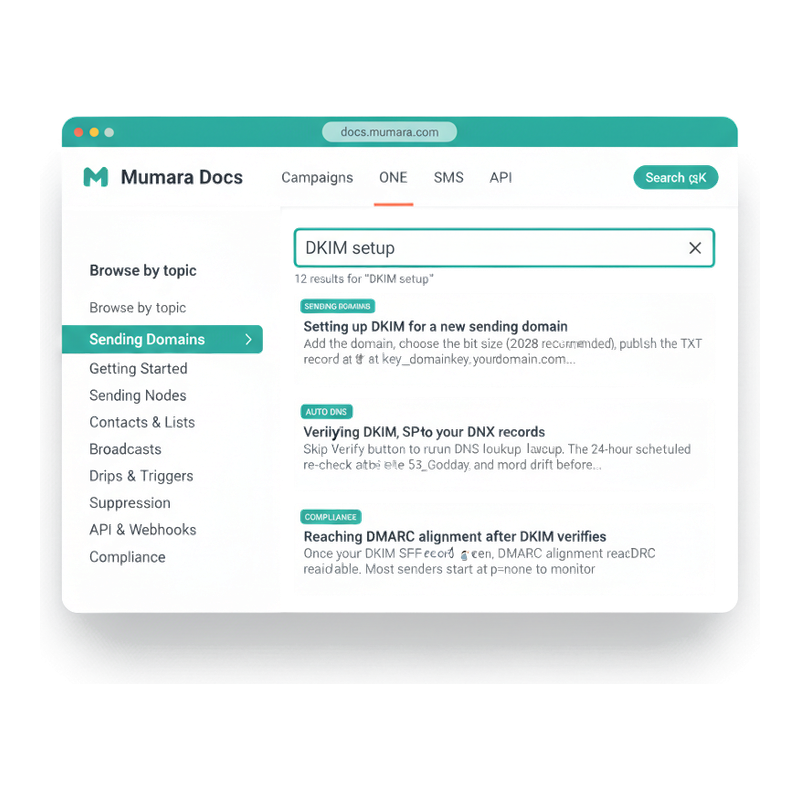
docs.mumara.com is the searchable knowledge base — every feature documented, every form field explained, every workflow walked through with the actual UI you're looking at in-app. Search by keyword (the search bar suggests results live), or browse by topic in the sidebar. New features ship with new doc pages; changed features get updated copy and screenshots in the same release. The first place to look — most questions have been answered already.

  • Search everything from one bar

    Cmd-K (or click the search pill) opens the full KB search. Results rank by relevance and include category tags so you can tell at a glance which corner of the platform an answer covers.

  • Browse by topic when you're exploring

    Left sidebar lists every major topic — Sending Domains, Sending Nodes, Contacts & Lists, Broadcasts, API & Webhooks, Compliance. Useful when you don't yet know what to search for.

  • Result snippets show the answer inline

    Each result card surfaces a snippet that includes the actual answer — often you don't need to click through. When you do, the doc page is concise and illustrated.

  • Updated with every release

    Docs ship in lockstep with the product. When a feature changes, the docs change. When a new addon ships, its docs ship with it. No stale 2019-vintage screenshots showing UI that no longer exists.

Mumara Docs knowledge base search page — top nav with logo and section links (Campaigns, ONE, API), left sidebar with topic categories (Getting Started, Sending Domains highlighted, Sending Nodes, etc.), main column with search input containing 'DKIM setup' and four result cards with category pills and snippets

Tiered support

Pick the help level that matches your install.

Support scales with the plan tier. Community help is always free; premium support is bundled into Commercial-tier and above. No support paywalls on the platform itself — every customer gets the docs, the tooltips, the forum, and the lifetime updates.

Always free

Community support

Forum, knowledge base, in-app tooltips, and the public GitHub-style issue tracker for the platform. Other Mumara users solving similar problems, plus Mumara staff who participate publicly. The right tier for most installations once you're past the first month of setup — most questions have already been answered.

  • Free forever
  • Public forum
  • Complete KB
  • Issue tracker

Personal + Professional

Standard support

Direct email support with a typical-48-hour response for Personal-plan customers and faster for Professional. For setup, configuration, deliverability questions, and integration help. Mumara staff respond — no chatbots, no AI deflection, no "we'll get back to you in 5 business days". The right tier for individual customers and small teams.

  • Email support
  • Typical 48h response
  • Setup + config help
  • Real human replies

Commercial +

Premium support

Prioritised queue, faster SLAs, named contacts for ongoing customers. The right tier for installations operating in production at scale — agencies, resellers, enterprise customers with compliance obligations. Includes onboarding-call options and named escalation paths for deliverability incidents.

  • Priority queue
  • Faster SLAs
  • Named contacts
  • Onboarding calls

What "lifetime updates" actually means

One purchase. Every future version. Forever.

Lifetime updates is the line that catches every prospective Self-Hosted buyer's eye. Here's exactly what it covers — and what it doesn't.

Covered: every major-version upgrade ever shipped, every minor and patch release, every bug fix, every security patch. You buy version 4.x today; when version 5 ships, you get it free. When version 6 ships, you get it free. There is no 'maintenance fee', no 'upgrade pack', no 'extended support' SKU. The one-time purchase price you paid is the only money Mumara gets from you on the licensing side.

Covered separately by addons: paid addons (Drag & Drop Builder, RSS Feed, Webhooks, Auto DNS, and so on) are sold on a monthly or annual subscription. The addon subscriptions are independent of the core platform license — you keep your platform license forever, you keep paying for the addons only as long as you want their functionality. Stop paying for an addon and the rest of the platform keeps working.

Not covered: the underlying hosting (you provide your own server for Self-Hosted, or Mumara provides the VPS for Mumara Machine). External services your account uses (your DNS provider, your ESP credentials, your SSL certificate provider). Custom development if you've forked the codebase. None of this is unusual — it's the same model every responsible self-hosted platform follows. Lifetime updates is the platform license, not the hosting bill.

Mumara Machine slightly differs: the managed VPS is a monthly subscription that includes the platform license, the hosting, the managed updates, and the priority support. You don't apply updates yourself; we apply them for you on a maintenance window of your choosing. Stop paying and the VPS deprovisions — but you keep your database (downloadable as a SQL dump from the Backups feature) so the data is always yours.

From purchase to fluent

The path every new customer follows — with the support surface helping at each step.

Most installations get from signup to first send in under a day. The support and documentation surface compresses that further.

  1. Step 1

    Sign up + provision

    Pick Self-Hosted or Mumara Machine. Self-Hosted: download, install (one-line setup script available). Machine: VPS provisioned in minutes, credentials emailed. Either way, you're looking at the admin dashboard within an hour.

  2. Step 2

    Skim the docs

    Knowledge base walks through the first-day flow: connect a sending node, add a sending domain, import contacts, send a test. Every step illustrated with the actual UI you're looking at. Start at docs.mumara.com.

  3. Step 3

    Use the in-app tooltips

    Every form field with a "?" icon has a tooltip explaining what it's for, what the valid values are, and what happens if you leave it blank. Hover instead of context-switching to the docs.

  4. Step 4

    Email support when stuck

    Questions the docs don't answer — deliverability advice, custom integration help, configuration choices specific to your environment — email support. Real humans, typically within 48 hours on standard support, prioritised on premium.

  5. Step 5

    Updates land — keep going

    New versions ship periodically. Self-Hosted: download and apply when you're ready (with a backup point first). Mumara Machine: scheduled in your maintenance window. Lifetime updates means this step keeps happening for as long as you keep using the platform.

Different shapes of support need

One support surface. Many use shapes. Same answer: real humans, real docs.

  • Solo founder / small team

    Customer
    You're running marketing for a single business. Standard tier purchase. You're technical enough to set up the platform but you want help when something deep breaks.
    What support delivers
    Community + standard support is the right level. Most setup questions have been asked already on the forum; the docs cover the rest. Email support handles edge cases. Lifetime updates means you'll never face a forced re-purchase.
  • Growing team, new platform

    Customer
    Five marketers, all new to Mumara, migrating from another ESP. You need to come up to speed fast without burning time on shallow questions.
    What support delivers
    Onboarding calls available on premium support — pair your team with a Mumara staff member for the first week. The knowledge base + in-app tooltips train everyone afterwards. Forum participation accelerates institutional learning.
  • Enterprise with SLA needs

    Customer
    Production deployment serving millions of recipients. Compliance team needs documented response times. A deliverability incident at 2am can't wait until business hours.
    What support delivers
    Premium support tier — prioritised queue, faster SLAs, named contacts who know your installation. Mumara Machine adds managed maintenance to take the on-call load off your team.
  • Agency running clients

    Customer
    40+ client accounts on one Mumara installation. Each client has different questions. You're the support layer for them; you need a support layer behind you.
    What support delivers
    Premium support gives you the escalation path. The agency uses the docs and forum to deflect routine client questions; the Mumara queue covers the deep stuff. Lifetime updates protects the agency's margin — no surprise re-licensing costs that compress profitability.

Common questions

What buyers usually ask.

What does 'lifetime updates' actually cover?

Every major-version upgrade, every minor release, every patch release, every security patch — for the lifetime of the platform. One-time Self-Hosted purchase price covers all future versions; there's no annual maintenance fee, no upgrade pack, no 'extended support' SKU. What it doesn't cover: paid addons (which run on monthly / annual subscriptions independent of the core license), the underlying hosting (you provide your own server for Self-Hosted), or external services like DNS or SSL certificates. The platform license is yours forever; everything around it follows normal commercial logic.

Is community support actually useful or just marketing?

Useful. The Mumara forum has years of accumulated knowledge — setup configurations, deliverability case studies, integration walk-throughs, edge-case debugging. Mumara staff participate publicly, so questions that get a community answer are often supplemented by staff clarification. For the typical 'how do I do X' question, a forum search beats an email ticket by hours. For 'X is broken in my specific environment', email support is the better path.

How fast does standard support respond?

Typically within 48 hours on standard support, faster on premium. The response is from a real Mumara staff member — no chatbot deflection, no AI-generated summaries, no "a senior engineer will get back to you in 5-7 business days". Mumara has been doing customer support for the same product since 2012; the team that built the platform also reads the tickets.

Does Mumara offer onboarding calls?

On premium support tiers, yes. A scheduled video call with a Mumara staff member to walk through your installation, discuss deliverability strategy, review your sending domain authentication, and answer questions specific to your setup. Useful for teams onboarding multiple users at once or for installations under tight compliance / migration deadlines.

What if my question is about a paid addon?

Addon questions go to the same support queue. Mumara's support team supports the core platform AND the addons — you don't have a separate support channel for each addon. If the question is about an addon's specific functionality and you don't have the addon installed, support will tell you what the addon does and whether it solves your problem; no upsell pressure.

How is documentation kept current?

Docs are updated with every release. New features ship with new doc pages; changed features get updated screenshots and copy. The docs.mumara.com knowledge base is searchable and indexed by Google. Every form field in the platform also has an in-app tooltip — the "?" icon next to the field opens a tooltip with the same content the docs cover, so you don't have to context-switch to find what a setting does.

Can I file feature requests?

Yes — through the forum, through email support, or through the in-app Bug Report / Feature Request form (Tools → Issues). Requests are reviewed by the product team; popular requests with clear use cases tend to land in upcoming releases. There's no formal voting / public roadmap today, but recurring requests trend in the right direction.

What about Mumara Machine — is support the same?

Mumara Machine includes managed support by default — the platform runs on a VPS we provision and maintain, so the support surface covers both the application and the infrastructure layer. Updates are applied on your scheduled maintenance window without you doing the work. Email support, knowledge base, forum, and in-app tooltips are identical to Self-Hosted. The premium support tier adds prioritised response on top.

What happens if I cancel?

Self-Hosted: nothing — you bought the license outright, you keep using the platform forever. Mumara Machine: the VPS deprovisions at end of the billing cycle. Either way, your data is yours — download a backup as a SQL dump before you stop using the platform; the dump is importable into any future Mumara installation. Your contact list, your campaigns, your sending configuration — all portable, none locked in.

Mumara Campaigns · Support & Updates

One purchase. Forever updated. Always supported.

Lifetime updates ship with every Self-Hosted Mumara Campaigns purchase. Premium support tiers available on Commercial and above. Knowledge base, forum, and in-app help available to every customer regardless of tier. The support surface that makes Self-Hosted feel like SaaS — without the lock-in.