Skip to content
Mumara

Reliability · point-in-time restore

Restoration points before every upgrade. Rollback one click away.

Self-hosted Mumara Campaigns includes first-class backup and restore — a SaaS-grade reliability surface that SaaS competitors keep hidden behind support tickets. Create a restoration point before a risky operation, let the scheduler take nightly snapshots in the background, roll back to any saved point in one click. Download backups locally for off-platform retention.

Restoration Points

4 saved · 380 MB / 5 GB

  • Before v4.2 upgrade

    ON-DEMAND

    May 22 · 09:41 · 94 MB

  • Pre-DKIM-rotation snapshot

    ON-DEMAND

    May 21 · 14:08 · 92 MB

  • Nightly · 2026-05-21

    NIGHTLY

    May 21 · 02:00 · 91 MB

  • Nightly · 2026-05-20

    NIGHTLY

    May 20 · 02:00 · 89 MB

Reliability surface, not a hidden ops tool

A real safety net. Owned by you, not the platform vendor.

The backup feature isn't buried in an admin panel three layers deep. It's a first-class UI surface — visible to the customer, controllable by the customer, exportable from the customer's account. The way reliability should work.

restoration
One-click
restoration
Pick a saved point, click Restore — Mumara rolls back the database to that snapshot. No SSH, no SQL, no support ticket.
scheduled snapshots
Nightly
scheduled snapshots
Background scheduler takes a snapshot every day at the time you configure. Auto-rotation deletes old snapshots per your retention policy.
restoration points
On-demand
restoration points
Hit + Create Point before a risky operation — version upgrade, DKIM rotation, bulk delete, suppression import. Named, dated, queryable.
download for off-platform retention
Local
download for off-platform retention
Every backup can be downloaded as a SQL dump. Pair with your existing offsite-backup strategy for belt-and-braces durability.

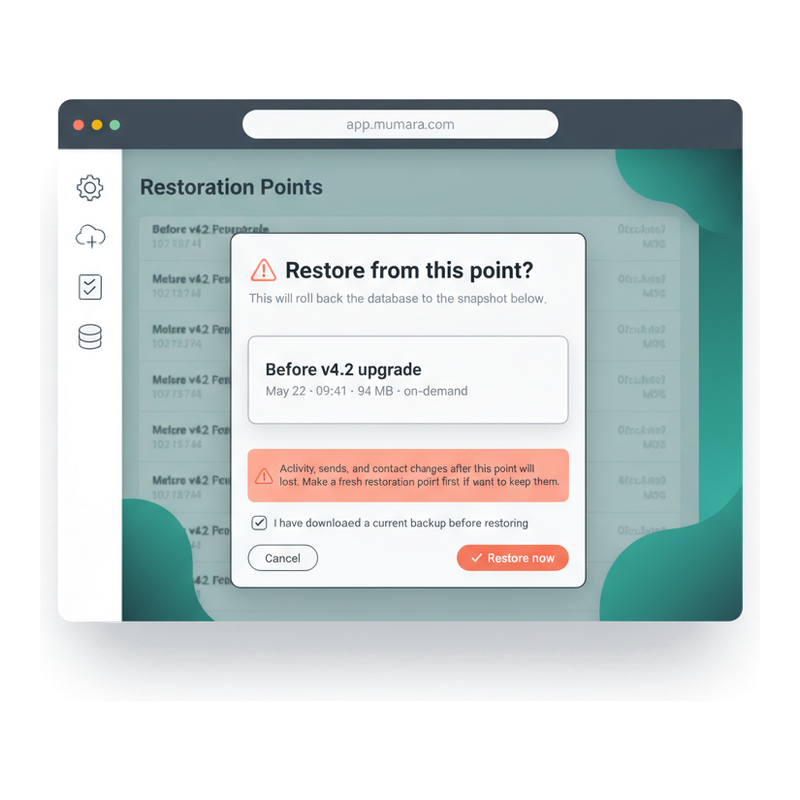
The rollback confirmation

Restore is a single dialog. With the warnings you'd expect.

Click Restore on a snapshot and the platform asks you to confirm. The dialog spells out exactly what's about to happen — which point you're rolling back to, when it was taken, how big the backup is, and what gets lost (any activity, sends, or contact changes after the snapshot). A confirmation checkbox forces you to acknowledge you have a current backup before destructive rollback. No accidental one-click data loss.

  • Snapshot details shown up front

    The dialog displays the snapshot name, exact timestamp, size, and whether it was an on-demand or scheduled snapshot. Verify you've picked the right point before you commit.

  • Plain-English warning about what gets lost

    A coral-tinted warning panel explains that activity, sends, and contact changes after the snapshot will be reverted. No technical jargon, no fine-print misunderstandings.

  • Confirmation checkbox before destructive action

    You can't proceed without ticking the 'I have downloaded a current backup before restoring' box. The platform protects you from the muscle-memory mistake.

  • Restoration audited in Activity Logs

    Every restore creates an Activity Log entry — actor, target snapshot, timestamp, IP. Compliance audit trail intact even after a rollback.

Mumara Backups restore confirmation modal — snapshot details (Before v4.2 upgrade, May 22 09:41, 94 MB, on-demand), warning about post-snapshot data loss, confirmation checkbox, Cancel and Restore now buttons

Three deployment shapes, three backup surfaces

Self-hosted, Mumara Machine, or generic SaaS — the backup story differs.

Where Mumara differs from typical SaaS ESPs is the customer's relationship with their own data. Both Self-Hosted and Mumara Machine expose the same first-class backup surface; SaaS competitors hide it.

Full control

Self-Hosted Mumara Campaigns

You run the platform on your own server. Backups are a customer feature — visible in the UI, downloadable as SQL dumps, restorable in one click. You also own the OS-level filesystem, so you can layer your own backup strategy (filesystem snapshots, S3 sync, off-site replication) on top of the platform-level restoration points. Belt, braces, and a third belt if you want.

  • Restoration points in the UI
  • SQL dump download
  • OS-level backups your call
  • Full filesystem access

Managed reliability

Mumara Machine (managed VPS)

We run the platform on a VPS provisioned for your account. The restoration-points surface in the UI is the same as Self-Hosted — visible, customer-controllable, downloadable. Mumara Machine adds VPS-level snapshots on top, taken by the underlying infrastructure provider, which can recover the entire VM if something happens below the application layer.

  • Same UI restoration points
  • Plus VPS-level snapshots
  • Managed restore on request
  • Off-platform download still yours

The contrast

Typical SaaS competitor

Backups exist — every responsible SaaS runs them — but they're hidden from the customer. The customer can't see the snapshots, can't pick a restoration point, can't download a backup. A "restore" is a support ticket that takes hours or days, and what gets restored is the platform vendor's choice, not yours. The customer's data lives in the vendor's reliability budget, not their own.

  • No restoration UI
  • No download
  • Support-ticket restores
  • Vendor-dictated recovery

What gets backed up

The database. The configuration. The story of every contact.

A Mumara backup captures the database — everything the platform stores about your sending operation. Restore that backup and the platform is functionally where it was at the snapshot's timestamp.

Inside the backup: every contact, every list, every custom field. Every broadcast, every drip, every trigger definition. Every sending node configuration (encrypted credentials preserved). Every sending domain with its DKIM keys. Every suppression entry, every bounce rule, every web form. Every admin account, every role, every API token. Activity Logs and Authentication Logs up to the snapshot timestamp. In short — everything that defines what your installation does.

Not inside the backup: in-flight emails (active queue), real-time send statistics that arrived after the snapshot, OS-level configuration (PHP version, web server settings, scheduler crontab). For a complete disaster-recovery posture, pair platform backups with OS-level filesystem snapshots — the platform backup restores the application's state of mind; OS backups restore the environment.

The download format is a standard SQL dump — readable, restorable from the command line, importable into any Mumara installation of the same major version. You're not locked into the platform's backup format; the data is yours in a format that survives the platform.

From 'I'm about to do something risky' to 'I did, and rolled back when it broke'

The path through a real recovery.

The fastest path to a working install after an oops. Restoration is one click; the surrounding hygiene is the rest of the flow.

  1. Step 1

    Risky operation looms

    You're about to upgrade Mumara to a new major version. Or rotate DKIM keys across 20 sending domains. Or bulk-delete a contact list that "looks wrong". Or import a 2M-row CSV against an unfamiliar list. All are reversible — easier when you have the point to reverse to.

  2. Step 2

    Create the point

    Tools → Restoration Points → + Create Point. Name it descriptively ("Before v4.2 upgrade", "Pre-DKIM-rotation"). Mumara dumps the database, names the file, lists it in the restoration table. Takes seconds for small installs; minutes for installs with millions of contacts.

  3. Step 3

    Proceed with confidence

    Do the risky thing. Upgrade. Rotate. Delete. Import. Knowing the rollback exists changes the risk calculus — you can move faster and more confidently because the worst case is "click Restore".

  4. Step 4

    Rollback if needed

    Something went wrong. The upgrade broke a custom plugin. The DKIM rotation hit a DNS issue. The import populated the wrong list. Open Restoration Points, pick the snapshot, click Restore. Mumara restores the database to that point. Activity Logs after the snapshot don't survive — but everything from before does.

  5. Step 5

    Download for off-platform retention

    For installations under compliance regimes that require off-site backups (financial services, healthcare, federal contracting), download the SQL dump and store it in your offsite vault — S3 cross-region, immutable bucket, whatever your policy demands.

Four oh-no moments

Four scenarios where the restoration point earns its keep.

  • Version upgrade gone sideways

    Scenario
    Mumara ships a new major version. You apply the upgrade. A custom modification you'd forgotten about breaks. The platform won't start. You're in pre-production rollback mode at 11pm.
    What restoration enables
    Click Restore on the "Before v4.2 upgrade" point. The database rolls back. The custom modification can be reapplied to the prior version while you debug the upgrade. Downtime measured in minutes instead of hours.
  • Mass-delete misfire

    Scenario
    An admin runs a bulk delete on what they thought was a test list. It wasn't. 80,000 production contacts are gone. The contacts table is now wrong. Support tickets start arriving.
    What restoration enables
    Restore the most recent nightly. The contacts come back; engagement events after the snapshot don't, but the contact records are intact and re-engagement can begin. Pair with Activity Logs to identify the actor and update role permissions so the same mistake can't repeat.
  • ESP migration cleanup

    Scenario
    You're migrating from a previous platform. You imported the wrong CSV format. Half your contacts have mangled custom fields. You need to start over.
    What restoration enables
    Restore to the pre-migration point. The CSV import vanishes. Reformat the CSV, retry. Repeat as needed — restoration points make import iteration cheap.
  • Disaster recovery rehearsal

    Scenario
    Your business-continuity policy requires quarterly DR drills. You need to prove the platform can be restored from a backup within a defined RTO (recovery time objective).
    What restoration enables
    Download the latest backup, restore it onto a separate Mumara installation, time the restoration, document the result. Repeat quarterly. The audit team sees real evidence, not theoretical capability.

Common questions

What buyers usually ask.

How often are backups taken automatically?

Configurable per installation, with a sensible nightly default. Tools → Settings → Backup Schedule lets you pick the cadence (nightly, every 6 hours, weekly) and the retention window (how many auto-snapshots to keep before rotating the oldest). On top of the schedule, you can hit + Create Point any time for an on-demand restoration point — useful before any operation you'd describe as risky.

How long does a restore actually take?

Depends on installation size, not platform speed. For a typical mid-volume installation (~1M contacts, ~10k campaigns) the restore takes a few minutes — the database dump is read and applied. Large installations (10M+ contacts) take longer; tens of minutes is typical. The platform is unavailable during the restore so plan for the maintenance window, but the operation itself is straightforward and predictable.

What's in a backup, exactly?

The full database state — contacts, lists, custom fields, broadcasts, drips, triggers, segments, sending nodes (with credentials encrypted), sending domains (with DKIM keys), suppression entries, bounce rules, web forms, admin accounts, roles, API tokens, activity logs, authentication logs. The format is a standard SQL dump, readable on the command line and importable into any Mumara installation of the same major version. OS-level configuration (PHP version, web server settings, cron jobs) is NOT included — pair platform backups with OS-level snapshots for a complete DR posture.

Can I download backups to my own storage?

Yes — every backup has a download button. The format is SQL, so you can store it in S3 (with versioning + Object Lock for immutability), in a corporate file share, in a tape archive, wherever your compliance regime dictates. The platform also keeps recent backups locally, but downloading is the recommended path for installations under data-retention compliance — your offsite copy is yours regardless of what happens to the platform.

Does restoring lose any data after the snapshot?

Yes — restoring is a point-in-time rollback. Anything that happened after the snapshot (sends, opens, clicks, new contacts, configuration changes) is reverted. This is the trade-off of a database-level snapshot vs an incremental backup. For most use cases (recovering from a broken upgrade, undoing a bulk-delete, reverting a misconfigured trigger) this is exactly the behaviour you want. For partial recoveries (restore only one list while keeping recent activity), the typical pattern is to restore the backup to a separate install, copy the specific data, and import it back.

What about Mumara Machine — do I still have this surface?

Yes. Mumara Machine exposes the same restoration-points UI as Self-Hosted, plus VPS-level snapshots taken by the underlying infrastructure provider. So you have application-level restoration (the UI you see in your account) plus infrastructure-level recovery (which our team can perform on request if something below the application layer fails). Same data ownership — every backup is downloadable as a SQL dump, so you can always take it off-platform.

Can the API trigger backups?

Yes — the REST API exposes endpoints for creating restoration points programmatically. Useful for integrating backups into your deploy pipeline (e.g. create a point before a scheduled bulk import, fetch the latest backup ID for audit logging). See [REST API](/campaigns/features/rest-api/) for the full surface.

Are backups encrypted?

The SQL dump itself isn't encrypted at rest by default — it's a standard SQL file, sized for portability and human-readability. For installations under encryption-at-rest requirements, the standard pattern is to layer encryption on the storage side: encrypt the backup before uploading to your offsite archive (gpg, age, openssl), use an S3 bucket with server-side encryption, or run Mumara on an encrypted filesystem. Sensitive fields inside the database (sending-node passwords, OAuth tokens) are encrypted in-place using the application's encryption key, so even the SQL dump doesn't expose plaintext credentials.

Does this replace my OS-level backups?

No — they're complementary layers. Mumara's restoration points cover the application's state (the database). OS-level backups cover everything else (filesystem, configuration, installed packages, custom modifications). A robust DR posture uses both. The platform-level surface is the fast path for everyday recovery; OS-level is the deeper safety net for catastrophic failures or full host rebuilds.

Mumara Campaigns · Backups & Restoration

The reliability surface SaaS competitors keep hidden.

Backups and restoration points ship with every Mumara Campaigns plan — Self-Hosted and Mumara Machine. Customer-controllable, downloadable, one-click restorable. The data ownership story that comes built-in when you don't rent your platform.