Skip to content
Mumara

Throughput · gateways · rotation

Many gateways. One rotation. Every send authenticated.

Mumara ONE is the recommended ESP — Bridges, dedicated IPs, and Pools, end-to-end inside one vendor. Plus a growing roster of SMTP and API gateways for customers who prefer their existing provider. Rotate, cap, test, auto-recover — no emails wasted when a node fails.

  • Multi-MTA rotation — random or round-robin
  • Per-node limits — hourly + daily caps
  • Test Connection before you save
  • Auto-deactivate on connection failure

Sending Nodes

Active rotation

Rotating randomly
  • Mumara ONE

    RECOMMENDED

    Bridge · dedicated pool · API

    100k / hr Active
  • Amazon SES

    us-east-1 · API · IAM

    50k / hr Active
  • SendGrid

    production · API · v3

    30k / hr Active
  • Mailgun

    EU · API · region

    25k / hr Active
  • SMTP — primary

    mail.acme.com:587 · TLS

    10k / hr Active
  • SMTP — backup

    mail2.acme.com:587 · TLS

    5k / hr Idle
Combined ceiling 220,000 / hr
Recommended ESP

Mumara ONE is Mumara's own cloud ESP — Bridges (SMTP and API endpoints), dedicated IPs you buy directly from Mumara, Pools that group them, and managed sending infrastructure underneath. Connect a Mumara ONE Bridge as a Sending Node in Mumara Campaigns and the whole pipeline — from the queue in Campaigns to the MTA on the other side — is operated by one team. No third-party gateway in between, no reseller layer, no surprise rate limits from a vendor you don't control.

  • Dedicated IPs

    Buy from Mumara directly

    Your own IPs, not a shared pool. Reputation is yours to build and yours to keep.

  • Pools

    Group IPs your way

    Separate marketing IPs from transactional, warm-up from production. Pool-level visibility.

  • Bridges

    SMTP + API endpoints

    Route specific Campaigns traffic through specific Pools. The Sending Node integration uses Bridges.

  • Managed infrastructure

    PMTA underneath, run by Mumara

    You don't manage the MTA, the warm-up, the blocklist monitoring — Mumara does. You stay in Campaigns.

Honest framing: every other sending node Mumara Campaigns supports — SES, SendGrid, Mailgun, the SMTP family, the rest of the API drivers — still works first-class. Pick whichever provider fits your budget and existing infrastructure. Mumara ONE is the recommended option when you want infrastructure ownership without the operational burden — and when you want every layer of your sending stack to come from the same vendor.

Add a node

One form. Type picker, credentials, test connection.

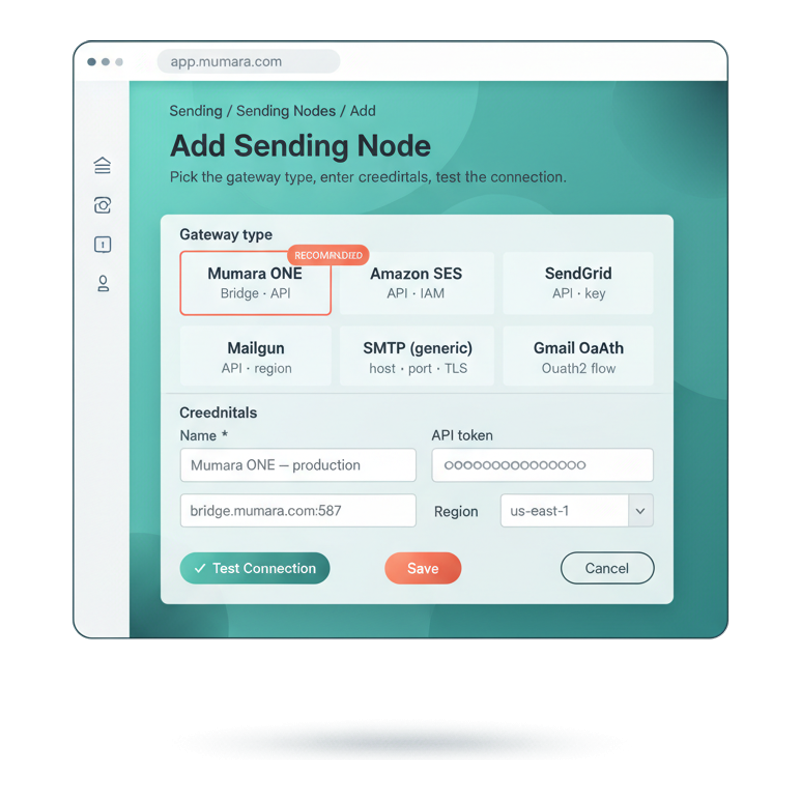
Adding a sending node is a single form. Pick the gateway type from the picker — Mumara ONE is the highlighted recommendation; the rest of the roster sits one click away. Enter the credentials specific to that type. Hit Test Connection — Mumara probes the gateway with your credentials and surfaces the exact response before you save. No silent misconfigurations carried into a campaign.

  • Type picker leads with Mumara ONE

    Mumara ONE is pinned at the top with the Recommended badge. The growing roster of third-party drivers (Amazon SES, SendGrid, Mailgun, Sparkpost, more) sits alongside, plus generic SMTP for any provider Mumara doesn't have a native driver for.

  • Credentials match the gateway

    The form re-flows per gateway type — Bridge endpoint for Mumara ONE, IAM credentials for SES, API key for SendGrid, host + port + TLS for SMTP. No irrelevant fields, no fishing for what to fill.

  • Test before you save

    Click Test Connection. Mumara constructs the actual transport, calls a known-good endpoint, applies your SSL / TLS options, and surfaces a green check or the exact error. Catch misconfigurations before they hit a campaign.

  • Add headers + tracking + bounce per node

    After save, attach custom headers, a tracking domain, and a bounce return-path to the node. Reroute each node's behaviour without touching the campaign-level settings.

Mumara Add Sending Node form — gateway type picker with Mumara ONE highlighted as Recommended, Amazon SES, SendGrid, Mailgun, generic SMTP, Gmail OAuth tiles, plus credentials card with Bridge endpoint, API token, region dropdown, and Test Connection / Save buttons

Built for distribution

One queue. Many gateways. Predictable behaviour at every node.

The sending layer is where bulk-email projects break — not because a node failed, but because a node failed silently. Mumara catches the failure, pulls the node, alerts you, and keeps the rest of the rotation sending.

roster of gateway types
Growing
roster of gateway types
SMTP family + API drivers for the major ESPs. New drivers added regularly. Generic SMTP catches anything without a native driver.
rotation modes
Per-broadcast
rotation modes
Random for natural distribution across nodes; round-robin for predictable per-node load.
health-check + deactivation
Auto
health-check + deactivation
Connection exception during a send → node deactivated, error captured, ticket opened. Other nodes carry the campaign.
limits + headers + tracking
Per-node
limits + headers + tracking
Hourly cap, daily cap, custom headers, attached tracking domain, attached bounce return-path — each configurable per node.

Families of node. One management surface.

Native SMTP family or third-party API drivers — set up the same way.

Mumara speaks both protocols natively. SMTP nodes use the protocol directly; API drivers translate Mumara's send instructions into the ESP's REST format. Same node table, same rotation logic, same per-node limits — and the recommended path uses both shapes via Mumara ONE Bridges so you stay inside the Mumara stack end-to-end.

SMTP family

Direct SMTP connections

Generic SMTP to any provider on the planet — host, port, TLS / SSL, credentials. Plus first-class flows for Gmail (app password or OAuth2), Outlook, Yahoo, AOL — providers whose SMTP endpoints have idiosyncratic auth that Mumara has already done the work for.

  • Generic SMTP — works with any provider
  • TLS / SSL with custom peer-verification options
  • Gmail OAuth2 flow built in
  • Outlook / Yahoo / AOL app-password flows

API drivers

Native ESP integrations

First-class drivers for the major API-based ESPs — Amazon SES, SendGrid, Mailgun, Sparkpost, Elastic Email, Mailjet, SMTP2GO, Mandrill, SendinBlue, Zeptomail. Each driver maps Mumara's send instructions to that vendor's REST API; you provide the key, Mumara handles the protocol.

  • Amazon SES (IAM credentials)
  • SendGrid · Mailgun · Sparkpost
  • Elastic Email · Mailjet · SMTP2GO
  • Mandrill · SendinBlue · Zeptomail

Multi-MTA rotation

The same broadcast. Distributed across every node you've configured.

When you schedule a broadcast against multiple sending nodes, Mumara assigns each recipient batch to a node from the active pool. Failed nodes drop out of the rotation for the rest of that campaign; survivors absorb the load.

Broadcast

100,000

recipients in queue

Random rotation
across active pool

  • Amazon SES 42,310
  • SendGrid 25,108
  • Mailgun 20,944
  • SMTP — primary 11,638

Random

Each recipient batch picks a node uniformly at random from the active pool. Natural smoothing across nodes; no node dominates.

Round-robin

Batches cycle predictably through the pool — A, B, C, A, B, C — so per-node load is deterministic. Reset per campaign thread.

Failed nodes

A node that throws a connection exception is pulled from the rotation immediately. The background re-check brings it back into the pool when it recovers and resumes any paused broadcasts automatically.

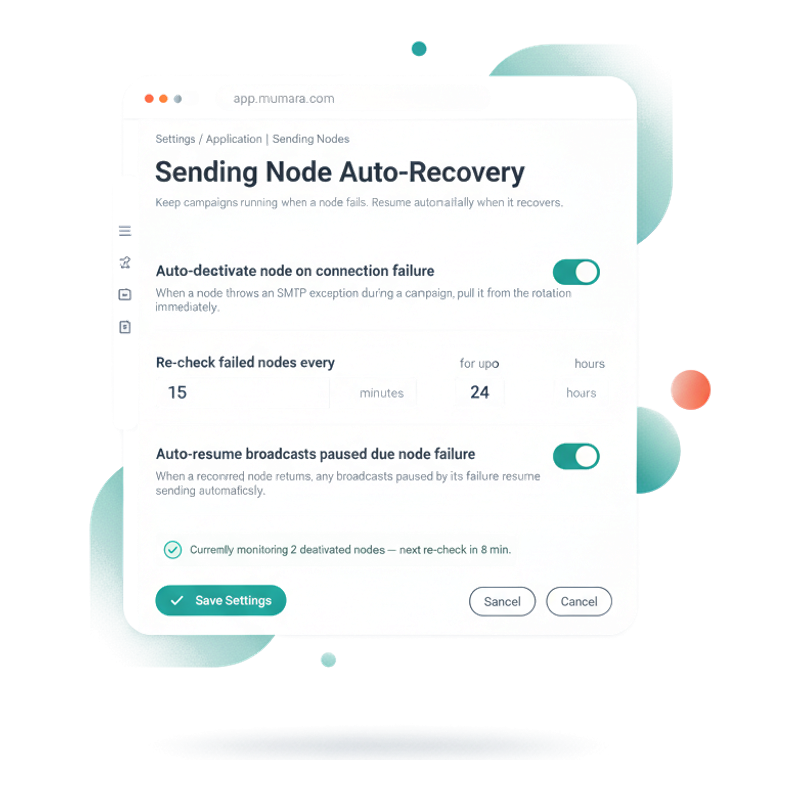
Auto-deactivate. Auto-recover.

Two layers of safety. No emails wasted.

When a sending node fails mid-campaign, Mumara catches the connection exception, pulls the node from the rotation, and routes the rest of the queue through the surviving nodes. Nothing retries onto a known-bad gateway; nothing waits for an operator to intervene. Then in the background, Application Settings re-checks deactivated nodes on the schedule you configure — when one recovers, the broadcasts that were paused because of its failure resume automatically.

  • Layer 1 — in-flight rotation

    Connection exception during a send → the node's status flips to inactive, the error is captured in test_status, the timestamp is recorded. The recipient batch that failed is re-routed; the rest of the campaign keeps flowing through the surviving nodes. No emails wasted; no manual recovery needed mid-campaign.

  • Layer 2 — background re-check + auto-resume

    Set the re-check interval (every X minutes) and the maximum window (for up to XX hours) in Application Settings. Mumara polls deactivated nodes on that cadence — when a node returns to healthy, any broadcasts that were auto-paused because of that node's failure resume sending from where they stopped.

  • Why both layers

    The in-flight rotation keeps a campaign flowing through transient failures (e.g. one gateway has a brief outage). The background re-check handles longer failures (e.g. an API key was rotated upstream and just needs the test to pass again) without you noticing the campaign was ever paused.

  • Per-node alerts + audit

    Every auto-deactivation creates an Issue with the exact error message — investigate from the same UI, fix the upstream problem, hit Test Connection. If the test passes within the re-check window, Mumara picks the node back up automatically. The audit trail captures every deactivation and recovery.

Mumara Application Settings — Sending Node Auto-Recovery section showing auto-deactivate toggle ON, re-check interval (15 minutes for up to 24 hours), auto-resume broadcasts toggle ON, and a status line showing 2 deactivated nodes being monitored

From signup to first authenticated send

From a new node to a campaign at full throttle.

No engineering tickets, no shell access. Add the credentials, test, set the limits, attach to a broadcast.

  1. Step 1

    Pick the type

    Sending Nodes → + Add Node. Pick from the SMTP family (generic SMTP, Gmail / OAuth, Outlook, Yahoo, AOL) or an API driver (Amazon SES, SendGrid, Mailgun, Sparkpost, Elastic Email, Mailjet, SMTP2GO, Mandrill, SendinBlue, Zeptomail).

  2. Step 2

    Enter credentials

    Host + port + TLS for SMTP. API key (and region / secret where applicable) for API drivers. IAM credentials for SES. Password fields encrypted at rest.

  3. Step 3

    Test connection

    Click Test Connection. Mumara probes the gateway with the credentials you entered, surfaces the exact error if it fails, and turns the test green if it succeeds — before you save.

  4. Step 4

    Set limits + headers

    Per-node hourly + daily caps so this node never sends more than its provider allows. Attach the tracking domain and the bounce return-path. Add custom headers (X-Mailer-Variant, X-Campaign-Source) for downstream debugging.

  5. Step 5

    Rotate

    Schedule a broadcast against multiple nodes. Pick random or round-robin. Mumara distributes the queue across active nodes; failed nodes drop out; the surviving nodes carry the rest.

Different shapes of sending fabric

One Sending Nodes surface. Many ways to deploy.

  • High-volume single gateway

    Setup
    Amazon SES (or any high-throughput provider) as the only node. Hourly + daily limits matched to your SES quota. Custom headers tagging campaigns for downstream attribution.
    Outcome
    Maximum throughput out of a single trusted gateway. Auto-deactivation catches AWS account-level issues before they cascade across a campaign.
  • Mixed-gateway rotation

    Setup
    Three or four API gateways from different vendors, each capped at a fraction of your total volume. Random rotation per broadcast spreads the load.
    Outcome
    Reputation distributed across providers — a complaint storm on one gateway doesn't poison the others. Survives a single-vendor outage with no campaign interruption.
  • Transactional + marketing split

    Setup
    One node tagged transactional (e.g. a high-deliverability gateway with low volume), another node for bulk marketing. Per-broadcast picker assigns the right node for each campaign type.
    Outcome
    Transactional sends always go through the reputation-protected gateway. Marketing campaigns can saturate the bulk node without affecting transactional deliverability.
  • Primary + backup with failover

    Setup
    Primary node (e.g. SES) configured at full capacity. Backup node (e.g. an SMTP-based provider) configured at lower priority, idle by default. Round-robin against both with the backup pulled in only when the primary fails.
    Outcome
    Auto-deactivation pulls the primary when it starts erroring; the backup absorbs the rest of the campaign. Manual reactivation after you've verified the primary is healthy.

Common questions

What buyers usually ask.

Which gateway should I pick?

If you want Mumara on both sides of the pipe — meaning the same vendor operates the queue in Campaigns AND the MTA on the other side — pick **Mumara ONE** as your Sending Node. ONE is Mumara's own cloud ESP with dedicated IPs, Pools, Bridges (SMTP + API endpoints), and managed sending infrastructure. Connect a Bridge as a Sending Node in Campaigns and the entire pipeline operates inside one stack. For customers who already have established relationships with Amazon SES, SendGrid, Mailgun, or another major ESP, those integrations are still first-class — keep your existing provider and Mumara routes through them transparently. See the [Mumara ONE page](/one/) for the ESP side of the story.

Which gateways does Mumara integrate with?

A growing roster. The API-driver side includes Mumara ONE (the recommended path — see above), Amazon SES, SendGrid, Mailgun, Sparkpost, Elastic Email, Mailjet, SMTP2GO, Mandrill, SendinBlue, and Zeptomail today, with more drivers added as customers ask for them. The SMTP-family side includes generic SMTP (which works with literally any provider), Gmail with app password or OAuth2, Outlook, Yahoo, and AOL. If your provider isn't in the API-driver list, the generic SMTP option will almost always work — the platform isn't locked to a curated set.

What's the difference between an SMTP node and an API node?

Protocol. SMTP nodes talk SMTP directly to the provider — host, port, TLS, credentials. API nodes talk the provider's REST API — keys, regions, sometimes IAM identities. From your side, both are just "a node" with the same per-node settings (limits, headers, tracking domain, bounce domain) and the same rotation behaviour. The choice is dictated by what the provider offers — Amazon SES via API is faster and more idiomatic than SES via SMTP, for instance.

How does multi-MTA rotation work?

Per-broadcast. When you schedule a broadcast against more than one sending node, Mumara picks a rotation mode (random or round-robin) and assigns recipient batches to nodes from the active pool. Random picks uniformly at random per batch for natural smoothing; round-robin cycles A → B → C → A → B → C for predictable per-node load. If a node throws a connection exception during the campaign, it's pulled from the rotation for the rest of that campaign; the remaining nodes absorb the load.

What happens when a node fails mid-campaign?

Two layers of recovery. First, mid-flight: Mumara catches the connection exception, sets the node's status to inactive, records the exact error message in test_status, and timestamps the auto-deactivation. The rest of the campaign continues on the remaining active nodes — no emails wasted, no retries onto a known-bad gateway. Second, in the background: Application Settings has a re-check setting (every X minutes for up to XX hours). When a deactivated node returns to healthy on the scheduled re-check, any broadcasts that were paused because of its failure resume sending automatically. No silent failures, no broken nodes blocking active campaigns, no manual reactivation required when the gateway recovers on its own.

How does the re-check / auto-resume work exactly?

Settings → Application → Sending Nodes lets you configure the polling cadence: re-check every X minutes for up to XX hours. Within that window, Mumara probes deactivated nodes on the schedule. If a node's test passes (e.g. the upstream API key was rotated and is now valid again, or the SMTP gateway has come back up), the node returns to the active pool and any broadcasts that were auto-paused because of its failure resume from where they stopped. Past the configured window, the node stays deactivated until an admin investigates and reactivates manually — preventing perpetual retries on a permanently-broken gateway.

What can I configure per-node?

Hourly sending limit, daily sending limit, from-name + from-email defaults, reply-to, bounce return-path, attached tracking domain, mail encoding, SMTP encryption (TLS / SSL) with custom peer-verification options for self-signed certs, custom headers (array of header_label + header_value pairs), and provider-specific settings like AWS region for SES or Mailgun region (US vs EU). The headers attached at the node level merge with the global custom-headers list before delivery.

Does the API allow me to manage sending nodes?

Yes — the REST API exposes full CRUD on sending nodes. POST /api/sending-node/add/{type} adds a node of the specified type. GET /api/sending-node/get-all lists every node. GET /api/sending-node/{id} fetches a single node. PUT /api/sending-node/update/{id} updates settings. DELETE /api/sending-node/delete/{ids} removes nodes by ID (batch-capable). Useful for fleet-managed installations where node configuration is treated as infrastructure-as-code.

How does Test Connection actually work?

Before saving, click Test Connection. For SMTP nodes, Mumara constructs the EsmtpTransport with your credentials, calls start() and stop() against the gateway, applies your SSL / TLS options exactly as a real send would, and reports back whether the handshake succeeded. For API nodes, Mumara calls a known-good endpoint on the provider's API (typically a credentials-validation endpoint) and checks the response. If the test passes, the node activates immediately; if it fails, the exact error message surfaces in the UI for you to fix before saving.

What about PowerMTA?

PowerMTA is a first-class addon. The base Sending Nodes feature treats PMTA as a separate concept that lives alongside the SMTP / API node list — same `smtps` table, but with a `pmta_id` foreign key into a parallel `pmtas` table that holds the PMTA-specific data (config-file generation, SSH deployment, accounting-file ingestion, advanced settings JSON). See the [PowerMTA addon page](/campaigns/addons/powermta-integration/) for the full surface — what it adds on top of base Sending Nodes.

Can I import / export node configs in bulk?

Not from the UI — the codebase doesn't ship CSV import / export for sending nodes today. The REST API is the bulk path: write a small script that POSTs your node definitions in sequence, or call the batch-delete endpoint to wipe a set of nodes. For self-hosted installations, the `smtps` table is yours to seed directly with a migration if you really need fleet provisioning at scale.

Does Mumara persist SMTP connections?

Connections are managed at the transport layer per send batch. Mumara doesn't run a global pool by default; each batch establishes its connection, runs the send, and tears down — which matches how most major ESPs prefer their inbound SMTP to behave. For very high-throughput single-gateway setups, the multi-threaded send architecture means many connections run in parallel rather than one connection running serially.

Mumara Campaigns · Sending Nodes

Connect your gateways. Rotate them ruthlessly.

Sending Nodes ship with every Mumara Campaigns plan. Mumara ONE as the recommended ESP. SMTP family + API drivers, multi-MTA rotation, per-node limits, Test Connection, two-layer auto-recovery (in-flight + background re-check) — all included. PowerMTA control via the dedicated addon.