Skip to content
Mumara

Content · per-recipient rotation

One broadcast. Every recipient reads a slightly different email.

Spintax rotates text variations per recipient. Define {{greeting}} once with a value list — Hello, Hi, Hey, Greetings — and Mumara picks one at random for each contact at send time. Two modes: saved tags managed at Campaigns → Spintax, and inline options written directly in the email body. Reduces content fingerprint repetition across large sends. Sits inside the broader personalization stack.

  • Saved tags{{tag_name}} reusable across campaigns
  • Inline syntax[a|b|c] straight in the body
  • Same tag = same value within a single recipient's email
  • Pre-defined templates clone curated tag libraries
spintax / greeting

Tag definition

{{greeting}}
Hello
Hi
Hey
Greetings
rendered per recipient
[email protected] Hello Alex,
[email protected] Hey Jordan,
[email protected] Greetings Priya,

Two syntaxes, plus a templates library

Saved tags. Inline options. Pre-defined libraries.

Two ways to write Spintax that suit different scales of variation. Saved tags are reusable across campaigns and edit-once-update-everywhere; inline options are throwaway one-line variations. Pre-defined templates seed both.

Saved tags · {{tag_name}}

Define once at Campaigns → Spintax → Add New. Pick a name (alphanumeric + underscores + hyphens), paste the value list one per line, optional description, save. Reference as {{tag_name}} anywhere in any future broadcast or drip. Update the value list and every campaign using the tag inherits the change. Tag name is locked post-save — same data-integrity contract as Custom Fields.

Inline · [option1|option2]

Write the variation right into the email body. Square brackets, options separated by a pipe. Useful for one-off rotations you don't need to reuse — a single subject-line alternative, a one-off CTA wording variant, a quick A/B-style test inside a single send.

Pre-defined templates

The Spintax library ships with curated template sets — common greetings, calls-to-action, urgency phrasings, sender variations. Clone a single template into your account or clone all in one click. Useful for accelerating new accounts, agency client onboarding, or seeding consistent brand voice across teams.

The two syntaxes, side by side

When to save a tag — and when to inline.

Both syntaxes resolve to the same per-recipient random selection. The difference is reuse. Saved tags are durable contracts referenced across campaigns; inline options are throwaway variations local to one email.

Saved · reusable

{{tag_name}}

# Setup once
Tag name:     greeting
Values:       Hello
              Hi
              Hey
              Greetings

# Use in any campaign
{{greeting}} %%first_name%%,
  • Reusable across every broadcast, drip, dynamic content body
  • Update values once, every campaign inherits
  • Pre-defined templates clone into this surface
  • Tag name locked once saved (data-integrity contract)

Inline · ad-hoc

[option1|option2]

# Write it directly in the email
[Hello|Hi|Hey|Greetings] %%first_name%%,

# Mid-sentence inline variation
We have a [special offer|exclusive deal|
hand-picked recommendation] for you.

# Subject-line inline test
[Save 50% today|Half off ends tonight]
  • No setup — write the variation right where you need it
  • Local to one campaign — no library accumulation
  • Great for one-off subject-line A/B-style rotations
  • Best for short variations; longer lists belong in a saved tag

The determinism rule

Same tag = same value. Within one recipient's email.

Most ESPs that rotate content randomise per-occurrence — the third instance of {{greeting}} in an email might render differently from the first. Mumara takes the opposite stance: every instance of the same tag in one recipient's email renders the same selected value. This is a deliberate trade-off.

If {{greeting}} appears in the subject AND in the body opener AND in the closing salutation, all three render "Hello" (or whichever variant was selected) for that recipient. A different recipient may get "Hi" in all three positions. The randomisation happens once per tag per recipient, not once per occurrence.

Why this matters: per-occurrence randomisation makes emails read internally inconsistent — your subject says "Hello Sarah" but your closing says "Greetings Sarah" — which is jarring. Per-recipient randomisation lets you use Spintax as a brand-tone selector — pick this recipient's brand voice once, render it consistently throughout that single email.

Different recipients get different selections. The same recipient on a different send gets a different selection (the random selection is per-render). The contract is just: one email is internally consistent in its variant choices. Build your value lists assuming they'll be applied uniformly across the message — choose options that all fit any position the tag appears in.

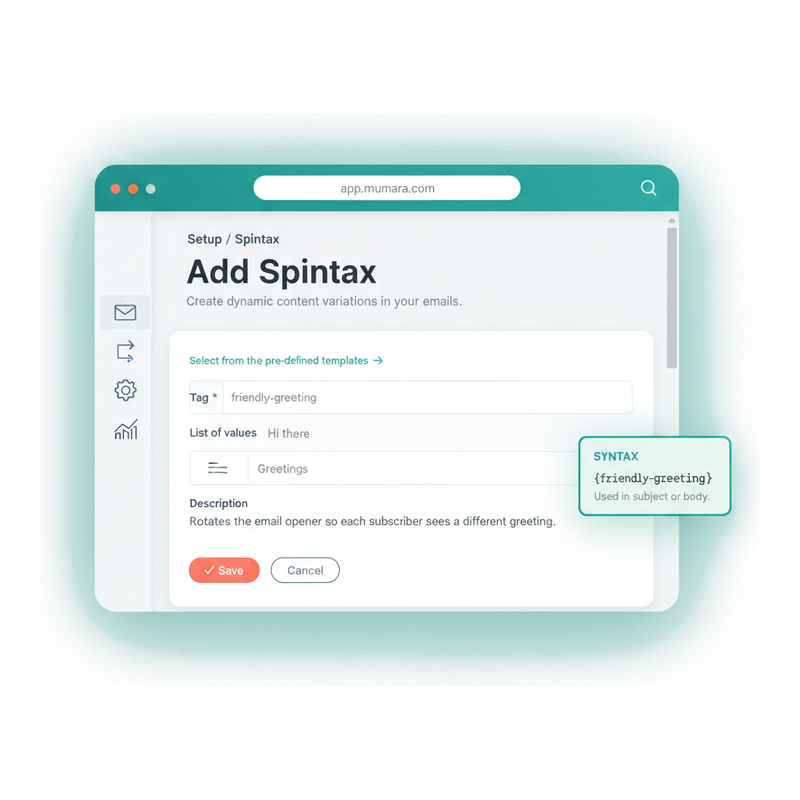
Add Spintax · the form

One name. One value list. Save.

Campaigns → Spintax → Add New. Enter a tag name (alphanumeric + underscores + hyphens), paste your value list one variation per line, optional description, save. The tag is live and referenceable as {{tag_name}} in any broadcast or drip from then on. Edit the value list any time — the tag name stays locked, just like Custom Fields.

  • Naming convention enforced at save

    Tag names accept alphanumeric characters, underscores, and hyphens — nothing else. Use descriptive names: greeting, sales_guy, call_to_action, discount_offer. Names like g1 or x123 work but read terribly in templates; descriptive names self-document.

  • Value list — one per line, no commas

    Paste your variations one per line in the List of Values textarea. No separators needed. 3-5 variations per tag is the deliverability-recommended diversity floor; you can add as many as you want above that.

  • Description field — for the team

    Optional description explains the tag's purpose. Useful when handing the account to a teammate, building an agency template library, or remembering why you defined the tag in the first place six months later.

  • Save creates the {{tag_name}} reference

    The platform automatically wraps your tag name in double curly braces — entering "sales_guy" creates the reference {{sales_guy}}. Insert via the Spintax dropdown below any editor; the dropdown is searchable across your full tag library.

Mumara Campaigns Add Spintax form — Tag name input (sales_guy), List of Values textarea with multiple sender name variations one per line, optional Description field, Save button

Where Spintax shows up

Five fields. Three campaign types. One processing order.

Spintax tags render in every place email content gets composed — Subject, From Name, Pre-header, HTML body, Text body — across Broadcasts, Drips, and Dynamic Content. The platform processes Spintax after DCT and before Recipient Fields, so all three syntaxes stack inside the same email.

composable fields supported
All
composable fields supported
Subject, From Name, Pre-header Text, HTML Content, Text Content — every field where you compose recipient-facing copy supports Spintax tags.
syntax modes available
Both
syntax modes available
Saved tags {{tag_name}} for reusable rotations and inline [option1|option2] for one-off variations. Combine freely in the same campaign.
with other syntaxes
Stacks
with other syntaxes
Spintax resolves AFTER Dynamic Content Tags [[tag]] and BEFORE Recipient Fields %%field%%. Use all three inside one broadcast — they layer cleanly.
same-value determinism
Same-tag
same-value determinism
Multiple {{greeting}} instances in one recipient's email all render the same selected variant. Each recipient gets their own selection.

The processing order

How Spintax composes with the rest of the personalization stack.

When Mumara renders an email for a recipient, content passes through a fixed pipeline. Each stage resolves its syntax against the recipient's record before passing output to the next stage — so the syntaxes layer.

  1. 1
    Dynamic Content Tags [[tag]]

    Conditional content blocks resolve first. [[pricing-block]] branches to one of several Content Units based on recipient field values. RSS-fed DCTs (addon) render feed items here.

  2. 2
    Spintax {{tag}} [a|b|c]

    Saved tags and inline options resolve next. A single random selection per tag per recipient. Spintax inside a DCT block (now visible after stage 1) also resolves here.

  3. 3
    Recipient Fields %%field%%

    Custom Fields substitute the recipient's stored value. %%first_name%% becomes Sarah. Inline conditionals [if:field]…[endif] evaluate here.

  4. 4
    System Variables {var}

    Last pass — sender info, web-version links, unsubscribe links, current date. The platform-provided values that don't depend on recipient data.

Implication: a Dynamic Content Tag can contain Spintax tags that contain Custom-Field references — each stage operates on the resolved output of the previous stage. See Personalization Options for the full layered example.

Common patterns

What buyers usually rotate.

The Spintax patterns that show up across most senders. Use the pre-defined templates library to clone-and-customise, or build from scratch.

  • Greeting rotation

    Tag
    {{greeting}} — Hello / Hi / Hey / Greetings
    Pattern
    The classic. Every recipient gets a slightly different opener. Combined with %%first_name%% becomes "Hello Sarah," / "Hi Sarah," / "Hey Sarah,".
  • Call-to-action variation

    Tag
    {{cta_button}} — Shop Now / Buy Today / Order Now
    Pattern
    Vary the action button copy across recipients. Combined with A/B testing surfaces which phrasing actually converts in your audience.
  • Urgency phrasing

    Tag
    {{urgency}} — Limited time / Today only / Ends tonight
    Pattern
    Recurring promo emails benefit from urgency-phrase rotation — the same content reads slightly differently each send.
  • Sender name rotation

    Tag
    {{sales_guy}} — round-robin rep names
    Pattern
    B2B outreach pattern. Rotate the From Name and the email signature across sales reps. The platform's docs call this exact use case out.
  • Discount framing

    Tag
    {{offer_framing}} — Save 50% / Half off / 50% discount
    Pattern
    Same numeric offer, different framings. Particularly useful when running evergreen campaigns multiple times — each run reads as fresh content.
  • Closing salutation

    Tag
    {{closing}} — Best / Cheers / Talk soon
    Pattern
    The signature line. Pair with {{sales_guy}} rotation for a complete signature that matches the brand voice for each recipient.

What content repetition costs

Why per-recipient content variation isn't a vanity feature.

ISPs aggregate metadata about the emails they deliver — content fingerprints, URL signatures, header patterns. Identical content sent to thousands of recipients gets flagged differently than mostly-identical-but-slightly-varied content. Spintax is the lightest-touch way to dodge that.

  • Content fingerprint matching at the ISP layer

    Major mailbox providers compute hashes of email content during ingestion. When 100,000 emails arrive with the same exact body, that hash gets a different reputation signal than 100,000 emails with the same body modulo small text variations. Spintax flips the math without changing the message.

  • Bulk-template smell at the human layer

    Subscribers can tell when they're recipient 50,000 of an identical broadcast. "Dear Customer" reads worse than "Hi Sarah" — but even "Hi Sarah" reads slightly more personal when the next variant in the system reads "Hey Sarah" for someone else. Variation prevents the platform from feeling templated.

  • A/B testing without a separate split-test

    Inline Spintax in a subject line — [Save 50% today|Half off ends tonight] — gives you a quick subject-line A/B without configuring a formal split test. Look at the open rate by which variant rendered to find the winner. Not a substitute for proper split-tests but useful for quick gut checks.

  • Evergreen campaigns lose freshness without rotation

    Evergreen campaigns (addon) re-fire the same template on a schedule. Without Spintax, every run reads identically — recipients who get the campaign twice see the exact same email. With Spintax, each run reads slightly different. Combined with [DCT-driven RSS](/campaigns/features/dynamic-content-tags/) this is how senders run high-cadence campaigns without burnout.

“We moved off another ESP partly because of the {{tag}} system. Same broadcast, three sales reps' names rotating in the From line, six greeting variations, four CTA variants. The same outreach campaign goes out three days a week and still reads fresh because no two recipients see the same compiled email.”

Verified review

Mumara customer

Trustpilot

Common questions

What buyers usually ask.

What's the actual Spintax syntax in Mumara?

Two modes. Saved tags use double curly braces with a named tag: {{greeting}}, {{cta_button}}, {{sales_guy}}. Inline options use square brackets with pipe separators: [Hello|Hi|Hey]. Both produce the same per-recipient random selection. Older third-party Spintax docs sometimes show curly-brace-pipe forms like {a|b|c} — that's not Mumara's syntax. Use {{tag_name}} or [a|b|c].

How does "same tag = same value" actually work?

When Mumara renders an email for a recipient, the platform selects one value from the tag's value list and uses that same value everywhere the tag appears in that single email. If {{greeting}} is in the subject, the body opener, and the closing — all three render "Hello" (or whichever variant got selected) for that recipient. A different recipient gets their own selection. This keeps individual emails internally consistent in tone.

Can I nest Spintax tags inside other variables?

Spintax resolves after Dynamic Content Tags ([[tag]]) and before Recipient Fields (%%field%%). So a DCT block can contain Spintax — when the DCT resolves to its content, the Spintax inside that content then resolves. Spintax can contain Recipient Fields — {{greeting}} %%first_name%% works fine. Spintax inside Spintax (nested tags) isn't documented as supported; use saved tags for the inner rotation if you need that.

Where can I use Spintax — subject, body, both?

All composable fields: Email Subject, From Name, Pre-header Text, HTML Content, Text Content. Across Broadcasts, Drips, and Dynamic Content. Same tag references work in every field — define {{sales_guy}} once and use it as both a From Name and inside the body signature. The Spintax dropdown below the editor inserts tags directly at the cursor position.

Can I use Spintax in A/B tests?

Yes. A/B testing tests variants of a campaign; Spintax rotates within a single variant. Use Spintax to keep ALL recipients getting slightly-different copy regardless of which test variant they're in, then use A/B testing to compare structural variations (subject line angle, CTA placement, content layout). The two layer cleanly. See [A/B Testing](/campaigns/features/ab-testing/) for the test configuration surface.

What are pre-defined templates?

Mumara ships curated Spintax tag libraries — common greetings, calls-to-action, urgency phrasings, sender-name patterns. Clone a single template into your account or clone all templates in one click. Useful for accelerating new accounts, agency client onboarding, or seeding a consistent brand voice library across teams. After cloning, edit the value list to match your brand tone.

Can I edit a tag's value list after it's already in use?

Yes — values are editable indefinitely. Add new variants, remove stale ones, retire entire tags via deletion. The tag NAME is locked once saved (so broadcasts referencing {{greeting}} keep working after edits), but the value list inside is fluid. Every campaign using the tag inherits value-list changes on the next send.

Why is the tag name locked after creation?

Because every broadcast, drip, and dynamic content body that references {{greeting}} would silently break the day someone renamed the tag. Mumara locks the name as a deliberate trade-off — one immutable identifier in exchange for never-breaking references. Same contract as Custom Fields. To use a different name: create a new tag, update references, delete the old tag.

What happens if I delete a tag that's still referenced?

Deleted tags render as literal text in emails — {{greeting}} would appear in the email body verbatim if the recipient gets a campaign after the tag is deleted. The platform warns before bulk-deletes; for single deletes the responsibility is on you. Best practice: search active broadcasts and drips for {{tag_name}} before deleting, or just edit the value list to a single value as a soft retirement.

How many variations should I have per tag?

Documentation guidance is 3-5 variations per tag as the deliverability-recommended diversity floor. Above 5 is fine and adds more variation, with diminishing returns. Below 3 starts to feel formulaic — and a tag with just one value renders identically every time. Use the rule of thumb: "can a recipient who gets this campaign twice tell it's the same campaign?" — if yes, add more variations.

Mumara Campaigns · Spintax

Define once. Every recipient reads a different email.

Spintax ships with every Mumara Campaigns plan — Self-Hosted and Mumara Machine. Saved tags, inline options, pre-defined templates, and clean processing-order interop with Custom Fields and Dynamic Content Tags. The per-recipient content layer.