Skip to content
Mumara

Audience · typed fields · merge tags

The data your business runs on. Stored, typed, and ready to personalize.

Custom Profile Fields extend every contact beyond email. Text, Numeric, Multiline, Checkboxes, Dropdown, Radio, Date — each with its own validation and its own segmentation operators. Define a field once at admin level, assign it to any list, reference it as %%field_name%% anywhere downstream.

  • Multiple field types — each with type-aware segmentation operators
  • Reusable across lists — define once, assign anywhere
  • Groups + ordering — clean contact forms with logical sections
  • Immutable field names — broken merge tags impossible by design
contact #18293

Stored on contact record

first_name Sarah
plan_tier Pro
signup_source Google Ads
birth_date 1989-04-12
rendered in email

Hello Sarah,

You're on our Pro plan — we noticed you signed up via Google Ads. Here's how others on Pro get the most out of it…

[if:birth_date] · birthday block renders this month [endif]

The audience layer

One field model. Used everywhere.

Custom Profile Fields are not a side feature — they're the data layer that personalization, segmentation, triggers, web forms, and dynamic content all read from. Get the field model right, and every downstream feature gets sharper for it.

field model
Typed
field model
Text, Numeric, Multiline, Checkboxes, Dropdown, Radio, Date — each with its own validation rules and its own set of segmentation operators.
across lists
Reusable
across lists
Define a field once at admin level. Assign it to any list — including selective per-list assignment. Update the definition; every list inherits the change.
reach
Cross-feature
reach
Reference fields across broadcasts, segments, triggers, web forms, dynamic content tags, the preference centre, the import wizard, and the REST API.
fields for new lists
Default-marked
fields for new lists
Mark a field "Default" and every new list created from then on inherits it automatically. Existing lists are unaffected — explicit opt-in.

The mental model

Define once. Assign anywhere. Use everywhere.

Most ESPs make you define a field per list, or worse, define it inline on a form and lose the definition the moment the form goes away. Mumara treats Custom Fields as first-class admin-managed entities — defined centrally, assigned selectively, referenced consistently.

Create the field at the admin level — Lists → Custom Fields → Add New. You pick the name, the type, whether it's Required, the display order, and (for Dropdown / Radio / Checkboxes) the value list. The field exists as a definition with no attached data yet.

Assign the field to the lists that should capture it. The assignment tree shows every list, grouped, with current contact counts. Check the lists; save. Now every contact on those lists has that field as part of their record (initially empty). Toggle 'Assign / unassign to existing contacts' to backfill or hard-unassign in one step.

Reference the field as %%field_name%% from anywhere downstream. Broadcasts substitute it per recipient. Segments filter on it. Triggers watch for changes. Web Forms render it as an input. Dynamic Content Tags branch on it. The preference centre lets the subscriber update their own values. Same field, used everywhere.

The field types

Pick the type that matches the data shape.

Each type carries its own validation and its own set of segmentation operators. Numeric fields offer Greater-than. Date fields offer Between and Day-of-month. Checkboxes offer Contains-any-of vs Contains-all-of. The type isn't cosmetic — it shapes what you can do with the data.

  • Text

    Single-line free text. Names, identifiers, short URLs, phone numbers, codes.

    Segmentation operators

    Is / Isn't · Contains / Doesn't contain · Starts with / Ends with · Domain is

  • Numeric

    Integer or decimal only. Validation enforced. Ages, scores, quantities, currency amounts.

    Segmentation operators

    Is / Isn't · Greater than · Lesser than · Between

  • Multiline Text

    Textarea — multiple lines. Comments, notes, descriptions, full address blocks.

    Segmentation operators

    Contains / Doesn't contain

  • Checkboxes

    Multiple selections from a defined value list. Interests, product categories, opted-in programmes.

    Segmentation operators

    Contains any of · Contains all of · Doesn't contain

  • Dropdown

    Single selection from a defined value list. Country, plan tier, lifecycle stage, region.

    Segmentation operators

    Is / Isn't · Contains

  • Radio

    Single selection, all options visible. Yes / No, mutually-exclusive choices, ratings.

    Segmentation operators

    Is / Isn't

  • Date

    Calendar picker. Birthdays, anniversaries, registration dates, event-aware automation triggers.

    Segmentation operators

    After / Before / Exactly on · Between · For the past · Day of month · Month of year · Is today

  • Pre-configured defaults

    Mumara ships with a set of common fields ready to use — First Name, Last Name, Birth Date, City, State, Country, Zip Code, Mobile, Phone, Fax, Company, Title. Toggle them "Default" to inherit automatically into new lists; existing lists keep whatever you've already configured.

Add Profile Field · the form

One form. Every option you need.

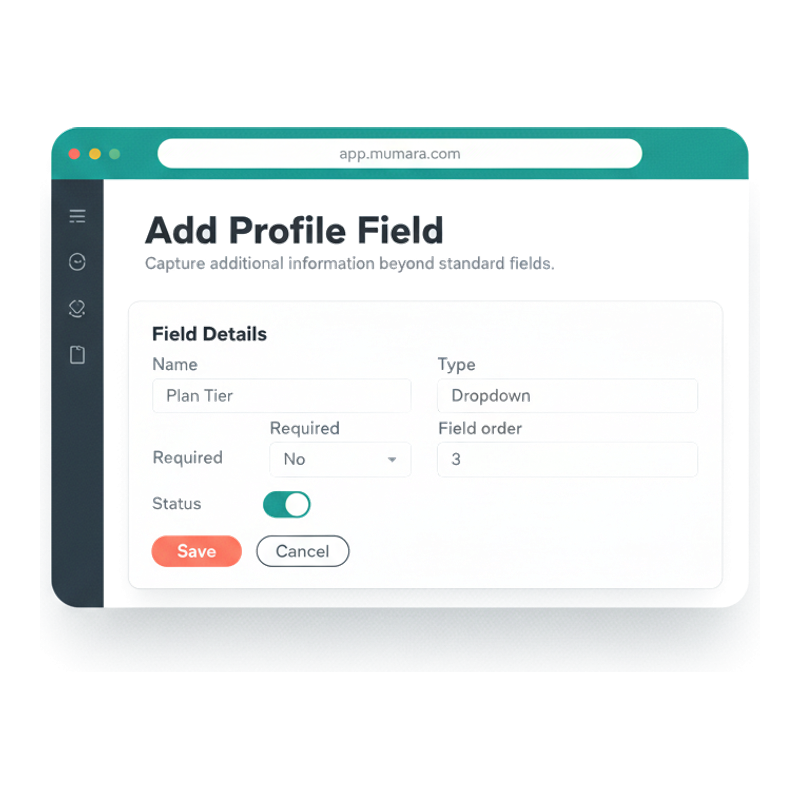
Lists → Custom Fields → Add New. Pick the name (immutable once saved), the group (organise the contact form), the field order, Required toggle, the type, and — for selection types — the Value Options list (one per line, no commas). Assign to lists via the tree. Save. The field is live.

  • Name validation built in

    First character must be a letter; letters, numbers, underscores, spaces only; must be unique across the installation. The platform rejects invalid names at save time — typos in merge tags become impossible later because the field name is locked.

  • Group + field order

    Fields in the same group appear together in contact add/edit forms under a collapsible section. Drag-reorder groups via "Prioritize Groups" to control top-to-bottom layout. Field order sorts within group. Clean forms instead of a flat dump of every field you ever defined.

  • Required is a hard constraint

    Toggling Required ON means web forms enforce the field as mandatory, the contact-add form rejects empty values, and import rows missing the field are flagged at step 3 of the import wizard. Compliance-critical fields (country for tax, consent date for GDPR) belong here.

  • Assignment with safety

    "Assign / unassign to existing contacts" toggle decides whether the field is backfilled to existing contacts (empty) or hard-deleted from contacts being unassigned. The platform warns before destructive unassign because deleting field data is irreversible.

Mumara Campaigns Add Profile Field form — Name input, Group selector with priority list, Field order number, Required toggle, Type dropdown showing seven field types, Value Options textarea, Assign to Contact Lists tree with per-list contact counts

Three pillars

The contract that keeps merge tags safe across years.

Custom Fields make a small set of trade-offs deliberately. Each one prevents a specific failure mode you've probably hit on another ESP.

Field name is immutable

Once saved, the field name cannot be changed. The platform forces this because every broadcast, segment, trigger, and web form that references %%plan_tier%% breaks the day someone renames the field. Type, value options, Required, list assignments — all editable. Name is the one immutable contract.

Assignment is list-scoped

A field belongs to the lists you assign it to — not globally to every contact. List A can have 'plan_tier' assigned; List B can ignore it. Contacts that move between lists keep their field data on lists where the field is assigned. Selective assignment keeps lists clean of irrelevant fields.

Default marker is opt-in, not retroactive

Mark a field Default and every NEW list inherits it automatically. Existing lists keep whatever you've already configured — no surprise injection of fields into established lists. Default is a forward-looking signal; old lists are sovereign until you explicitly assign.

Where Custom Fields show up

Every other feature reads from this layer.

The fields you define here aren't trapped inside contact records — they're the source of truth that personalization, segmentation, triggers, forms, and content all draw from. Build the field model right once; every other feature in Mumara gets smarter for it.

  • Personalization

    Reference as %%field_name%% inside any broadcast. Mumara substitutes the value per recipient at send time. Empty values render via [if:field][else][endif] fallback.

    Learn more

  • Segmentation

    Build segments with type-specific operators — Greater-than for numeric, Between for date, Contains-any-of for checkboxes. Field types dictate filter shape.

    Learn more

  • Triggers

    Fire actions when a custom field changes value, gets populated, or matches a condition. Date fields drive birthday / anniversary / renewal campaigns.

    Learn more

  • Web Forms

    Custom fields you assign to a list show up as form inputs — Dropdowns render as <select>, Checkboxes as multi-select, Date as a date picker. Required toggle enforces capture.

    Learn more

  • Dynamic Content Tags

    Conditional content blocks branch on field values — [[pricing-block]] resolves to one block for free-tier, another for pro, another for enterprise. Block-level personalization.

    Learn more

  • Import & API

    CSV import wizard maps columns to assigned fields (case-sensitive). REST API writes field values directly. Mass-update changes thousands of records in one operation.

    Learn more

  • Preference Centre

    Subscribers update their own custom fields on the hosted preference centre. Field-edits flow straight back into the contact record — single source of truth.

    Learn more

  • Broadcasts

    Every broadcast can reference any field assigned to the destination list. Use %%merge_tags%%, conditional inline blocks, Spintax, and DCT in the same template — they stack.

    Learn more

A field's lifecycle

From definition to live personalization in minutes.

The path every field takes from admin definition through capture, use, and the occasional refinement. Five stages, each one cheap on its own — the compounding payoff is in the use.

  1. Step 1

    Define

    Lists → Custom Fields → Add. Pick the name, type, Required toggle, group, field order. For Dropdown / Radio / Checkboxes, paste the value list (one per line). Save. The field is a definition only — no attached data yet.

  2. Step 2

    Assign

    Assign the field to the lists that should capture it. Tree view shows every list with contact counts so you know the scope. Toggle 'Default' if you want every future list to inherit automatically.

  3. Step 3

    Capture

    Contacts get values through the entry point you choose — Web Forms render the field as an input; the import wizard maps a CSV column to it; the API writes values directly; bulk update mass-applies a value across thousands of contacts.

  4. Step 4

    Use

    Reference %%field_name%% in broadcasts, segment conditions, trigger filters, dynamic content tags, web forms, preference-centre layouts. Same field name across every surface — one definition, ubiquitous reach.

  5. Ongoing

    Refine

    Add value options, retire stale dropdowns by toggling Status, reorder groups for cleaner forms. The field name stays locked (data integrity); everything else is editable indefinitely.

What sloppy field modelling costs

The compounding cost of skipping the field model.

Most senders bolt fields on as needed and pay for it months later. The decisions you make at the field-modelling layer ripple across every campaign you'll ever send.

  • You can't segment what you didn't capture

    If 'signup_source' isn't a field, you'll never run a campaign targeted at 'subscribers from the Q4 launch landing page.' Capturing the right fields at intake is the cheap-now / expensive-later decision that distinguishes good email programmes from great ones.

  • Missing values cripple personalization

    If half your contacts don't have plan_tier populated, every email referencing %%plan_tier%% renders the fallback for half the audience — and your campaign reads generic where it should read personal. Required fields + Web Forms enforce capture at intake so the data layer stays full.

  • Renamed fields silently break tags

    On platforms that let you rename fields, every broadcast referencing %%old_name%% silently breaks the day someone renames the field. Mumara locks the name precisely to prevent this — the trade-off is one immutable identifier in exchange for never-breaking merge tags.

  • List-per-attribute is the wrong shape

    Some ESPs encourage moving contacts between lists to encode attributes ('VIP list', 'Lapsed list', 'Trial list'). That breaks the moment a contact has two attributes at once. Mumara's typed fields + segments query the data instead of moving the contact — one record, many dimensions.

“We migrated 40 client accounts off three different ESPs. The Custom Fields model was the reason we could standardise — define plan_tier once at admin level, every client list inherits it, every broadcast references it. The field name being locked is the feature we didn't realise we needed until it saved us.”

Verified review

Mumara customer

Trustpilot

Common questions

What buyers usually ask.

Why is the field name immutable?

Because every broadcast, segment, trigger, web form, and dynamic content tag that references %%field_name%% breaks the day someone renames the field. Mumara locks the name as a deliberate trade-off — one immutable identifier in exchange for never-breaking merge tags. Type, value options, list assignments, group, field order, Required, Status — all editable. Just not the name. If you genuinely need a different name, delete the field and recreate it; data is lost in the process, which is the intended friction.

How do I add fallback content when a field is empty?

Use the inline conditional syntax: [if:first_name]Hello %%first_name%%[else]Hello Friend[endif]. The platform evaluates the [if:field] block at send time and renders the appropriate branch per contact. Useful for greetings, plan-specific blocks, region-specific offers, and any content that needs a non-empty fallback. See [Personalization Options](/campaigns/features/personalization-options/) for the full syntax stack — variables, spintax, dynamic content tags, AI content tags, all of which can layer with field fallbacks.

What's the difference between a field's Default marker and assigning it to all lists?

Default marker means 'every NEW list created from now on will have this field assigned automatically.' Existing lists are unaffected. Assigning to all lists is a manual one-time action that adds the field to every current list. Use Default when you're about to create many similar lists (e.g., one per client) and want consistency; use mass-assign when you've already created the lists and want to retrofit the field onto them.

Can I use Custom Fields in segments?

Yes — and the operators available depend on the field type. Text fields support Is/Isn't, Contains/Doesn't contain, Starts with, Ends with, Domain is. Numeric fields support Greater than, Lesser than, Between. Date fields support After/Before/Exactly on, Between, For-the-past, Day of month, Month of year, Is today (great for birthday campaigns). Dropdown / Radio support Is/Isn't. Checkboxes support Contains-any-of vs Contains-all-of. The richer the type, the richer the segmentation. See [Segmentation](/campaigns/features/segmentation/) for the full filter library.

How do imports handle Custom Fields?

The 3-step import wizard auto-detects CSV column headers and lets you map each column to a field — standard fields (first_name, email, etc.) or any custom field assigned to the destination list. Field name mapping is case-sensitive. Fields not assigned to the target list can't be mapped — assign first, then re-run the import. The wizard's step-3 results panel shows per-field how many values populated, how many skipped, and which columns went unmapped.

Do Custom Fields work in Web Forms?

Yes. Any custom field assigned to a list that the form writes to is available as a form input. The field type determines the rendered control — Dropdowns render as <select>, Checkboxes as multi-select, Radio as radio buttons, Date as a date picker, Text/Numeric/Multiline as text inputs of the appropriate shape. Required fields are enforced client-side and server-side. See [Web Forms](/campaigns/features/web-forms/) for the form-builder surface.

What happens to field data when I unassign a field from a list?

If 'Assign / unassign to existing contacts' is enabled, unassigning the field from a list deletes that field's data for every contact in that list. This is permanent — there's no undo and the data isn't recoverable. The platform warns before saving the unassign because this is the irreversible action in the lifecycle. Best practice: export the list to CSV before destructive unassign so you have a recovery copy.

Are there limits on how many fields I can define?

No hard cap, but the platform notes that too many fields slow the contact-management UI. Practical guidance: define the fields you actively use, retire stale fields by toggling Status off (data is retained), archive unused fields by unassigning from lists (carefully — see above on data loss). For frequently-filtered fields, your installation can index them for faster segmentation; contact support if performance ever lags on a high-cardinality field.

Do Custom Fields work in the REST API?

Yes — every field assigned to a list is readable and writable via the [REST API](/campaigns/features/rest-api/). Field names match exactly (case-sensitive). The API accepts JSON payloads with field names as keys; the platform validates type at write time (Numeric fields reject non-numeric values, Date fields validate format, Dropdown / Radio / Checkboxes validate against the value list). Useful for syncing fields with your CRM or product database.

How are fields organised in the contact form?

By group, then by field order within group. Groups are admin-defined organisational containers — create 'Demographics' / 'Engagement' / 'Compliance' / whatever fits your model. The Prioritize Groups drag-and-drop list controls top-to-bottom layout. Within a group, lower field-order numbers appear first. The result: contact add/edit forms render in logical sections instead of as a flat dump of every field ever defined.

Related

Mumara Campaigns · Custom Fields

Model your audience once. Personalize forever.

Custom Fields ship with every Mumara Campaigns plan — Self-Hosted and Mumara Machine. Multiple types, type-aware segmentation, group-organised forms, locked names, and cross-feature reach. The audience layer every other feature reads from.